
PC 용 Liveuamap
- 카테고리: News
- 최근 업데이트: 2026-10-09
- 현재 버전: 3.0.66
- 파일 크기: 30.17 MB
- 개발자: Altwork LLC
- 호환성: 필요 Windows XP, Windows Vista, Windows 7, Windows 8, Windows 8.1 and Windows 10, Windows 11
에뮬레이터의 중요성은 컴퓨터에서 안드로이드 환경을 흉내 내고 안드로이드 폰을 구입하지 않고도 안드로이드 앱을 설치하고 실행하는 것을 매우 쉽게 만들어주는 것입니다. 누가 당신이 두 세계를 즐길 수 없다고 말합니까? 우선 아래에있는 에뮬레이터 앱을 다운로드 할 수 있습니다.
A. Nox App . OR
B. Bluestacks App .
Bluestacks는 매우 대중적이므로 개인적으로 "B"옵션을 사용하는 것이 좋습니다. 문제가 발생하면 Google 또는 Naver.com에서 좋은 해결책을 찾을 수 있습니다.
Bluestacks.exe 또는 Nox.exe를 성공적으로 다운로드 한 경우 컴퓨터의 다운로드 폴더 또는 다운로드 한 파일을 일반적으로 저장하는 곳으로 이동하십시오.
찾으면 클릭하여 응용 프로그램을 설치하십시오. PC에서 설치 프로세스를 시작해야합니다.
다음을 클릭하여 EULA 라이센스 계약에 동의하십시오.
응용 프로그램을 설치하려면 화면 지시문을 따르십시오.
위 사항을 올바르게 수행하면 소프트웨어가 성공적으로 설치됩니다.
이제 설치 한 에뮬레이터 애플리케이션을 열고 검색 창을 찾으십시오. 지금 입력하십시오. - Liveuamap 앱을 쉽게 볼 수 있습니다. 그것을 클릭하십시오. 응용 프로그램 창이 열리고 에뮬레이터 소프트웨어에 응용 프로그램이 표시됩니다. 설치 버튼을 누르면 응용 프로그램이 다운로드되기 시작합니다. 이제 우리는 모두 끝났습니다.
그런 다음 "모든 앱"아이콘이 표시됩니다.
클릭하면 설치된 모든 응용 프로그램이 포함 된 페이지로 이동합니다.
당신은 Liveuamap 상. 그것을 클릭하고 응용 프로그램 사용을 시작하십시오.
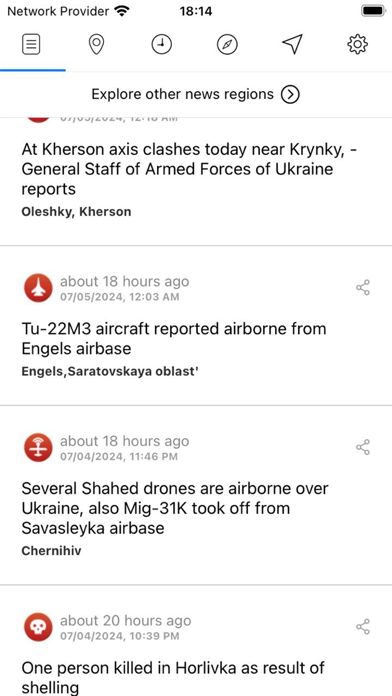
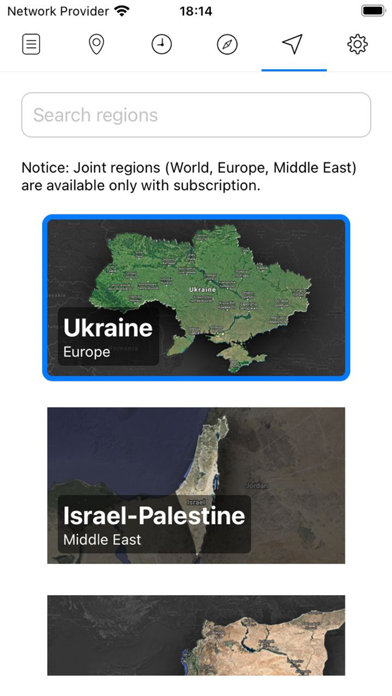
Liveuamap — Live Universal Awareness Map — delivers breaking news, conflicts, security incidents and major world events on an interactive map. Follow events as they unfold across the world, with a special focus on the war in Ukraine, Russia and Eastern Europe, the Baltic region, Iran and the Persian Gulf, the Strait of Hormuz, Yemen and the Red Sea, Israel and Palestine, Gaza, Lebanon, Syria, Iraq and the wider Middle East. Liveuamap also covers major developments across Europe, the Arctic and Greenland, the Caucasus, Africa, Asia, North and South America, including military and security incidents, geopolitical tensions, protests, terrorism, migration, natural disasters and other significant events. Explore what is happening — and where it is happening. Liveuamap combines an interactive map with a continuously updated news feed containing reports, photos, videos and links to sources. Follow developing situations geographically, search different regions and receive notifications about important events. KEY FEATURES • Breaking news displayed directly on the map • Live conflict and security maps • War in Ukraine and Russia coverage • Iran, Persian Gulf and Strait of Hormuz developments • Yemen, Red Sea and Bab el-Mandeb events • Israel–Palestine and Gaza conflict coverage • Lebanon, Syria, Iraq and wider Middle East news • Baltic states and Eastern Europe security developments • Arctic and Greenland security and geopolitical developments • Europe, Africa, Asia and Americas regional maps • Protests, political events and civil unrest • Terrorism and security incidents • Wildfires, natural disasters and emergencies • Photos and videos from developing events • Map tools and additional map markers • Region and location search • Push notifications for important developments • Historical events and map exploration NEWS ON THE MAP Instead of reading events only as a traditional news feed, Liveuamap lets you see where they are happening. Move around the world map, select an incident and explore related reports, images, videos and sources. From Ukraine and the Baltic Sea to Greenland and the Arctic, from Iran and the Persian Gulf to Yemen, the Red Sea, Gaza and the wider Middle East — Liveuamap helps you understand rapidly developing events through their geographic context. LIVEUAMAP SUBSCRIPTION Liveuamap offers renewable subscriptions that remove advertising from the application and unlock additional map features. • Monthly renewable subscription • Half-year renewable subscription — an additional option for users who want to save compared with monthly renewal • Payment will be charged to your Apple Account at confirmation of purchase • Subscription automatically renews unless auto-renew is turned off at least 24 hours before the end of the current subscription period • Your account will be charged for renewal within 24 hours prior to the end of the current period • Subscriptions can be managed and auto-renewal can be turned off in your Account Settings after purchase • Any unused portion of a free trial period, if offered, will be forfeited when a subscription is purchased, where applicable Please read our Terms of Service: https://liveuamap.com/about#terms Privacy Policy: https://liveuamap.com/about#mobileprivacy


