PC 용 Coverpad
- 카테고리: Photo & Video
- 최근 업데이트: 2026-11-07
- 현재 버전: 4.0.2
- 파일 크기: 81.16 MB
- 개발자: Maysam Shahsavari
- 호환성: 필요 Windows XP, Windows Vista, Windows 7, Windows 8, Windows 8.1 and Windows 10, Windows 11



PC에서 Coverpad 용 호환 APK 다운로드
| 다운로드 | 개발자 | 평점 | 점수 | 현재 버전 | 성인 랭킹 |
|---|---|---|---|---|---|
| ↓ PC용 APK 다운로드 | Maysam Shahsavari | 2 | 5 | 4.0.2 | 4+ |
에뮬레이터의 중요성은 컴퓨터에서 안드로이드 환경을 흉내 내고 안드로이드 폰을 구입하지 않고도 안드로이드 앱을 설치하고 실행하는 것을 매우 쉽게 만들어주는 것입니다. 누가 당신이 두 세계를 즐길 수 없다고 말합니까? 우선 아래에있는 에뮬레이터 앱을 다운로드 할 수 있습니다.
A. Nox App . OR
B. Bluestacks App .
Bluestacks는 매우 대중적이므로 개인적으로 "B"옵션을 사용하는 것이 좋습니다. 문제가 발생하면 Google 또는 Naver.com에서 좋은 해결책을 찾을 수 있습니다.
Bluestacks.exe 또는 Nox.exe를 성공적으로 다운로드 한 경우 컴퓨터의 다운로드 폴더 또는 다운로드 한 파일을 일반적으로 저장하는 곳으로 이동하십시오.
찾으면 클릭하여 응용 프로그램을 설치하십시오. PC에서 설치 프로세스를 시작해야합니다.
다음을 클릭하여 EULA 라이센스 계약에 동의하십시오.
응용 프로그램을 설치하려면 화면 지시문을 따르십시오.
위 사항을 올바르게 수행하면 소프트웨어가 성공적으로 설치됩니다.
이제 설치 한 에뮬레이터 애플리케이션을 열고 검색 창을 찾으십시오. 지금 입력하십시오. - Coverpad 앱을 쉽게 볼 수 있습니다. 그것을 클릭하십시오. 응용 프로그램 창이 열리고 에뮬레이터 소프트웨어에 응용 프로그램이 표시됩니다. 설치 버튼을 누르면 응용 프로그램이 다운로드되기 시작합니다. 이제 우리는 모두 끝났습니다.
그런 다음 "모든 앱"아이콘이 표시됩니다.
클릭하면 설치된 모든 응용 프로그램이 포함 된 페이지로 이동합니다.
당신은 Coverpad 상. 그것을 클릭하고 응용 프로그램 사용을 시작하십시오.
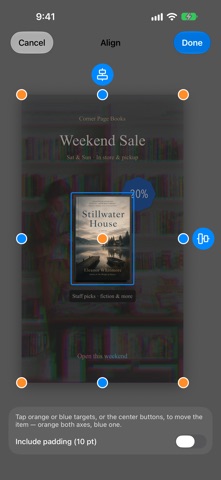
Coverpad is a layered editor for covers, thumbnails, posts, and stories. Start from a blank canvas, or draft a layout with your own AI agent — then finish every detail yourself in Coverpad. NO AI IN THE APP. BRING YOUR OWN. Coverpad does not include AI, does not run models, and does not generate designs for you. Use any AI agent or assistant you already have: copy Coverpad’s layout prompt, create a draft design there, then paste the result back. It opens as an editable canvas with real text, shapes, and photo slots — ready for you to refine. YOUR DESIGNS STAY ON YOUR DEVICE. No account. No analytics. No ads. No tracking. No identifiers. Documents live in Files on your iPhone or iPad. Optional icon and stock photo searches send only the search words — your designs and photos never leave your device for editing. BUY ONCE. No subscription. No ads. Try free for 14 days, then unlock every feature forever with a one-time purchase. ADVANCED EDITING. • Layers with z-order, duplicate, undo and redo • Smart snap guides; align to canvas edges, mid-edges, and center • Rotation; linear gradients on text, shapes, and backgrounds • Text: bold, italic, underline, strikethrough, outline, shadow, rounded background chips • Photos: shape masks, framing, filters, outline, shadow, opacity • Shapes and icons; background photo framing • Optional Pexels stock photos and Iconify icons CUSTOM FONTS. Browse a bundled library with favorites. Install fonts from Files, or send them from a computer over Wi‑Fi — no cable, no cloud. SIZES & EXPORT. YouTube 16:9, Instagram post, story 9:16, square, A4, Letter, and custom. Export PNG, JPEG, or HEIC at the exact pixel size. Transparent PNG when you need it. Share or Save to Photos. Built for iPhone and iPad, with keyboard shortcuts and six languages.