PC 용 Hyphen.
- 카테고리: Book
- 최근 업데이트: 2017-10-17
- 현재 버전: 1.2.3
- 파일 크기: 43.21 MB
- 개발자: Mattitiah Curtis
- 호환성: 필요 Windows XP, Windows Vista, Windows 7, Windows 8, Windows 8.1 and Windows 10, Windows 11



에뮬레이터의 중요성은 컴퓨터에서 안드로이드 환경을 흉내 내고 안드로이드 폰을 구입하지 않고도 안드로이드 앱을 설치하고 실행하는 것을 매우 쉽게 만들어주는 것입니다. 누가 당신이 두 세계를 즐길 수 없다고 말합니까? 우선 아래에있는 에뮬레이터 앱을 다운로드 할 수 있습니다.
A. Nox App . OR
B. Bluestacks App .
Bluestacks는 매우 대중적이므로 개인적으로 "B"옵션을 사용하는 것이 좋습니다. 문제가 발생하면 Google 또는 Naver.com에서 좋은 해결책을 찾을 수 있습니다.
Bluestacks.exe 또는 Nox.exe를 성공적으로 다운로드 한 경우 컴퓨터의 다운로드 폴더 또는 다운로드 한 파일을 일반적으로 저장하는 곳으로 이동하십시오.
찾으면 클릭하여 응용 프로그램을 설치하십시오. PC에서 설치 프로세스를 시작해야합니다.
다음을 클릭하여 EULA 라이센스 계약에 동의하십시오.
응용 프로그램을 설치하려면 화면 지시문을 따르십시오.
위 사항을 올바르게 수행하면 소프트웨어가 성공적으로 설치됩니다.
이제 설치 한 에뮬레이터 애플리케이션을 열고 검색 창을 찾으십시오. 지금 입력하십시오. - Hyphen. 앱을 쉽게 볼 수 있습니다. 그것을 클릭하십시오. 응용 프로그램 창이 열리고 에뮬레이터 소프트웨어에 응용 프로그램이 표시됩니다. 설치 버튼을 누르면 응용 프로그램이 다운로드되기 시작합니다. 이제 우리는 모두 끝났습니다.
그런 다음 "모든 앱"아이콘이 표시됩니다.
클릭하면 설치된 모든 응용 프로그램이 포함 된 페이지로 이동합니다.
당신은 Hyphen. 상. 그것을 클릭하고 응용 프로그램 사용을 시작하십시오.
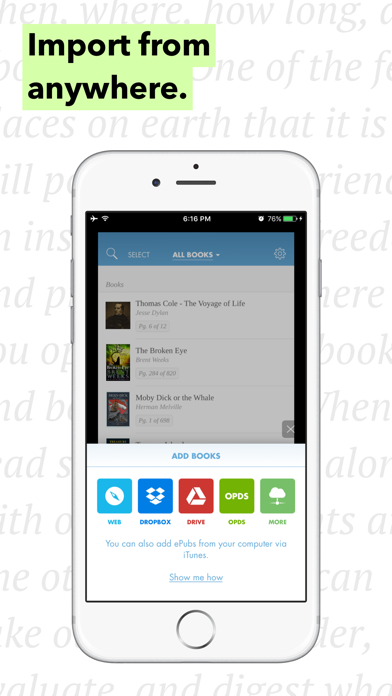
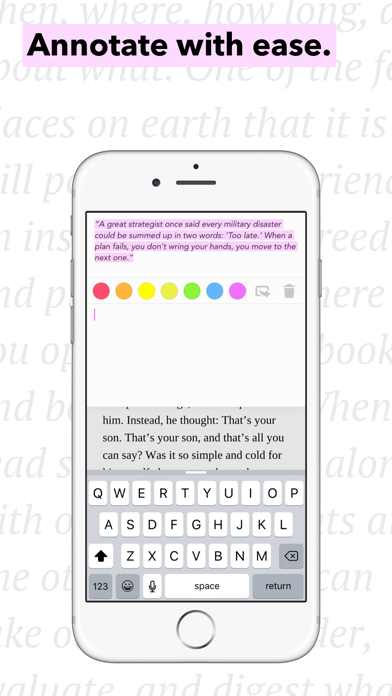
Hyphen is a powerful, easy-to-use ePub reader designed from the ground up with you in mind, with cross-device syncing, super-fast rendering, effortless customization, and intuitive annotation features. ■ CROSS-DEVICE SYNCING Start on one device, finish on another. Your entire library - books, annotations, bookmarks, and all - is synced between devices via iCloud. ■ PERSONALIZE YOUR READING EXPERIENCE Hyphen comes packed with a ton of options for custom colors, fonts, font sizes, line heights, paragraph indentations, margins - ...well, you get the idea. You can even use styling on a per-book basis. And if that’s not enough, you can also add your own CSS. Cool, right? ■ HIGHLIGHT AND ANNOTATE EFFORTLESSLY Tap-and-drag or use the selection handles to highlight in any one of several available colors. Write notes for a highlight and refer to them any time you need to. You can also share highlights as images and post them to Twitter or Facebook, or export all your highlights for use elsewhere. ■ GOODREADS INTEGRATION Use Goodreads? We've got you covered - shelve books, make status updates and post quotes, all right from the app. ■ ADD BOOKS WITH EASE Add ePubs using your favorite cloud services - Dropbox, Google Drive, OPDS servers, and more. You can also use the in-app web browser to download ePubs, or add them using iTunes. ====== OTHER NOTABLE FEATURES: ■ NIGHT MODE Transition Hyphen's reading interface to soothing, darker colors at night. ■ METADATA Edit the title, author, subjects, covers and more of your books. Hyphen can even lookup book covers and metadata for you. ■ SHELVE & SORT Add books to custom shelves, and sort by author, title, last read, or date added. ■ CUSTOM CSS & FONTS Hyphen lets you import both your favorite fonts for use while reading, as well as CSS. ■ DEFINE & TRANSLATE Translations of the text you're reading are only a tap away. Lookup words and terms in Wikipedia, Dictionary.com or Google. ■ TWO COLUMN SUPPORT Got one of those large, spacious, king-sized, oh-my-lord-this-screen-is-so-big-I-should've-gotten-an-ipad-mini-instead,-its-so-big, why-is-it-so-big-sized screens? Use this setting to make reading more comfortable. You can also optionally only use two columns when your device is in landscape orientation. ■ VOCABULARY Add words to a vocabulary list and export them easily. ■ INTERACTIVE Tap and hold a link to open it in the in-app browser, or Safari. Images zoom in, letting you see every detail. Swipe through and jump between images throughout the text with the Image Viewer. ■ ADE PAGES SUPPORT Hyphen utilizes ADE pages, so you’ll always have a cross-reader compatible way of finding and noting where you are in a book. ■ INCREDIBLY FAST Download and import books in the blink of an eye. Hyphen’s ePub Rendering System is optimized so that there’s the least delay between you and the text. ====== CONTACT & SUPPORT Need help or have a question? Tweet me @hyphenreader on twitter, or email me at [email protected].




