
PC 용 AutoDrive Online
- 카테고리: Travel
- 최근 업데이트: 2026-05-23
- 현재 버전: 2.2
- 파일 크기: 1.26 MB
- 개발자: Wrights Creative Services, L.L.C.
- 호환성: 필요 Windows XP, Windows Vista, Windows 7, Windows 8, Windows 8.1 and Windows 10, Windows 11





PC에서 AutoDrive Online 용 호환 APK 다운로드
| 다운로드 | 개발자 | 평점 | 점수 | 현재 버전 | 성인 랭킹 |
|---|---|---|---|---|---|
| ↓ PC용 APK 다운로드 | Wrights Creative Services, L.L.C. | 0 | 0 | 2.2 | 4+ |
호환되는 PC 앱 또는 대안 확인
| 소프트웨어 | 다운로드 | 평점 | 개발자 |
|---|---|---|---|
| AutoDrive Online |
PC 앱 받기 | 0/5 0 리뷰 0 |
Wrights Creative Services, L.L.C. |
에뮬레이터의 중요성은 컴퓨터에서 안드로이드 환경을 흉내 내고 안드로이드 폰을 구입하지 않고도 안드로이드 앱을 설치하고 실행하는 것을 매우 쉽게 만들어주는 것입니다. 누가 당신이 두 세계를 즐길 수 없다고 말합니까? 우선 아래에있는 에뮬레이터 앱을 다운로드 할 수 있습니다.
A. Nox App . OR
B. Bluestacks App .
Bluestacks는 매우 대중적이므로 개인적으로 "B"옵션을 사용하는 것이 좋습니다. 문제가 발생하면 Google 또는 Naver.com에서 좋은 해결책을 찾을 수 있습니다.
Bluestacks.exe 또는 Nox.exe를 성공적으로 다운로드 한 경우 컴퓨터의 다운로드 폴더 또는 다운로드 한 파일을 일반적으로 저장하는 곳으로 이동하십시오.
찾으면 클릭하여 응용 프로그램을 설치하십시오. PC에서 설치 프로세스를 시작해야합니다.
다음을 클릭하여 EULA 라이센스 계약에 동의하십시오.
응용 프로그램을 설치하려면 화면 지시문을 따르십시오.
위 사항을 올바르게 수행하면 소프트웨어가 성공적으로 설치됩니다.
이제 설치 한 에뮬레이터 애플리케이션을 열고 검색 창을 찾으십시오. 지금 입력하십시오. - AutoDrive Online 앱을 쉽게 볼 수 있습니다. 그것을 클릭하십시오. 응용 프로그램 창이 열리고 에뮬레이터 소프트웨어에 응용 프로그램이 표시됩니다. 설치 버튼을 누르면 응용 프로그램이 다운로드되기 시작합니다. 이제 우리는 모두 끝났습니다.
그런 다음 "모든 앱"아이콘이 표시됩니다.
클릭하면 설치된 모든 응용 프로그램이 포함 된 페이지로 이동합니다.
당신은 AutoDrive Online 상. 그것을 클릭하고 응용 프로그램 사용을 시작하십시오.
Mac OS 에서 AutoDrive Online 다운로드
| 다운로드 | 개발자 | 점수 | 현재 버전 | 성인 랭킹 |
|---|---|---|---|---|
| 무료 - Mac 에서 다운로드 | Wrights Creative Services, L.L.C. | 0 |
2.2 | 4+ |
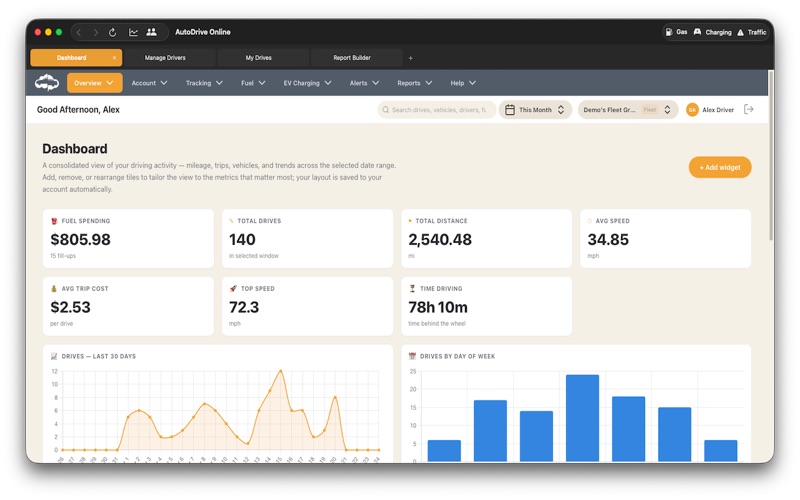
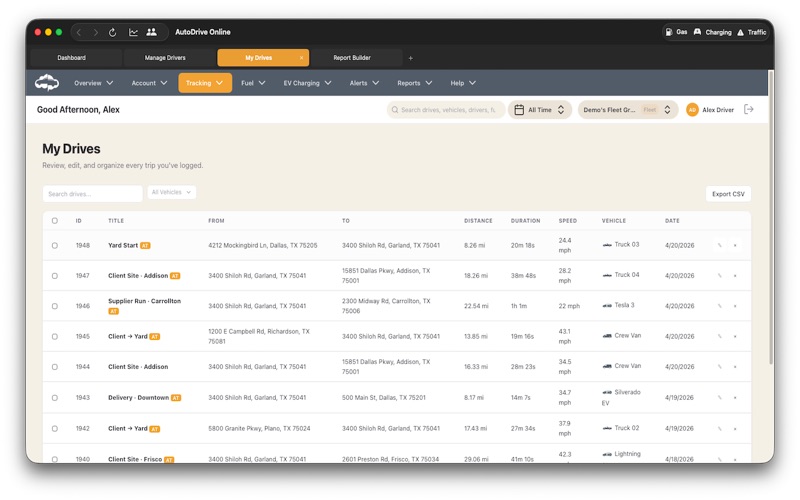
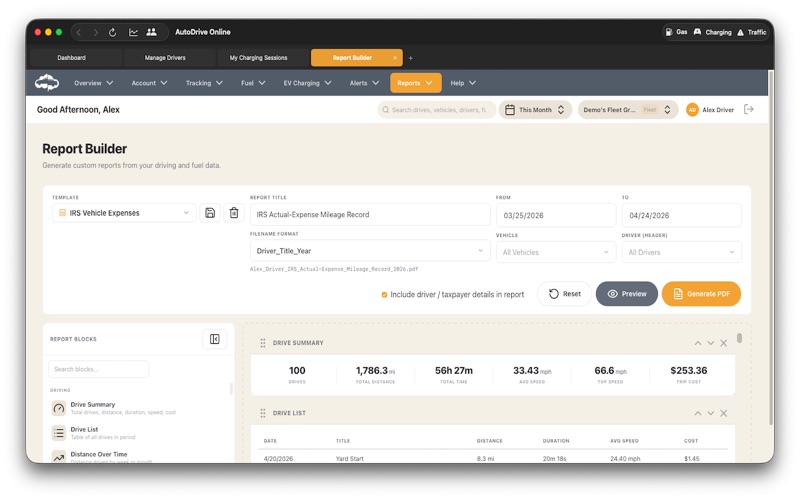
AutoDrive Online is the Mac companion to the AutoDrive mobile app — a desktop cockpit for every drive your phone already tracks. The AutoDrive mobile app logs your trips automatically in the background. AutoDrive Online is where you sit down at your Mac and actually work with all that data: review the week's drives on a map, pull a mileage report for taxes, reconcile a fuel receipt, track your EV's kWh, or just see where the miles went. EVERYTHING YOUR PHONE CAPTURES, ON A BIG SCREEN • Dashboard — mileage, trips, fuel spend, and EV efficiency at a glance, customizable tile-by-tile • My Drives — every drive on an interactive map, edit notes, split, merge, categorize Business/Personal • Manage Vehicles — add gas, diesel, hybrid, or electric vehicles; AutoDrive treats each one correctly • Manage Drivers — track who drove what, attribute trips, share a family or fleet account • Fuel Manager — log fill-ups, track cost per mile, watch MPG trend over time • Charging Manager — record EV sessions with kWh, cost, and location • Traffic Alerts, Gas Station Locator, and Charging Station Locator — right from the toolbar REPORTS THAT ACTUALLY HELP • Report Builder — pick the date range, vehicles, drivers, and categories you want • Mileage, Expense, Fuel Type Breakdown, and more • Download as PDF for taxes, client billing, or expense reports • Import existing data from a CSV so AutoDrive starts day one with history SHARE IT WITH YOUR FAMILY OR FLEET • Account Groups — one Personal group for you, plus Fleet groups for a household or a company • Invite drivers by email; they keep their own phone app and their drives roll up to the group • Per-vehicle limits and usage tracked on every plan so you always know where you stand YOUR DATA, YOUR CONTROL • Signs in with the same AutoDrive account you use on your phone • Everything syncs two-way — edit a drive on your Mac, it updates on your phone instantly • Paddle handles subscriptions; cancel or change your plan any time • Clear All Cache wipes the app to a clean slate without uninstalling AutoDrive Online requires an AutoDrive account. The AutoDrive mobile app captures drives automatically; this Mac app is the desktop surface for reviewing, reporting on, and managing everything you've tracked. Questions, feedback, or trouble? The in-app Help Center and Support Tickets reach us directly — no account required to browse help articles.