
PC 용 Music Library Tracker
- 카테고리: Utilities
- 최근 업데이트: 2026-10-06
- 현재 버전: 2.2
- 파일 크기: 9.97 MB
- 개발자: Dodo Apps
- 호환성: 필요 Windows XP, Windows Vista, Windows 7, Windows 8, Windows 8.1 and Windows 10, Windows 11




PC에서 Music Library Tracker 용 호환 APK 다운로드
| 다운로드 | 개발자 | 평점 | 점수 | 현재 버전 | 성인 랭킹 |
|---|---|---|---|---|---|
| ↓ PC용 APK 다운로드 | Dodo Apps | 0 | 0 | 2.2 | 4+ |
에뮬레이터의 중요성은 컴퓨터에서 안드로이드 환경을 흉내 내고 안드로이드 폰을 구입하지 않고도 안드로이드 앱을 설치하고 실행하는 것을 매우 쉽게 만들어주는 것입니다. 누가 당신이 두 세계를 즐길 수 없다고 말합니까? 우선 아래에있는 에뮬레이터 앱을 다운로드 할 수 있습니다.
A. Nox App . OR
B. Bluestacks App .
Bluestacks는 매우 대중적이므로 개인적으로 "B"옵션을 사용하는 것이 좋습니다. 문제가 발생하면 Google 또는 Naver.com에서 좋은 해결책을 찾을 수 있습니다.
Bluestacks.exe 또는 Nox.exe를 성공적으로 다운로드 한 경우 컴퓨터의 다운로드 폴더 또는 다운로드 한 파일을 일반적으로 저장하는 곳으로 이동하십시오.
찾으면 클릭하여 응용 프로그램을 설치하십시오. PC에서 설치 프로세스를 시작해야합니다.
다음을 클릭하여 EULA 라이센스 계약에 동의하십시오.
응용 프로그램을 설치하려면 화면 지시문을 따르십시오.
위 사항을 올바르게 수행하면 소프트웨어가 성공적으로 설치됩니다.
이제 설치 한 에뮬레이터 애플리케이션을 열고 검색 창을 찾으십시오. 지금 입력하십시오. - Music Library Tracker 앱을 쉽게 볼 수 있습니다. 그것을 클릭하십시오. 응용 프로그램 창이 열리고 에뮬레이터 소프트웨어에 응용 프로그램이 표시됩니다. 설치 버튼을 누르면 응용 프로그램이 다운로드되기 시작합니다. 이제 우리는 모두 끝났습니다.
그런 다음 "모든 앱"아이콘이 표시됩니다.
클릭하면 설치된 모든 응용 프로그램이 포함 된 페이지로 이동합니다.
당신은 Music Library Tracker 상. 그것을 클릭하고 응용 프로그램 사용을 시작하십시오.
Mac OS 에서 Music Library Tracker 다운로드
| 다운로드 | 개발자 | 점수 | 현재 버전 | 성인 랭킹 |
|---|---|---|---|---|
| ₩6,000 - Mac 에서 다운로드 | Dodo Apps | 0 |
2.2 | 4+ |
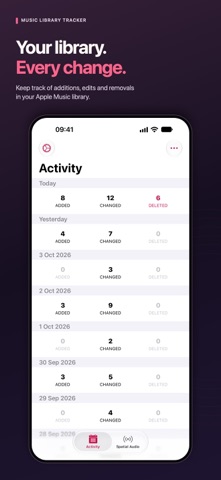
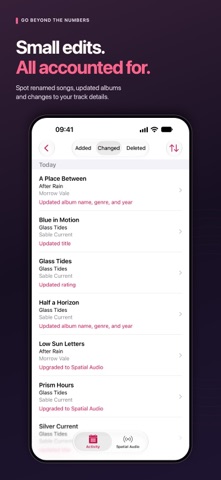
Know when songs disappear, details change, or favourites get a Spatial Audio upgrade. Music Library Tracker automatically monitors the music library on your iPhone or iPad, keeping a history of additions, deletions, and changes. Whether you use Apple Music, iTunes Match, or music you've synced yourself, you can see what's happened to the collection you've spent years building. SEE WHAT CHANGED Spot songs that have been added or removed, then explore the details. Compare previous and current information to see exactly what's different, from a renamed album to a changed artist or release year. Track changes to titles, artists, albums, album artists, genres, release years, ratings, disc numbers, track numbers and Spatial Audio status. REDISCOVER YOUR FAVOURITES IN SPATIAL AUDIO Find out which songs in your library have been upgraded to Spatial Audio, including Dolby Atmos and Dolby Audio. Browse your upgraded tracks and let Music Library Tracker create an Apple Music playlist that updates automatically as more upgrades are found. Get an optional daily notification when new upgrades are found. FOLLOW THE HISTORY OF YOUR LIBRARY Browse changes by day, filter additions, deletions, and updates, or open a track to follow its individual history. See when a song was added, what changed along the way, and whether it was later removed. Tracking starts with your first scan, building a history from that point onwards. GET THE UPDATES YOU CARE ABOUT Receive an optional morning summary of changes detected the previous day. Choose whether it includes added, changed, or deleted tracks, so you can focus on what matters to you. MADE FOR YOUR IPHONE AND IPAD Enjoy Dark Mode, iPad multitasking, and keyboard and trackpad support. Use Shortcuts or Siri to check library changes through x-callback-url automation. One purchase includes both iPhone and iPad. No subscriptions or in-app purchases. YOUR LIBRARY, YOUR PRIVACY Your library history is stored on your device. There are no adverts or usage analytics. Spatial Audio matching is optional and requires an internet connection. If you enable it, Apple Music track identifiers are sent to my server to check for matches. These identifiers are used only to process the request and are not stored. Privacy policy: https://bendodson.com/apps/music-library-tracker/privacy-policy/ Music Library Tracker is independently developed by Ben Dodson. If you need help, email [email protected] and I'll be happy to help.


