
PC 용 YamaTrack Mobile
- 카테고리: Sports
- 최근 업데이트: 2023-12-20
- 현재 버전: 2.1.8
- 파일 크기: 27.17 MB
- 개발자: L1 Technologies, Inc.
- 호환성: 필요 Windows XP, Windows Vista, Windows 7, Windows 8, Windows 8.1 and Windows 10, Windows 11




PC에서 YamaTrack Mobile 용 호환 APK 다운로드
| 다운로드 | 개발자 | 평점 | 점수 | 현재 버전 | 성인 랭킹 |
|---|---|---|---|---|---|
| ↓ PC용 APK 다운로드 | L1 Technologies, Inc. | 0 | 0 | 2.1.8 | 4+ |
에뮬레이터의 중요성은 컴퓨터에서 안드로이드 환경을 흉내 내고 안드로이드 폰을 구입하지 않고도 안드로이드 앱을 설치하고 실행하는 것을 매우 쉽게 만들어주는 것입니다. 누가 당신이 두 세계를 즐길 수 없다고 말합니까? 우선 아래에있는 에뮬레이터 앱을 다운로드 할 수 있습니다.
A. Nox App . OR
B. Bluestacks App .
Bluestacks는 매우 대중적이므로 개인적으로 "B"옵션을 사용하는 것이 좋습니다. 문제가 발생하면 Google 또는 Naver.com에서 좋은 해결책을 찾을 수 있습니다.
Bluestacks.exe 또는 Nox.exe를 성공적으로 다운로드 한 경우 컴퓨터의 다운로드 폴더 또는 다운로드 한 파일을 일반적으로 저장하는 곳으로 이동하십시오.
찾으면 클릭하여 응용 프로그램을 설치하십시오. PC에서 설치 프로세스를 시작해야합니다.
다음을 클릭하여 EULA 라이센스 계약에 동의하십시오.
응용 프로그램을 설치하려면 화면 지시문을 따르십시오.
위 사항을 올바르게 수행하면 소프트웨어가 성공적으로 설치됩니다.
이제 설치 한 에뮬레이터 애플리케이션을 열고 검색 창을 찾으십시오. 지금 입력하십시오. - YamaTrack Mobile 앱을 쉽게 볼 수 있습니다. 그것을 클릭하십시오. 응용 프로그램 창이 열리고 에뮬레이터 소프트웨어에 응용 프로그램이 표시됩니다. 설치 버튼을 누르면 응용 프로그램이 다운로드되기 시작합니다. 이제 우리는 모두 끝났습니다.
그런 다음 "모든 앱"아이콘이 표시됩니다.
클릭하면 설치된 모든 응용 프로그램이 포함 된 페이지로 이동합니다.
당신은 YamaTrack Mobile 상. 그것을 클릭하고 응용 프로그램 사용을 시작하십시오.
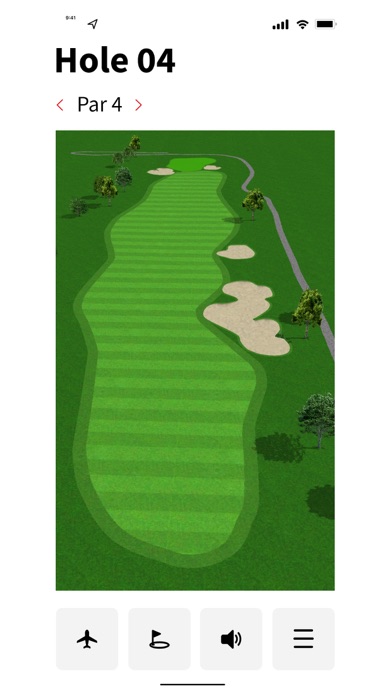
Welcome Golfers, Your course has provided you with the name of our app to enrich your playing experience on their course. The YamaTrack Player App provides an advertising free experience while you are enjoying your favorite golf course. While playing, this app will give you accurate distances from tee to green and all points in between. Simply touch any point on the course map and this app will tell you the distance to that point from your current location as well as the distance from that point to the hole. Also, the app has your course's food and beverage menu loaded which facilitates easy ordering while on the course. At the end of the round, if you choose, you can provide feedback regarding course conditions, pace of play and your overall experience. We hope that you have a great round today. Compliments, Yamaha Golf-Car Company maythebestcarwin.com ============================= Features No signup or account is necessary. Simply download the app to use at participating golf courses. GPS Distances Golfers are provided distances from tee to green and all points in between. With the geo-coded graphic representations of each hole, touch any point on the course map to see the distance to that point as well as the distance from that point to the green. This makes planning shots and layup distances simple and easy. Use the one-press Shot Distance Calculator to measure drives without having to leave the main screen. Food & Drink Ordering Participating courses may provide food and drink menus for simple and easy ordering from within the app without leaving the round. Course Feedback At the end of the round, provide ratings for course conditions, pace of play and your overall experience. Feedback will is provided to the courses so they see just how much your enjoyed your round. Future Enhancements Updates will include messages from the course explaining any changes at the course, specials and upcoming events. =============================