PC 용 Eutelsat SmartBEAM
- 카테고리: Entertainment
- 최근 업데이트: 2020-01-03
- 현재 버전: 3.13
- 파일 크기: 49.20 MB
- 개발자: Eutelsat SA
- 호환성: 필요 Windows XP, Windows Vista, Windows 7, Windows 8, Windows 8.1 and Windows 10, Windows 11



PC에서 Eutelsat SmartBEAM 용 호환 APK 다운로드
| 다운로드 | 개발자 | 평점 | 점수 | 현재 버전 | 성인 랭킹 |
|---|---|---|---|---|---|
| ↓ PC용 APK 다운로드 | Eutelsat SA | 0 | 3.13 | 4+ |
에뮬레이터의 중요성은 컴퓨터에서 안드로이드 환경을 흉내 내고 안드로이드 폰을 구입하지 않고도 안드로이드 앱을 설치하고 실행하는 것을 매우 쉽게 만들어주는 것입니다. 누가 당신이 두 세계를 즐길 수 없다고 말합니까? 우선 아래에있는 에뮬레이터 앱을 다운로드 할 수 있습니다.
A. Nox App . OR
B. Bluestacks App .
Bluestacks는 매우 대중적이므로 개인적으로 "B"옵션을 사용하는 것이 좋습니다. 문제가 발생하면 Google 또는 Naver.com에서 좋은 해결책을 찾을 수 있습니다.
Bluestacks.exe 또는 Nox.exe를 성공적으로 다운로드 한 경우 컴퓨터의 다운로드 폴더 또는 다운로드 한 파일을 일반적으로 저장하는 곳으로 이동하십시오.
찾으면 클릭하여 응용 프로그램을 설치하십시오. PC에서 설치 프로세스를 시작해야합니다.
다음을 클릭하여 EULA 라이센스 계약에 동의하십시오.
응용 프로그램을 설치하려면 화면 지시문을 따르십시오.
위 사항을 올바르게 수행하면 소프트웨어가 성공적으로 설치됩니다.
이제 설치 한 에뮬레이터 애플리케이션을 열고 검색 창을 찾으십시오. 지금 입력하십시오. - Eutelsat SmartBEAM 앱을 쉽게 볼 수 있습니다. 그것을 클릭하십시오. 응용 프로그램 창이 열리고 에뮬레이터 소프트웨어에 응용 프로그램이 표시됩니다. 설치 버튼을 누르면 응용 프로그램이 다운로드되기 시작합니다. 이제 우리는 모두 끝났습니다.
그런 다음 "모든 앱"아이콘이 표시됩니다.
클릭하면 설치된 모든 응용 프로그램이 포함 된 페이지로 이동합니다.
당신은 Eutelsat SmartBEAM 상. 그것을 클릭하고 응용 프로그램 사용을 시작하십시오.
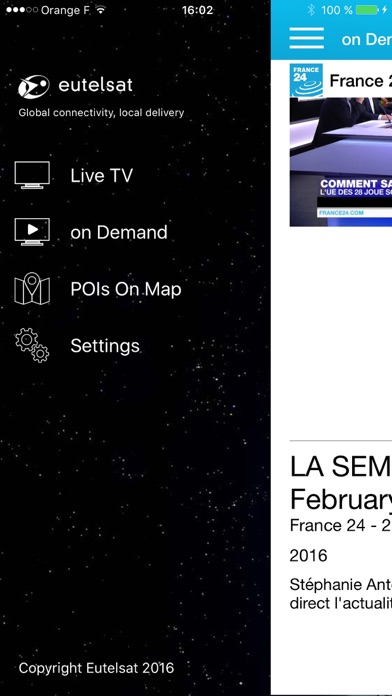
Eutelsat SmartBEAM application allow people to watch live TV and on demand contents, broadcasted and pushed via satellite, using iPads and iPhones via Wifi. To access SmartBEAM services the following are required: 1) reception of SmartBEAM services using Eutelsat SmartBEAM satellite Set Top Box (STB) 2) Eutelsat SmartBEAM application installed on iPads and iPhones 3) Wifi access point connected to Eutelsat SmartBEAM STB 4) as an option a hard drive can be connected to the STB, via USB, to store video contents for On Demand services. Without an external hard drive it is not possible to watch On Demand contents. Note: the iPads and the iPhones use the Wifi access point to communicate with the SmartBEAM STB (iPhones, iPads and the STB must be on the same local network provided by the access point). The access point must work in DHCP mode to provide a local IP address to the SmartBEAM STB and the iPads and iPhones. After the Wifi network connection is set, the IP address of the SmartBEAM STB is automatically discovered setting SmartBEAM App on Autodetection mode (top-left menu). Then it is possible to choose between Live TV and On Demand services and play the content (from top-left menu). Using an Internet connection and choosing POIs from the top-left menu, the App gives the possibility to know if (and where) SmartBEAM STBs are installed in public places (e.g. pubs, restaurants, airports, railway stations, hotels, etc). To allow the SmartBEAM STB to share its position: 1) the box must be made available (MAC address/IP etc.) 2) the STB must be connected on the Internet (connect the RJ45 cable from the access point to the RJ45 port of the SmartBEAM STB). Note1: the access point must have an Internet connection Note2: the position sharing is not done using the application Clicking on Open Set Up page (visible at the bottom center from the main menu) it is also possible to control the SmartBEAM STB (e.g. knowing satellite signal quality, restart and shutdown the STB, format the hard drive, knowing the status of the main running process, etc.).