PC 용 LinkConnects حساباتي
- 카테고리: Social Networking
- 최근 업데이트: 2020-08-24
- 현재 버전: 4.1
- 파일 크기: 19.30 MB
- 개발자: Ahmed Alzarooni
- 호환성: 필요 Windows XP, Windows Vista, Windows 7, Windows 8, Windows 8.1 and Windows 10, Windows 11



PC에서 LinkConnects حساباتي 용 호환 APK 다운로드
| 다운로드 | 개발자 | 평점 | 점수 | 현재 버전 | 성인 랭킹 |
|---|---|---|---|---|---|
| ↓ PC용 APK 다운로드 | Ahmed Alzarooni | 0 | 0 | 4.1 | 4+ |
에뮬레이터의 중요성은 컴퓨터에서 안드로이드 환경을 흉내 내고 안드로이드 폰을 구입하지 않고도 안드로이드 앱을 설치하고 실행하는 것을 매우 쉽게 만들어주는 것입니다. 누가 당신이 두 세계를 즐길 수 없다고 말합니까? 우선 아래에있는 에뮬레이터 앱을 다운로드 할 수 있습니다.
A. Nox App . OR
B. Bluestacks App .
Bluestacks는 매우 대중적이므로 개인적으로 "B"옵션을 사용하는 것이 좋습니다. 문제가 발생하면 Google 또는 Naver.com에서 좋은 해결책을 찾을 수 있습니다.
Bluestacks.exe 또는 Nox.exe를 성공적으로 다운로드 한 경우 컴퓨터의 다운로드 폴더 또는 다운로드 한 파일을 일반적으로 저장하는 곳으로 이동하십시오.
찾으면 클릭하여 응용 프로그램을 설치하십시오. PC에서 설치 프로세스를 시작해야합니다.
다음을 클릭하여 EULA 라이센스 계약에 동의하십시오.
응용 프로그램을 설치하려면 화면 지시문을 따르십시오.
위 사항을 올바르게 수행하면 소프트웨어가 성공적으로 설치됩니다.
이제 설치 한 에뮬레이터 애플리케이션을 열고 검색 창을 찾으십시오. 지금 입력하십시오. - LinkConnects حساباتي 앱을 쉽게 볼 수 있습니다. 그것을 클릭하십시오. 응용 프로그램 창이 열리고 에뮬레이터 소프트웨어에 응용 프로그램이 표시됩니다. 설치 버튼을 누르면 응용 프로그램이 다운로드되기 시작합니다. 이제 우리는 모두 끝났습니다.
그런 다음 "모든 앱"아이콘이 표시됩니다.
클릭하면 설치된 모든 응용 프로그램이 포함 된 페이지로 이동합니다.
당신은 LinkConnects حساباتي 상. 그것을 클릭하고 응용 프로그램 사용을 시작하십시오.
Mac OS 에서 LinkConnects حساباتي 다운로드
| 다운로드 | 개발자 | 점수 | 현재 버전 | 성인 랭킹 |
|---|---|---|---|---|
| 무료 - Mac 에서 다운로드 | Ahmed Alzarooni | 0 |
4.1 | 4+ |
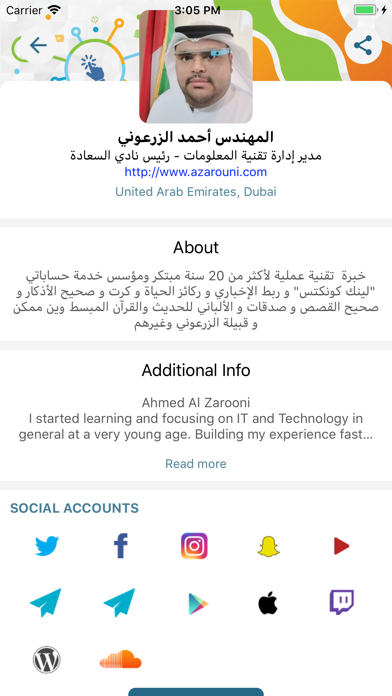
Linkconnects.com New Social Networking site Offers first-of-its-kind service in the world. JUST ONE LINK to all your social media accounts LinkConnects Your One Link. The website & App supports more than 55 global social networks. Instead of listing your various social network accounts one by one, you can simply use your LinkConnects account in order to list all of your accounts in a simple and unique way. LinkConnects is characteristically easy to use. In addition, it implements the latest procedures to provide an easygoing and effective social network environment. Ideal Use: You can use your LinkConnects account in your business card, digital posts, print, websites, email, or any other medium to display your numerous social network accounts easily. Extra features: Account types: We offer five account types, including governmental accounts, commercial accounts, App accounts, Candidate Accounts, Candidate Accounts and individual accounts. This is in order to facilitate matters and to provide each account with its distinctive features and needs. Follow: Enabling website users to follow you to receive any change or addition you might add to your LinkConnects account. Hashtag: You can use identifying hashtags that indicate your account. For example, if you are from UAE, add the #UAE hashtag; if you are an engineer, add the #engineer hashtag or #information_technology etc. in order to make it easier for everyone to reach your account. Featured accounts: The website offers the featured accounts section for people of unique specializations. For all those who wish to distinguish their accounts, they can ask for this through the link (contact us) to add their account to the featured accounts page along with mentioning the reasons for the nomination. Currently, it is up to the website administration to approve such requests. This service will be automated in the future. Multi-lingual: This website is available in many languages, including Arabic, English, Japanese, Russian, Spanish and others in order to make it easier for the users. Search: You can search accounts using the search feature easily. Website users can hide their accounts from search results through the settings. Subscription is free and ad-free: Yes, the LinkConnects service is free, and does not include any ads in the user webpage. Keeping in mind that there might be some nominal fees for adding your account to the featured accounts page.