PC 용 Recall Alert & Safety News
- 카테고리: Health & Fitness
- 최근 업데이트: 2026-09-24
- 현재 버전: 1.2.0
- 파일 크기: 8.38 MB
- 개발자: Juicestand Inc
- 호환성: 필요 Windows XP, Windows Vista, Windows 7, Windows 8, Windows 8.1 and Windows 10, Windows 11


PC에서 Recall Alert & Safety News 용 호환 APK 다운로드
| 다운로드 | 개발자 | 평점 | 점수 | 현재 버전 | 성인 랭킹 |
|---|---|---|---|---|---|
| ↓ PC용 APK 다운로드 | Juicestand Inc | 0 | 0 | 1.2.0 | 4+ |
에뮬레이터의 중요성은 컴퓨터에서 안드로이드 환경을 흉내 내고 안드로이드 폰을 구입하지 않고도 안드로이드 앱을 설치하고 실행하는 것을 매우 쉽게 만들어주는 것입니다. 누가 당신이 두 세계를 즐길 수 없다고 말합니까? 우선 아래에있는 에뮬레이터 앱을 다운로드 할 수 있습니다.
A. Nox App . OR
B. Bluestacks App .
Bluestacks는 매우 대중적이므로 개인적으로 "B"옵션을 사용하는 것이 좋습니다. 문제가 발생하면 Google 또는 Naver.com에서 좋은 해결책을 찾을 수 있습니다.
Bluestacks.exe 또는 Nox.exe를 성공적으로 다운로드 한 경우 컴퓨터의 다운로드 폴더 또는 다운로드 한 파일을 일반적으로 저장하는 곳으로 이동하십시오.
찾으면 클릭하여 응용 프로그램을 설치하십시오. PC에서 설치 프로세스를 시작해야합니다.
다음을 클릭하여 EULA 라이센스 계약에 동의하십시오.
응용 프로그램을 설치하려면 화면 지시문을 따르십시오.
위 사항을 올바르게 수행하면 소프트웨어가 성공적으로 설치됩니다.
이제 설치 한 에뮬레이터 애플리케이션을 열고 검색 창을 찾으십시오. 지금 입력하십시오. - Recall Alert & Safety News 앱을 쉽게 볼 수 있습니다. 그것을 클릭하십시오. 응용 프로그램 창이 열리고 에뮬레이터 소프트웨어에 응용 프로그램이 표시됩니다. 설치 버튼을 누르면 응용 프로그램이 다운로드되기 시작합니다. 이제 우리는 모두 끝났습니다.
그런 다음 "모든 앱"아이콘이 표시됩니다.
클릭하면 설치된 모든 응용 프로그램이 포함 된 페이지로 이동합니다.
당신은 Recall Alert & Safety News 상. 그것을 클릭하고 응용 프로그램 사용을 시작하십시오.
Mac OS 에서 Recall Alert & Safety News 다운로드
| 다운로드 | 개발자 | 점수 | 현재 버전 | 성인 랭킹 |
|---|---|---|---|---|
| 무료 - Mac 에서 다운로드 | Juicestand Inc | 0 |
1.2.0 | 4+ |
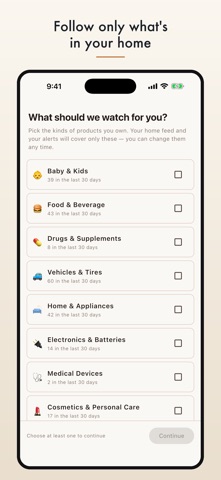
Recall Alert tells you when something in your home is recalled- and helps you find out whether you own the recalled item. A recall notice describes a product; you are standing in your kitchen holding a box. So when available, recalls here show the government agency's photos of the recalled items, close-ups that show date code or serial number. If a barcode is provided, you can scan and check the product(s) in question. WHAT YOU GET • Recalls from the CPSC, the FDA and NHTSA in one feed • Photographs and label close-ups, so you can check what you own • Choose your categories- baby and kids, food, vehicles, home, drugs, medical devices and more • Alerts only for those categories, at the volume you pick: urgent only, all recalls, or a daily summary • Filter by what is actually wrong: peanut, milk and other allergens; listeria, salmonella and lead; fire, choking, tip-over • Alerts for an allergen anywhere, even outside the categories you follow • Search by brand, model or lot code • Scan a barcode • Works offline- the last recalls you downloaded stay readable WHAT IT CANNOT DO This is not a real-time service. Recalls appear once the agency publishes them and we fetch them, usually within half an hour, but that is not a guarantee. Coverage is not complete. Meat, poultry and egg recalls come from USDA FSIS, which we cannot currently reach, so they appear only when a news report covers them. Categories are sorted by software, so something will occasionally land in the wrong one. Not finding a product here does not mean it is safe. Barcodes are published for a small minority of recalls, so a scan that finds nothing is not an all-clear. Recall Alert is not affiliated with any government agency. Always follow the instructions in the official notice. The app is free, paid for by ads.