PC 용 Zepp
- 카테고리: Health & Fitness
- 최근 업데이트: 2026-09-30
- 현재 버전: 10.9.1
- 파일 크기: 362.24 MB
- 개발자: Anhui Huami Information Technology Co., Ltd.
- 호환성: 필요 Windows XP, Windows Vista, Windows 7, Windows 8, Windows 8.1 and Windows 10, Windows 11




PC에서 Zepp 용 호환 APK 다운로드
| 다운로드 | 개발자 | 평점 | 점수 | 현재 버전 | 성인 랭킹 |
|---|---|---|---|---|---|
| ↓ PC용 APK 다운로드 | Anhui Huami Information Technology Co., Ltd. | 10959 | 4.57632 | 10.9.1 | 4+ |
호환되는 PC 앱 또는 대안 확인
| 소프트웨어 | 다운로드 | 평점 | 개발자 |
|---|---|---|---|
| Zepp |
PC 앱 받기 | 4.57632/5 10959 리뷰 4.57632 |
Anhui Huami Information Technology Co., Ltd. |
에뮬레이터의 중요성은 컴퓨터에서 안드로이드 환경을 흉내 내고 안드로이드 폰을 구입하지 않고도 안드로이드 앱을 설치하고 실행하는 것을 매우 쉽게 만들어주는 것입니다. 누가 당신이 두 세계를 즐길 수 없다고 말합니까? 우선 아래에있는 에뮬레이터 앱을 다운로드 할 수 있습니다.
A. Nox App . OR
B. Bluestacks App .
Bluestacks는 매우 대중적이므로 개인적으로 "B"옵션을 사용하는 것이 좋습니다. 문제가 발생하면 Google 또는 Naver.com에서 좋은 해결책을 찾을 수 있습니다.
Bluestacks.exe 또는 Nox.exe를 성공적으로 다운로드 한 경우 컴퓨터의 다운로드 폴더 또는 다운로드 한 파일을 일반적으로 저장하는 곳으로 이동하십시오.
찾으면 클릭하여 응용 프로그램을 설치하십시오. PC에서 설치 프로세스를 시작해야합니다.
다음을 클릭하여 EULA 라이센스 계약에 동의하십시오.
응용 프로그램을 설치하려면 화면 지시문을 따르십시오.
위 사항을 올바르게 수행하면 소프트웨어가 성공적으로 설치됩니다.
이제 설치 한 에뮬레이터 애플리케이션을 열고 검색 창을 찾으십시오. 지금 입력하십시오. - Zepp 앱을 쉽게 볼 수 있습니다. 그것을 클릭하십시오. 응용 프로그램 창이 열리고 에뮬레이터 소프트웨어에 응용 프로그램이 표시됩니다. 설치 버튼을 누르면 응용 프로그램이 다운로드되기 시작합니다. 이제 우리는 모두 끝났습니다.
그런 다음 "모든 앱"아이콘이 표시됩니다.
클릭하면 설치된 모든 응용 프로그램이 포함 된 페이지로 이동합니다.
당신은 Zepp 상. 그것을 클릭하고 응용 프로그램 사용을 시작하십시오.
Mac OS 에서 Zepp 다운로드
| 다운로드 | 개발자 | 점수 | 현재 버전 | 성인 랭킹 |
|---|---|---|---|---|
| 무료 - Mac 에서 다운로드 | Anhui Huami Information Technology Co., Ltd. | 4.57632 |
10.9.1 | 4+ |
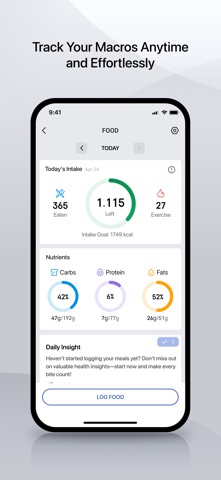
The official app for Amazfit, the Zepp app is free to use and trusted by top athletes such as running back Derrick Henry and sprinter Gabby Thomas. Built for sports and performance, it’s where you’ll track your training, health and recovery data, log your nutrition, and get easy-to-understand scores with AI-powered coaching and guidance — all protected with the highest level of data security. TRACK MACROS: Snap a photo of your meal and instantly get calories, weight, and macronutrients. No watch required, just the Zepp App. Perfect for athletes balancing training with strict diets. Log as many meals as you want with no limits, or enter them manually if that’s easier. HEALTH & FITNESS DATA: Vital health metrics like heart rate, sleep, stress, and blood oxygen, the Zepp App tracks your fitness progress in detail. It captures daily activity such as steps and calories burned, and advanced training data like pace, distance, speed, strength logs, and recovery insights. SLEEP MONITORING: The Zepp App monitors sleep with precision sensors and syncs the data to the Zepp App for full recovery analysis. You'll find detailed metrics on stages, duration, breathing, and recovery quality so you know if your body is ready to train hard or needs more rest to perform at its best. HEART HEALTH: See all your essential heart health data in one place. Track heart rate, HRV, and resting heart rate (RHR), and manually add blood pressure and blood glucose from external devices for a complete view of the most important muscle in your body. CUSTOMIZE YOUR WATCH: The Zepp App is where you’ll find software updates for your Amazfit smartwatch, band, or ring. It also gives you access to the Zepp Store, with hundreds of downloadable mini apps and watch faces to choose from. DATA SECURITY: The Zepp App delivers the highest level of data security, keeping your information safe and private. Safeguarded by Amazon Web Services (AWS), all data is regionally stored, encrypted, fully GDPR compliant, and never sold. FREE TO USE: The core experience of the Zepp App is free. You won't need to pay to view data tracked by your Amazfit device, upgrade software, or import maps. You'll also get free access to a core version of Zepp Aura, your very own wellness coach. For personalized wellness advice powered by AI, Zepp Aura Premium Subscription is available for a monthly or yearly fee, but there's no obligation to sign up. ZEPP AURA PREMIUM: Unlocking unlimited access to Zepp Aura will provide in-depth health assessments, a personal wellness assistant, sleep music and more (region specific). - Available in: Most countries and regions - Subscription Plans: Monthly or yearly options - Subscriptions are confirmed via your Google account and renew automatically unless canceled at least 24 hours in advance. Any unused portion of a free trial is forfeited once a purchase is made. - Details: https://upload-cdn.zepp.com/tposts/5845154 PERMISSIONS: The following optional permissions can enhance your experience but are not required: - Location Access: Used for automatically tracking running or cycling routes, and to show local weather - Storage: Used to import or export workout data, as well as save workout photos - Phone, Contacts, SMS, Call Logs: Used to display calls/notifications/texts on your watch and enable call reminders - Physical Activity: Used to synchronize step counts and workout information - Camera: Used for taking pictures and scanning QR codes to pair your devices - Calendar: Sync and manage schedules - Nearby Devices: Used to discover and connect to smart devices through bluetooth DISCLAIMER: Zepp is not a medical device and is intended for general fitness and health management purposes only