PC 용 Grid – Pattern Puzzle
- 카테고리: Games
- 최근 업데이트: 2026-10-13
- 현재 버전: 3.2.1
- 파일 크기: 22.92 MB
- 개발자: Emil Pedersen
- 호환성: 필요 Windows XP, Windows Vista, Windows 7, Windows 8, Windows 8.1 and Windows 10, Windows 11


PC에서 Grid – Pattern Puzzle 용 호환 APK 다운로드
| 다운로드 | 개발자 | 평점 | 점수 | 현재 버전 | 성인 랭킹 |
|---|---|---|---|---|---|
| ↓ PC용 APK 다운로드 | Emil Pedersen | 0 | 0 | 3.2.1 | 4+ |
에뮬레이터의 중요성은 컴퓨터에서 안드로이드 환경을 흉내 내고 안드로이드 폰을 구입하지 않고도 안드로이드 앱을 설치하고 실행하는 것을 매우 쉽게 만들어주는 것입니다. 누가 당신이 두 세계를 즐길 수 없다고 말합니까? 우선 아래에있는 에뮬레이터 앱을 다운로드 할 수 있습니다.
A. Nox App . OR
B. Bluestacks App .
Bluestacks는 매우 대중적이므로 개인적으로 "B"옵션을 사용하는 것이 좋습니다. 문제가 발생하면 Google 또는 Naver.com에서 좋은 해결책을 찾을 수 있습니다.
Bluestacks.exe 또는 Nox.exe를 성공적으로 다운로드 한 경우 컴퓨터의 다운로드 폴더 또는 다운로드 한 파일을 일반적으로 저장하는 곳으로 이동하십시오.
찾으면 클릭하여 응용 프로그램을 설치하십시오. PC에서 설치 프로세스를 시작해야합니다.
다음을 클릭하여 EULA 라이센스 계약에 동의하십시오.
응용 프로그램을 설치하려면 화면 지시문을 따르십시오.
위 사항을 올바르게 수행하면 소프트웨어가 성공적으로 설치됩니다.
이제 설치 한 에뮬레이터 애플리케이션을 열고 검색 창을 찾으십시오. 지금 입력하십시오. - Grid – Pattern Puzzle 앱을 쉽게 볼 수 있습니다. 그것을 클릭하십시오. 응용 프로그램 창이 열리고 에뮬레이터 소프트웨어에 응용 프로그램이 표시됩니다. 설치 버튼을 누르면 응용 프로그램이 다운로드되기 시작합니다. 이제 우리는 모두 끝났습니다.
그런 다음 "모든 앱"아이콘이 표시됩니다.
클릭하면 설치된 모든 응용 프로그램이 포함 된 페이지로 이동합니다.
당신은 Grid – Pattern Puzzle 상. 그것을 클릭하고 응용 프로그램 사용을 시작하십시오.
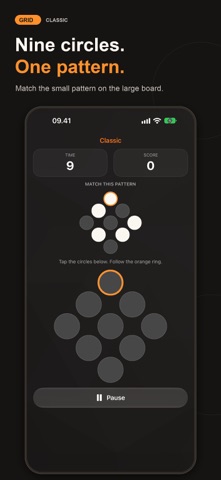
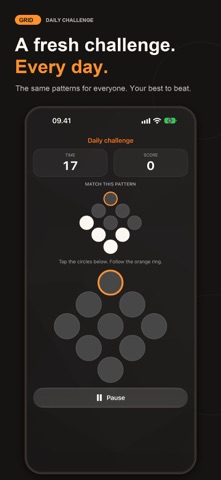
One small pattern. Nine circles. Your next best score. Match the pattern on the large board: tap circles to turn them on or off. Get a point and a fresh pattern when they match. Easy to learn — hard to put down. THREE FREE GAMES A DAY Play three Classic or Daily Challenge games per UTC day on this device. Both modes share the same allowance. New games arrive at midnight UTC; the reset time is shown in your local time. Pausing and continuing never uses another game. BEAT THE CLOCK Classic starts with 18 seconds. Correct matches add time. Follow the reference ring when the pattern rotates, and beat your best. A FRESH DAILY CHALLENGE Everyone gets the same daily sequence of patterns. The challenge changes at midnight UTC. LEARN AND PRACTICE FREE Untimed Practice and the interactive guide are always free and never use a daily game. The guide lights up your next tap and helps when you make a mistake. GRID PRO — ONE PERMANENT PURCHASE Unlock more with an optional one-time purchase: • Unlimited Classic and Daily Challenge games. • A fixed 60-second sprint and a Rotation challenge with rotated patterns from the start. • Custom training: choose the timer, lit-circle count and rotations. • Statistics by game mode and your recent game history. • Ocean, Violet and Mint color themes. Pro is not a subscription. The App Store price is shown before purchase. Restore your purchase on the Pro screen on devices using the same Apple Account. Play in Danish or English. Gameplay works offline and needs no app account. Game Center is optional for the Classic leaderboard. Purchase and restore require a connection. No ads. Scores, daily games, history and themes stay on this device; game data does not sync between devices. Have an idea or found a bug? Send optional feedback from the guide, a paused game or your result. Messages stay on your device while offline and send when you reconnect.