PC 용 Learn Graphs
- 카테고리: Education
- 최근 업데이트: 2026-09-29
- 현재 버전: 2026.09.27
- 파일 크기: 2.50 MB
- 개발자: Joao Frasco
- 호환성: 필요 Windows XP, Windows Vista, Windows 7, Windows 8, Windows 8.1 and Windows 10, Windows 11



PC에서 Learn Graphs 용 호환 APK 다운로드
| 다운로드 | 개발자 | 평점 | 점수 | 현재 버전 | 성인 랭킹 |
|---|---|---|---|---|---|
| ↓ PC용 APK 다운로드 | Joao Frasco | 0 | 0 | 2026.09.27 | 4+ |
에뮬레이터의 중요성은 컴퓨터에서 안드로이드 환경을 흉내 내고 안드로이드 폰을 구입하지 않고도 안드로이드 앱을 설치하고 실행하는 것을 매우 쉽게 만들어주는 것입니다. 누가 당신이 두 세계를 즐길 수 없다고 말합니까? 우선 아래에있는 에뮬레이터 앱을 다운로드 할 수 있습니다.
A. Nox App . OR
B. Bluestacks App .
Bluestacks는 매우 대중적이므로 개인적으로 "B"옵션을 사용하는 것이 좋습니다. 문제가 발생하면 Google 또는 Naver.com에서 좋은 해결책을 찾을 수 있습니다.
Bluestacks.exe 또는 Nox.exe를 성공적으로 다운로드 한 경우 컴퓨터의 다운로드 폴더 또는 다운로드 한 파일을 일반적으로 저장하는 곳으로 이동하십시오.
찾으면 클릭하여 응용 프로그램을 설치하십시오. PC에서 설치 프로세스를 시작해야합니다.
다음을 클릭하여 EULA 라이센스 계약에 동의하십시오.
응용 프로그램을 설치하려면 화면 지시문을 따르십시오.
위 사항을 올바르게 수행하면 소프트웨어가 성공적으로 설치됩니다.
이제 설치 한 에뮬레이터 애플리케이션을 열고 검색 창을 찾으십시오. 지금 입력하십시오. - Learn Graphs 앱을 쉽게 볼 수 있습니다. 그것을 클릭하십시오. 응용 프로그램 창이 열리고 에뮬레이터 소프트웨어에 응용 프로그램이 표시됩니다. 설치 버튼을 누르면 응용 프로그램이 다운로드되기 시작합니다. 이제 우리는 모두 끝났습니다.
그런 다음 "모든 앱"아이콘이 표시됩니다.
클릭하면 설치된 모든 응용 프로그램이 포함 된 페이지로 이동합니다.
당신은 Learn Graphs 상. 그것을 클릭하고 응용 프로그램 사용을 시작하십시오.
Mac OS 에서 Learn Graphs 다운로드
| 다운로드 | 개발자 | 점수 | 현재 버전 | 성인 랭킹 |
|---|---|---|---|---|
| ₩1,200 - Mac 에서 다운로드 | Joao Frasco | 0 |
2026.09.27 | 4+ |
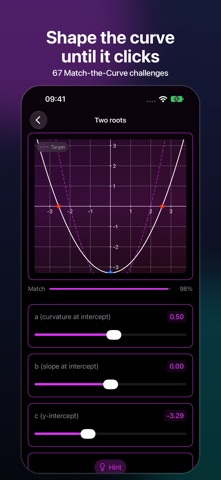
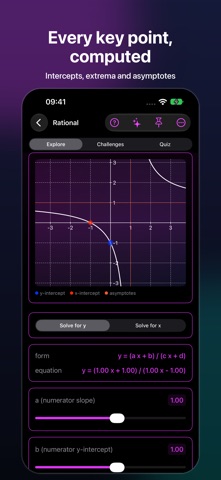
Don't just look at graphs — play them. Learn Graphs turns algebra into a game: shape a curve with sliders until it clicks onto the target, quiz yourself on the points that matter, and keep a daily streak going. Every answer is checked by real mathematics computed inside the app. MATCH THE CURVE • 67 hand-crafted challenges across 13 function families • Watch your curve morph live as the match meter climbs • Earn up to 3 stars per challenge — beat par, skip the hints QUIZZES THAT READ THE GRAPH • Tap the intercept, spot the vertex, pick the matching equation • A Daily Mix of 5 questions across the functions you've explored • Wrong answers teach: the correct point lights up on the curve A GRAPHING CANVAS THAT TEACHES • Press and drag to trace any curve — it snaps to intercepts, extrema, and inflection points with their coordinates • Ghost trails show before/after as you change a coefficient • Pin a curve, then bend a second one over it to compare • Type exact coefficients, save your favorite curves, and export them as clean PNG or PDF for homework and slides AN ON-DEVICE AI TUTOR On iPhone and iPad with Apple Intelligence, ask the tutor to explain the curve you're looking at or what your last change did — in plain language, powered entirely on device. The math always comes from the app's own engine, never guessed. EVERYWHERE YOU LEARN • Full iPad experience with a sidebar and keyboard shortcuts • "Function of the Day" Home Screen widget with your streak • Siri & Shortcuts: "Show a quadratic graph in Learn Graphs" • VoiceOver Audio Graphs — hear the shape of any curve • In English, Spanish, Portuguese, French, and German 13 function families: linear, quadratic, cubic, quartic, exponential, logarithmic, square root, cube root, absolute value, hyperbolic, rational, trigonometric (sin, cos, tan, sec, csc, cot), and constant — each with domain, range, intercepts, extrema, inflection points, and asymptotes computed instantly. Perfect for algebra and precalculus students, teachers who want a live demo tool, and parents helping with homework.