PC 용 Cleanpath - Quit Lust & Urges
- 카테고리: Utilities
- 최근 업데이트: 2026-09-20
- 현재 버전: 4.0
- 파일 크기: 39.48 MB
- 개발자: Maxima Apps
- 호환성: 필요 Windows XP, Windows Vista, Windows 7, Windows 8, Windows 8.1 and Windows 10, Windows 11



PC에서 Cleanpath - Quit Lust & Urges 용 호환 APK 다운로드
| 다운로드 | 개발자 | 평점 | 점수 | 현재 버전 | 성인 랭킹 |
|---|---|---|---|---|---|
| ↓ PC용 APK 다운로드 | Maxima Apps | 2 | 5 | 4.0 | 4+ |
에뮬레이터의 중요성은 컴퓨터에서 안드로이드 환경을 흉내 내고 안드로이드 폰을 구입하지 않고도 안드로이드 앱을 설치하고 실행하는 것을 매우 쉽게 만들어주는 것입니다. 누가 당신이 두 세계를 즐길 수 없다고 말합니까? 우선 아래에있는 에뮬레이터 앱을 다운로드 할 수 있습니다.
A. Nox App . OR
B. Bluestacks App .
Bluestacks는 매우 대중적이므로 개인적으로 "B"옵션을 사용하는 것이 좋습니다. 문제가 발생하면 Google 또는 Naver.com에서 좋은 해결책을 찾을 수 있습니다.
Bluestacks.exe 또는 Nox.exe를 성공적으로 다운로드 한 경우 컴퓨터의 다운로드 폴더 또는 다운로드 한 파일을 일반적으로 저장하는 곳으로 이동하십시오.
찾으면 클릭하여 응용 프로그램을 설치하십시오. PC에서 설치 프로세스를 시작해야합니다.
다음을 클릭하여 EULA 라이센스 계약에 동의하십시오.
응용 프로그램을 설치하려면 화면 지시문을 따르십시오.
위 사항을 올바르게 수행하면 소프트웨어가 성공적으로 설치됩니다.
이제 설치 한 에뮬레이터 애플리케이션을 열고 검색 창을 찾으십시오. 지금 입력하십시오. - Cleanpath - Quit Lust & Urges 앱을 쉽게 볼 수 있습니다. 그것을 클릭하십시오. 응용 프로그램 창이 열리고 에뮬레이터 소프트웨어에 응용 프로그램이 표시됩니다. 설치 버튼을 누르면 응용 프로그램이 다운로드되기 시작합니다. 이제 우리는 모두 끝났습니다.
그런 다음 "모든 앱"아이콘이 표시됩니다.
클릭하면 설치된 모든 응용 프로그램이 포함 된 페이지로 이동합니다.
당신은 Cleanpath - Quit Lust & Urges 상. 그것을 클릭하고 응용 프로그램 사용을 시작하십시오.
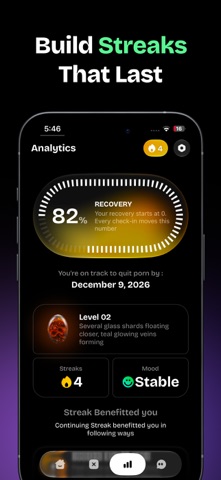
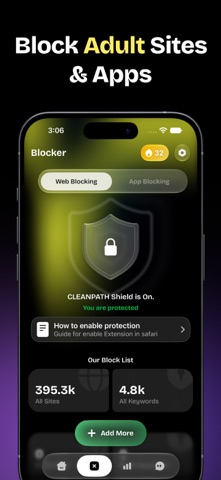
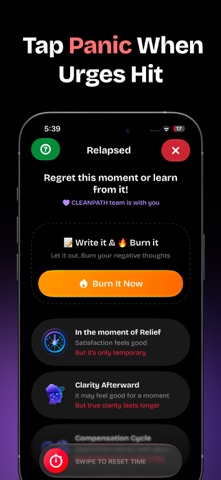
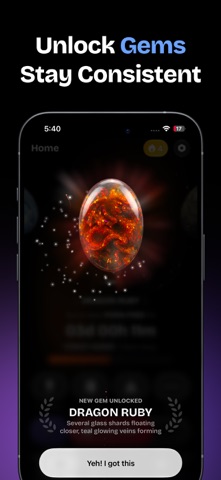
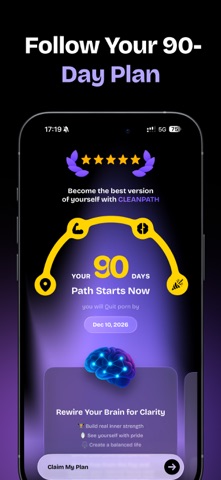
Cleanpath: Block Distractions, Build Better Habits Trying to change a habit can feel manageable until an urge hits, you’re bored, stressed, or one tap away from falling back into the same routine. Cleanpath helps you create more distance between you and the distractions you want to avoid. Block apps and websites, limit adult content, understand your triggers, track your progress, and build a routine you can stick with one day at a time. Whether you want to step away from adult content, reduce distracting habits, or build more self-control, Cleanpath brings everything together in one place. Features • App Blocker - Restrict distracting apps that tend to pull you away from your goals. • Web & Content Blocker - Block selected websites, custom URLs, and keywords in Safari, with built-in adult content blocking. • Streaks & Gems - Track your streak, see your progress, and earn gems as you stay consistent. • Panic Mode - Get quick access to support when an urge feels strong and you need a moment to pause and redirect your attention. • 90-Day Recovery Plan - Follow a structured, day-by-day plan and focus on one step at a time. • Path Quiz - Reflect on your triggers, habits, and usage patterns to better understand what tends to pull you off track. • Recovery Activities - Choose from meditation, daily affirmations, workouts, walks, runs, and journaling when you want to redirect your time and attention. • Recovery Analytics - Look back at your streaks, check-ins, and recorded activity to see your progress and patterns over time. • Daily Check-In - Log how you’re feeling each day and review your entries over time. • AI Support - Use AI support when you want to reflect, organize your thoughts, or get general motivational guidance. Built for everyday progress Cleanpath combines app blocking, website blocking, self-control, habit tracking, daily reflection, and recovery-focused features in one place. Some days you may need the blocker. Other days it might be Panic Mode, a workout, journaling, your streak, or simply checking in with yourself. Use the parts of Cleanpath that make sense for you and build your routine around your own goals. Cleanpath gives you a simple place to block distractions, understand your patterns, stay aware of your progress, and keep moving forward at your own pace. Important: Cleanpath is intended for personal development and habit support. It does not provide medical advice, diagnosis, treatment, or professional therapy. AI responses are intended for general informational and motivational purposes only. If you have concerns about your physical or mental health, addiction, or compulsive behavior, please consult a qualified healthcare professional. Privacy Policy: https://maximaapps.com/cleanpath/privacy-policy Terms of Use: https://maximaapps.com/cleanpath/terms-of-use