PC 용 Lap Swim
- 카테고리: Health & Fitness
- 최근 업데이트: 2024-03-05
- 현재 버전: 2.1.1
- 파일 크기: 5.10 MB
- 개발자: Peter Kramer
- 호환성: 필요 Windows XP, Windows Vista, Windows 7, Windows 8, Windows 8.1 and Windows 10, Windows 11



에뮬레이터의 중요성은 컴퓨터에서 안드로이드 환경을 흉내 내고 안드로이드 폰을 구입하지 않고도 안드로이드 앱을 설치하고 실행하는 것을 매우 쉽게 만들어주는 것입니다. 누가 당신이 두 세계를 즐길 수 없다고 말합니까? 우선 아래에있는 에뮬레이터 앱을 다운로드 할 수 있습니다.
A. Nox App . OR
B. Bluestacks App .
Bluestacks는 매우 대중적이므로 개인적으로 "B"옵션을 사용하는 것이 좋습니다. 문제가 발생하면 Google 또는 Naver.com에서 좋은 해결책을 찾을 수 있습니다.
Bluestacks.exe 또는 Nox.exe를 성공적으로 다운로드 한 경우 컴퓨터의 다운로드 폴더 또는 다운로드 한 파일을 일반적으로 저장하는 곳으로 이동하십시오.
찾으면 클릭하여 응용 프로그램을 설치하십시오. PC에서 설치 프로세스를 시작해야합니다.
다음을 클릭하여 EULA 라이센스 계약에 동의하십시오.
응용 프로그램을 설치하려면 화면 지시문을 따르십시오.
위 사항을 올바르게 수행하면 소프트웨어가 성공적으로 설치됩니다.
이제 설치 한 에뮬레이터 애플리케이션을 열고 검색 창을 찾으십시오. 지금 입력하십시오. - Lap Swim 앱을 쉽게 볼 수 있습니다. 그것을 클릭하십시오. 응용 프로그램 창이 열리고 에뮬레이터 소프트웨어에 응용 프로그램이 표시됩니다. 설치 버튼을 누르면 응용 프로그램이 다운로드되기 시작합니다. 이제 우리는 모두 끝났습니다.
그런 다음 "모든 앱"아이콘이 표시됩니다.
클릭하면 설치된 모든 응용 프로그램이 포함 된 페이지로 이동합니다.
당신은 Lap Swim 상. 그것을 클릭하고 응용 프로그램 사용을 시작하십시오.
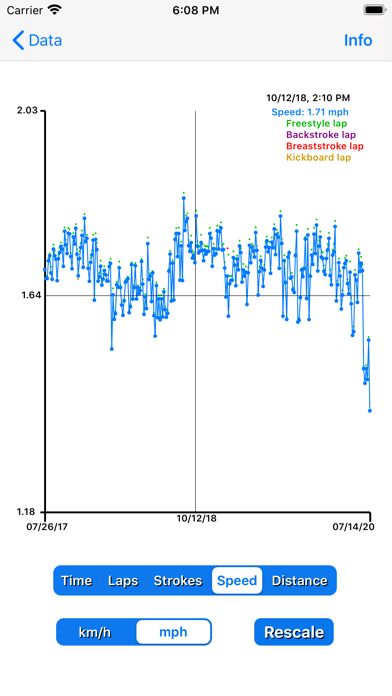
Automatic Lap Counter with Stopwatch and LARGE FONTS; Lap Swim is an Apple Watch (Series 2 and later) App that automatically detects, displays, records and graphs the lap count and elapsed time of a swim session. Detects and displays the type of stroke and stroke count during each lap. - Detects and displays the lap direction and lap count while swimming using the gyroscope in the Apple Watch - LARGE FONT display of time and lap count - Stopwatch function while swimming - Auto start/stop mode detects swimming and automatically starts (or stops) the stopwatch - Lap counter counts up from 0 or counts down from preset lap goal - Senses and displays freestyle strokes, backstrokes, and breaststrokes - Detects and counts kickboard laps - Records and graphs (on the paired iPhone) the following: ------ Date and time of a swim session ------ Time for each lap and of entire swim session ------ Number of laps ------ Average speed and speed for each lap ------ Stroke count and type of stroke (freestyle, back, breast or kick board) ------ Distance in meters or yards - Enters workout information into the Health and Activity apps Lap Swim uses the gyroscope and accelerometer in the Apple Watch to detect the type of stroke and the orientation of the swimmer. Using this information it displays the lap count of a swim session. Lap Swim also has a standard stopwatch function. The swim session information is transmitted to the paired iPhone and displayed on both a table and a graph. Lap Swim is free and fully functional for the first 250 laps. After that, Lap Swim continues to function but it requires a low cost IAP to display the lap count. Screenshots: -Apple Watch: 1) Large 2 line display - Swimming return half of 51st lap after 49:35 2) 3 line display - returning on lap 10 after 9:10; 11 breaststrokes taken this half lap 3) 3 line display - after turning and starting lap 11; showing last half lap stroke count (11) and elapsed time (34.6) 4) 3 line display - going out on lap 12; this lap you have taken 3 freestyle strokes, 2 backstrokes, 5 breaststrokes, and over 15 seconds using a kickboard 5) Starting a Workout Session in 2 second and turning on water lock. 6) Lap length set to 25 yards. 7) Settings options - 2 or 3 line display, split times half or full lap, automatic or manual start/stop, set lap length. -iPhone: 1) Home screen also showing the app on the Apple Watch 2) Graph of the average speed in over 200 swim sessions from 12/16 to 7/20. 3) Graph of the total times in over 200 swim sessions from 12/16 to 7/20. 4) Data collected in a single swim session available for editing. ----