PC 용 Offline Period Tracker: Enria
- 카테고리: Health & Fitness
- 최근 업데이트: 2026-10-13
- 현재 버전: 2.9.1
- 파일 크기: 27.31 MB
- 개발자: Oleksandr Kirichenko
- 호환성: 필요 Windows XP, Windows Vista, Windows 7, Windows 8, Windows 8.1 and Windows 10, Windows 11



PC에서 Offline Period Tracker: Enria 용 호환 APK 다운로드
| 다운로드 | 개발자 | 평점 | 점수 | 현재 버전 | 성인 랭킹 |
|---|---|---|---|---|---|
| ↓ PC용 APK 다운로드 | Oleksandr Kirichenko | 0 | 0 | 2.9.1 | 12+ |
에뮬레이터의 중요성은 컴퓨터에서 안드로이드 환경을 흉내 내고 안드로이드 폰을 구입하지 않고도 안드로이드 앱을 설치하고 실행하는 것을 매우 쉽게 만들어주는 것입니다. 누가 당신이 두 세계를 즐길 수 없다고 말합니까? 우선 아래에있는 에뮬레이터 앱을 다운로드 할 수 있습니다.
A. Nox App . OR
B. Bluestacks App .
Bluestacks는 매우 대중적이므로 개인적으로 "B"옵션을 사용하는 것이 좋습니다. 문제가 발생하면 Google 또는 Naver.com에서 좋은 해결책을 찾을 수 있습니다.
Bluestacks.exe 또는 Nox.exe를 성공적으로 다운로드 한 경우 컴퓨터의 다운로드 폴더 또는 다운로드 한 파일을 일반적으로 저장하는 곳으로 이동하십시오.
찾으면 클릭하여 응용 프로그램을 설치하십시오. PC에서 설치 프로세스를 시작해야합니다.
다음을 클릭하여 EULA 라이센스 계약에 동의하십시오.
응용 프로그램을 설치하려면 화면 지시문을 따르십시오.
위 사항을 올바르게 수행하면 소프트웨어가 성공적으로 설치됩니다.
이제 설치 한 에뮬레이터 애플리케이션을 열고 검색 창을 찾으십시오. 지금 입력하십시오. - Offline Period Tracker: Enria 앱을 쉽게 볼 수 있습니다. 그것을 클릭하십시오. 응용 프로그램 창이 열리고 에뮬레이터 소프트웨어에 응용 프로그램이 표시됩니다. 설치 버튼을 누르면 응용 프로그램이 다운로드되기 시작합니다. 이제 우리는 모두 끝났습니다.
그런 다음 "모든 앱"아이콘이 표시됩니다.
클릭하면 설치된 모든 응용 프로그램이 포함 된 페이지로 이동합니다.
당신은 Offline Period Tracker: Enria 상. 그것을 클릭하고 응용 프로그램 사용을 시작하십시오.
Mac OS 에서 Offline Period Tracker 다운로드
| 다운로드 | 개발자 | 점수 | 현재 버전 | 성인 랭킹 |
|---|---|---|---|---|
| 무료 - Mac 에서 다운로드 | Oleksandr Kirichenko | 0 |
2.9.1 | 12+ |
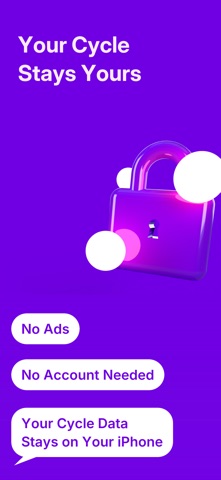
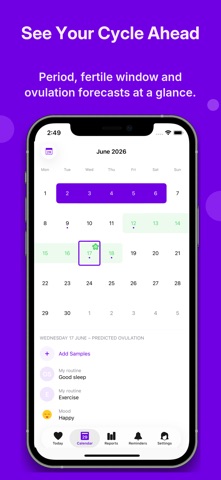
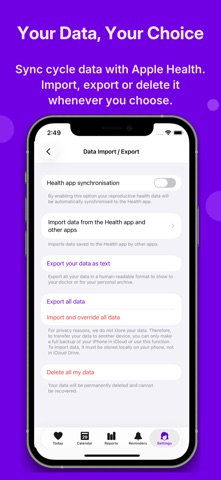
Enria is a period and cycle tracker that keeps your cycle and health data on your iPhone — no account or cloud storage. Just clear, simple cycle awareness. PRIVATE BY DESIGN Your cycle and health data remain on your device. Enria does not require an account, upload those records, or share them with others. Your most sensitive information stays in your hands. TRACK WHAT MATTERS TO YOU Log your period, symptoms, sexual activity, weight, water and basal body temperature (BBT) for free. Premium adds moods, flow intensity, discharge, tests, pills and notes, plus custom tracking categories for anything else — medication, exercise, sleep, or whatever fits your routine. CYCLE PREDICTIONS See predictions for your next period, fertile window, and ovulation day. Reports and charts help you spot patterns across cycles. APPLE HEALTH INTEGRATION Enria reads and writes menstrual flow data to Apple Health. Keep your health information consistent across apps and devices. REMINDERS Get notified before your period starts and when your fertile window opens, and set a daily reminder to log your day. Stay consistent without needing to think about it. THEMES AND PERSONALISATION Choose a colour theme that feels right — two are free and six more come with Premium. Organise your tracking categories and import or export your data whenever you need. FEATURES - Period and cycle tracking - Ovulation and fertility predictions - Symptom, sexual activity, weight, water and BBT logging - Mood, flow, discharge, test, pill and note logging (Premium) - Custom tracking categories (Premium) - Two-way Apple Health sync - Cycle reports and charts - Reminders - 8 colour themes (6 with Premium) - Data import and export Enria offers a Premium version with monthly, yearly, or lifetime plans. Unlock all features and get the most out of your cycle tracking. Payment will be charged to your Apple Account at confirmation of purchase. Subscriptions automatically renew unless auto-renew is turned off at least 24 hours before the end of the current period. Your account will be charged for renewal within 24 hours prior to the end of the current period at the rate of the selected plan. Subscriptions and auto-renewal may be managed by going to Account Settings after purchase. Any unused portion of a free trial period, if offered, will be forfeited when you purchase a subscription. Privacy Policy: https://enria.app/legal/enria_app_privacy_policy.html Terms of Service: https://enria.app/legal/enria_app_terms_and_conditions.html