PC 용 accoca - ID & Password Manager
- 카테고리: Productivity
- 최근 업데이트: 2026-10-17
- 현재 버전: 14.9
- 파일 크기: 77.89 MB
- 개발자: Sola, K.K.
- 호환성: 필요 Windows XP, Windows Vista, Windows 7, Windows 8, Windows 8.1 and Windows 10, Windows 11



PC에서 accoca - ID & Password Manager 용 호환 APK 다운로드
| 다운로드 | 개발자 | 평점 | 점수 | 현재 버전 | 성인 랭킹 |
|---|---|---|---|---|---|
| ↓ PC용 APK 다운로드 | Sola, K.K. | 2 | 4.5 | 14.9 | 4+ |
에뮬레이터의 중요성은 컴퓨터에서 안드로이드 환경을 흉내 내고 안드로이드 폰을 구입하지 않고도 안드로이드 앱을 설치하고 실행하는 것을 매우 쉽게 만들어주는 것입니다. 누가 당신이 두 세계를 즐길 수 없다고 말합니까? 우선 아래에있는 에뮬레이터 앱을 다운로드 할 수 있습니다.
A. Nox App . OR
B. Bluestacks App .
Bluestacks는 매우 대중적이므로 개인적으로 "B"옵션을 사용하는 것이 좋습니다. 문제가 발생하면 Google 또는 Naver.com에서 좋은 해결책을 찾을 수 있습니다.
Bluestacks.exe 또는 Nox.exe를 성공적으로 다운로드 한 경우 컴퓨터의 다운로드 폴더 또는 다운로드 한 파일을 일반적으로 저장하는 곳으로 이동하십시오.
찾으면 클릭하여 응용 프로그램을 설치하십시오. PC에서 설치 프로세스를 시작해야합니다.
다음을 클릭하여 EULA 라이센스 계약에 동의하십시오.
응용 프로그램을 설치하려면 화면 지시문을 따르십시오.
위 사항을 올바르게 수행하면 소프트웨어가 성공적으로 설치됩니다.
이제 설치 한 에뮬레이터 애플리케이션을 열고 검색 창을 찾으십시오. 지금 입력하십시오. - accoca - ID & Password Manager 앱을 쉽게 볼 수 있습니다. 그것을 클릭하십시오. 응용 프로그램 창이 열리고 에뮬레이터 소프트웨어에 응용 프로그램이 표시됩니다. 설치 버튼을 누르면 응용 프로그램이 다운로드되기 시작합니다. 이제 우리는 모두 끝났습니다.
그런 다음 "모든 앱"아이콘이 표시됩니다.
클릭하면 설치된 모든 응용 프로그램이 포함 된 페이지로 이동합니다.
당신은 accoca - ID & Password Manager 상. 그것을 클릭하고 응용 프로그램 사용을 시작하십시오.
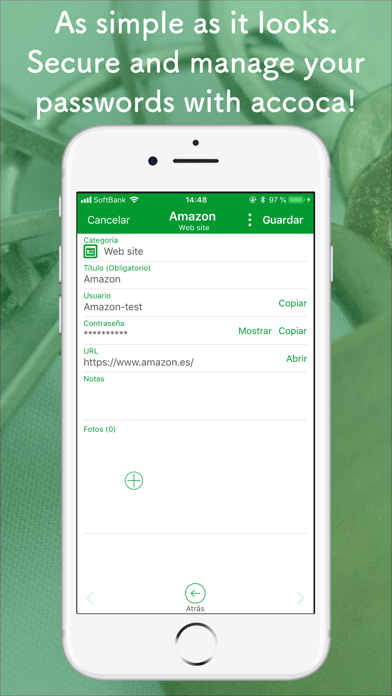
accoca is a personal information manager that helps make everyday life more comfortable. From passwords to insurance and subscription contracts, appliance model numbers and settings, car parts, and more—you can easily record all kinds of life information and check it anytime. Stronger login management • Passkeys — When creating a passkey in Safari and other apps, you can choose accoca as the save location. Sign in with Face ID or Touch ID for phishing-resistant login. Passkeys require Google Drive; they are not stored on this device only. They are saved encrypted to Google Drive and sync across your other iPhones and iPads. • CSV Account Import — Bring in CSV files exported from other password managers and migrate your account information in one step. Plus * Manage information for parents, children, pets, and the whole family * Keep records of cancelled contracts for reference * One purchase, use forever and many other features that support real life. As a tool for daily living, accoca values safety and simplicity above all. Our commitment to safety accoca does not rely on ads or cloud services that raise concerns about personal data tracking or large-scale leaks. Each file is encrypted with AES256 using a random password and stored on your device. Optionally, you can back up to Google Drive to prepare for data loss or device changes. Backups are also encrypted and stored in an app-only area on Google Drive that cannot be accessed from outside accoca. Our commitment to simplicity We keep the design simple, reduce distractions, and aim for an intuitive experience. Settings has been refreshed so you can see screen lock, backup, passkeys, and more at a glance. At the same time, accoca is deep and customizable—we hope you enjoy finding a way to use it that fits you. Key features Record & organize • Organize with groups • Customize with passwords, numbers, due dates, notes, photos, and more • Tag items by status such as favorites or active contracts (color tags) • Sort by title, last updated, due date, and more Login & security • Passkeys — Save website passkeys in accoca (Google Drive connection required) • Password AutoFill — Use IDs and passwords saved in accoca in Safari and other apps • TOTP (one-time passwords) supported • Copy IDs and account details with a tap • Lock with Touch ID, Face ID, or passcode Sharing & backup • View-only sharing with sub-devices and family devices (sub-device mode) • Backup for peace of mind (Google Drive) • CSV Account Import — Import account information in bulk from CSV files exported from other apps • In-app notifications for due dates and more Other • Theme color and background color settings • And many more touches that grow more useful the more you use the app We would love to hear your requests and feedback. accoca has become an essential part of daily life for many families, including the developer’s own, and we continue development responsibly for the long term. Less hassle managing information—more time for a comfortable, enjoyable life! Full version A one-time purchase unlocks the following with no time limit: - Unlimited account entries (free version: up to 10) - Password generator - OCR to convert text in images to editable text Device changes & data migration accoca supports secure backup to Google Drive. Backed-up data can be restored on another device. We recommend Google Drive backup when changing devices or in case of loss. When switching from another password manager to accoca, you can also import a CSV file from Settings → CSV Account Import. Restoring your purchase You can restore your purchase on a new device. While signed in with the same Apple ID used for the purchase: 1. Open the app 2. Tap Settings → Detailed information 3. Tap Restore payment ------------------------------------------- We welcome your feedback and requests. Contact us anytime at [email protected] #When contacting us, please allow messages from the address above.