
PC 용 fDeck: flight instruments
- 카테고리: Navigation
- 최근 업데이트: 2026-09-03
- 현재 버전: 3.0.4
- 파일 크기: 90.99 MB
- 개발자: Darren Yeates
- 호환성: 필요 Windows XP, Windows Vista, Windows 7, Windows 8, Windows 8.1 and Windows 10, Windows 11


PC에서 fDeck: flight instruments 용 호환 APK 다운로드
| 다운로드 | 개발자 | 평점 | 점수 | 현재 버전 | 성인 랭킹 |
|---|---|---|---|---|---|
| ↓ PC용 APK 다운로드 | Darren Yeates | 3 | 5 | 3.0.4 | 4+ |
에뮬레이터의 중요성은 컴퓨터에서 안드로이드 환경을 흉내 내고 안드로이드 폰을 구입하지 않고도 안드로이드 앱을 설치하고 실행하는 것을 매우 쉽게 만들어주는 것입니다. 누가 당신이 두 세계를 즐길 수 없다고 말합니까? 우선 아래에있는 에뮬레이터 앱을 다운로드 할 수 있습니다.
A. Nox App . OR
B. Bluestacks App .
Bluestacks는 매우 대중적이므로 개인적으로 "B"옵션을 사용하는 것이 좋습니다. 문제가 발생하면 Google 또는 Naver.com에서 좋은 해결책을 찾을 수 있습니다.
Bluestacks.exe 또는 Nox.exe를 성공적으로 다운로드 한 경우 컴퓨터의 다운로드 폴더 또는 다운로드 한 파일을 일반적으로 저장하는 곳으로 이동하십시오.
찾으면 클릭하여 응용 프로그램을 설치하십시오. PC에서 설치 프로세스를 시작해야합니다.
다음을 클릭하여 EULA 라이센스 계약에 동의하십시오.
응용 프로그램을 설치하려면 화면 지시문을 따르십시오.
위 사항을 올바르게 수행하면 소프트웨어가 성공적으로 설치됩니다.
이제 설치 한 에뮬레이터 애플리케이션을 열고 검색 창을 찾으십시오. 지금 입력하십시오. - fDeck: flight instruments 앱을 쉽게 볼 수 있습니다. 그것을 클릭하십시오. 응용 프로그램 창이 열리고 에뮬레이터 소프트웨어에 응용 프로그램이 표시됩니다. 설치 버튼을 누르면 응용 프로그램이 다운로드되기 시작합니다. 이제 우리는 모두 끝났습니다.
그런 다음 "모든 앱"아이콘이 표시됩니다.
클릭하면 설치된 모든 응용 프로그램이 포함 된 페이지로 이동합니다.
당신은 fDeck: flight instruments 상. 그것을 클릭하고 응용 프로그램 사용을 시작하십시오.
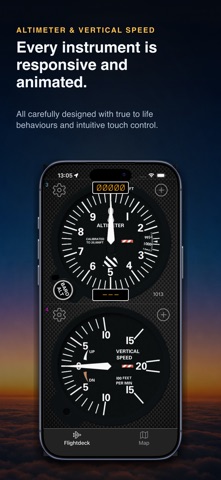
fDeck turns your iPhone or iPad into a working aircraft instrument panel - a graphically beautiful flight deck for your pocket, with live weather, real ADS-B traffic, a flight planner and a powerful radio-navigation trainer. Trusted by 50,000+ pilots, student pilots and flight-sim enthusiasts worldwide. 100% ad-free. A FULL PANEL OF INSTRUMENTS Every instrument is hand-crafted to look and behave like the real thing - responsive, animated, and controlled with intuitive touch. Mix and match any combination to build your own flight deck: • Synthetic Vision (Vision PFD) • Horizontal Situation Indicator (HSI) • VOR receiver • Automatic Direction Finder (ADF) • Artificial Horizon • Altimeter (GPS/Baro) • Vertical Speed Indicator (VSI) • Aircraft compass with heading bug • Groundspeed indicator • Chronometer with fuel totaliser • Live weather & wind, with TAF/METAR in raw or decoded form Every instrument has its own built-in video tutorial. LEARN TO NAVIGATE Pan your aircraft anywhere on the map and watch every instrument respond in real time. Tune any VOR, NDB or radio aid from a worldwide database - or build your own virtual navaids to practise tracking radials, intercepts and holds. The best radio-navigation trainer you can carry. PLAN YOUR FLIGHT Build a flight plan and slave any instrument to it. Waypoints transition automatically as you fly, so every needle keeps pointing exactly where it should - no re-tuning between legs. FLY WITH CONFIDENCE • Worldwide aviation database: 20,000+ airports and navaids, updated monthly • Aviation moving map with airspace, airports and navaids • Optional 5/10/20NM range rings and enhanced radial lines • Live ADS-B traffic with a built-in traffic avoidance (TCAS) system • Tag your own aircraft registration to silence alerts on yourself • Export your tracks as GPX or KML FOR YOUR HOME COCKPIT Drive the instruments straight from X-Plane or Microsoft Flight Simulator via the flight simulation connection, and turn any device into a secondary instrument panel. PRIVACY YOU CAN TRUST No ads. No tracking across other apps. We never sell your data and collect only what is needed to run the app. NEW IN VERSION 3.0 • Vision: a brand-new synthetic vision PFD (early access - 2D now, 3D coming soon) • Now 100% ad-free • Microsoft Flight Simulator support, alongside X-Plane FDECK PREMIUM fDeck is free to download and use. Become a Premium member to unlock: • Premium and Early Access instruments (including Vision) • Unlimited user navigation stations • Monthly navigation database updates • Map weather overlays & live virtual radar • Live ADS-B traffic with TCAS alerting • Live TAF & METAR reports • Unlimited X-Plane & MSFS flight simulation connection • Crazy fast support from the dev! Premium is available as a monthly or annual subscription, or as a one-time lifetime purchase. • Payment is charged to your Apple account at confirmation of purchase • Subscriptions renew automatically unless cancelled at least 24 hours before the period ends • Manage or cancel anytime in your account settings IMPORTANT fDeck is a training aid and a supplementary/backup instrument. It is not a certified instrument and must not be used as a primary means of navigation. Questions or ideas? I read every email personally - just use "Contact the developer" in the app, or the contact page on my website: https://fdeck.app/support/#contact Full details of our Terms of Service and Privacy policy can be found at the following URLs: Terms of Use: https://fdeck.app/terms/ Privacy Policy: https://fdeck.app/privacy/


