
PC 용 SmartBook: Dual Language Books
- 카테고리: Book
- 최근 업데이트: 2026-09-11
- 현재 버전: 3.10
- 파일 크기: 32.05 MB
- 개발자: Stanislau Kurs
- 호환성: 필요 Windows XP, Windows Vista, Windows 7, Windows 8, Windows 8.1 and Windows 10, Windows 11




PC에서 SmartBook: Dual Language Books 용 호환 APK 다운로드
| 다운로드 | 개발자 | 평점 | 점수 | 현재 버전 | 성인 랭킹 |
|---|---|---|---|---|---|
| ↓ PC용 APK 다운로드 | Stanislau Kurs | 0 | 0 | 3.10 | 4+ |
에뮬레이터의 중요성은 컴퓨터에서 안드로이드 환경을 흉내 내고 안드로이드 폰을 구입하지 않고도 안드로이드 앱을 설치하고 실행하는 것을 매우 쉽게 만들어주는 것입니다. 누가 당신이 두 세계를 즐길 수 없다고 말합니까? 우선 아래에있는 에뮬레이터 앱을 다운로드 할 수 있습니다.
A. Nox App . OR
B. Bluestacks App .
Bluestacks는 매우 대중적이므로 개인적으로 "B"옵션을 사용하는 것이 좋습니다. 문제가 발생하면 Google 또는 Naver.com에서 좋은 해결책을 찾을 수 있습니다.
Bluestacks.exe 또는 Nox.exe를 성공적으로 다운로드 한 경우 컴퓨터의 다운로드 폴더 또는 다운로드 한 파일을 일반적으로 저장하는 곳으로 이동하십시오.
찾으면 클릭하여 응용 프로그램을 설치하십시오. PC에서 설치 프로세스를 시작해야합니다.
다음을 클릭하여 EULA 라이센스 계약에 동의하십시오.
응용 프로그램을 설치하려면 화면 지시문을 따르십시오.
위 사항을 올바르게 수행하면 소프트웨어가 성공적으로 설치됩니다.
이제 설치 한 에뮬레이터 애플리케이션을 열고 검색 창을 찾으십시오. 지금 입력하십시오. - SmartBook: Dual Language Books 앱을 쉽게 볼 수 있습니다. 그것을 클릭하십시오. 응용 프로그램 창이 열리고 에뮬레이터 소프트웨어에 응용 프로그램이 표시됩니다. 설치 버튼을 누르면 응용 프로그램이 다운로드되기 시작합니다. 이제 우리는 모두 끝났습니다.
그런 다음 "모든 앱"아이콘이 표시됩니다.
클릭하면 설치된 모든 응용 프로그램이 포함 된 페이지로 이동합니다.
당신은 SmartBook: Dual Language Books 상. 그것을 클릭하고 응용 프로그램 사용을 시작하십시오.
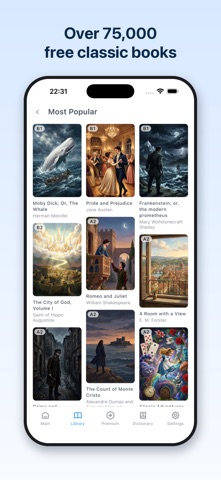
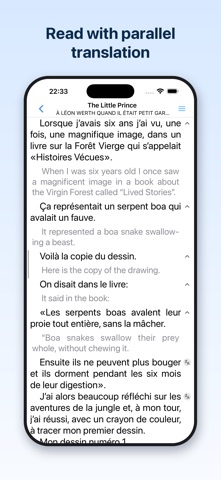
SmartBook turns every book into a dual-language reading experience. Read Spanish, Italian, French, English, German, Russian, Portuguese and more with the original text and its translation side by side. Follow the parallel text line by line and learn the language naturally as you read real books. WHY SMARTBOOK - Dual-language, side-by-side reading: see the original and its translation together in one parallel-text view. - Instant tap-to-translate: tap any word or phrase to translate it on the spot with your choice of engine (Google, DeepL, Reverso and more). - Word and phrase pronunciation: tap any single word or phrase to hear it read aloud (text-to-speech). - Save vocabulary as you read and review it later so new words stick. - Over 75,000 free books: a built-in multilingual library organised in folders, with ratings. Filter, sort and search to find the right book for your level. HOW IT WORKS 1. Pick a book from the free library or add your own (epub, fb2 or txt). 2. Read in parallel: the original and the translation stay side by side. 3. Tap any word or phrase for an instant translation and to hear how it sounds. 4. Save the words you want to remember and build your personal vocabulary. READ IN YOUR TARGET LANGUAGE Spanish, Italian, French, English, German, Russian, Portuguese and many more. Whether you are a beginner opening your first foreign-language book or an advanced reader enjoying literature in the original, SmartBook keeps the translation just one tap away. PERFECT FOR - Language learners who want to read real books, not only textbook drills. - Bilingual readers who like to follow the original and the translation together. - Anyone growing their foreign-language vocabulary through reading. WHY READING WORKS Reading in a foreign language builds vocabulary, grammar and intuition in context. With dual-language, parallel-text reading you never lose the thread: understand every line, look up what you need, and keep enjoying the story. Download SmartBook and start reading in two languages today.



