
PC 용 HexaVault Password Manager
- 카테고리: Productivity
- 최근 업데이트: 2018-10-17
- 현재 버전: 2.1
- 파일 크기: 26.65 MB
- 개발자: Uconomix Technologies LLP
- 호환성: 필요 Windows XP, Windows Vista, Windows 7, Windows 8, Windows 8.1 and Windows 10, Windows 11




PC에서 HexaVault Password Manager 용 호환 APK 다운로드
| 다운로드 | 개발자 | 평점 | 점수 | 현재 버전 | 성인 랭킹 |
|---|---|---|---|---|---|
| ↓ PC용 APK 다운로드 | Uconomix Technologies LLP | 0 | 2.1 | 4+ |
호환되는 PC 앱 또는 대안 확인
| 소프트웨어 | 다운로드 | 평점 | 개발자 |
|---|---|---|---|
| HexaVault Password Manager |
PC 앱 받기 | /5 0 리뷰 |
Uconomix Technologies LLP |
에뮬레이터의 중요성은 컴퓨터에서 안드로이드 환경을 흉내 내고 안드로이드 폰을 구입하지 않고도 안드로이드 앱을 설치하고 실행하는 것을 매우 쉽게 만들어주는 것입니다. 누가 당신이 두 세계를 즐길 수 없다고 말합니까? 우선 아래에있는 에뮬레이터 앱을 다운로드 할 수 있습니다.
A. Nox App . OR
B. Bluestacks App .
Bluestacks는 매우 대중적이므로 개인적으로 "B"옵션을 사용하는 것이 좋습니다. 문제가 발생하면 Google 또는 Naver.com에서 좋은 해결책을 찾을 수 있습니다.
Bluestacks.exe 또는 Nox.exe를 성공적으로 다운로드 한 경우 컴퓨터의 다운로드 폴더 또는 다운로드 한 파일을 일반적으로 저장하는 곳으로 이동하십시오.
찾으면 클릭하여 응용 프로그램을 설치하십시오. PC에서 설치 프로세스를 시작해야합니다.
다음을 클릭하여 EULA 라이센스 계약에 동의하십시오.
응용 프로그램을 설치하려면 화면 지시문을 따르십시오.
위 사항을 올바르게 수행하면 소프트웨어가 성공적으로 설치됩니다.
이제 설치 한 에뮬레이터 애플리케이션을 열고 검색 창을 찾으십시오. 지금 입력하십시오. - HexaVault Password Manager 앱을 쉽게 볼 수 있습니다. 그것을 클릭하십시오. 응용 프로그램 창이 열리고 에뮬레이터 소프트웨어에 응용 프로그램이 표시됩니다. 설치 버튼을 누르면 응용 프로그램이 다운로드되기 시작합니다. 이제 우리는 모두 끝났습니다.
그런 다음 "모든 앱"아이콘이 표시됩니다.
클릭하면 설치된 모든 응용 프로그램이 포함 된 페이지로 이동합니다.
당신은 HexaVault Password Manager 상. 그것을 클릭하고 응용 프로그램 사용을 시작하십시오.
Mac OS 에서 HexaVault Password Manager 다운로드
| 다운로드 | 개발자 | 점수 | 현재 버전 | 성인 랭킹 |
|---|---|---|---|---|
| 무료 - Mac 에서 다운로드 | Uconomix Technologies LLP | 2.1 | 4+ |
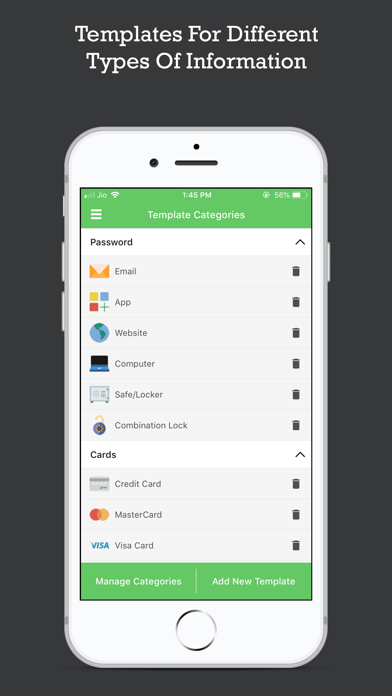
HexaVault is a password manager and personal information locker. Safely store all your passwords and important private information like bank account details, credit and debit card details, insurance and investment details, identity documents like passport, national id, tax id, utility account details like electricity, cable, membership details frequent flyer account, subscriptions and more. All the information is stored in a secure encrypted vault on your iPhone or iPad. not on someone else's server. Your vault will be safe even if you lose your phone or tablet. What kind of information can you store in HexaVault? Passwords and login information - Passwords to websites, apps, computers, servers - Combination locks, digital keys and PINs - Software serial numbers Financial Information - Credit cards, debit, charge, ATM and gift cards - Bank accounts - Loan and mortgage details - Insurance policies - Investments and retirement accounts Personal ID documents - Passport - Government issued ID, tax ID, school or employer ID - Driver's license - Membership cards, library cards Personal Information - Medical prescriptions and records - Subscriptions and membership details - Warranty and servicing information - Vehicle details And everything else that is important to you. HexaVault Features - Add new information - Specify various details about the information in name-value pairs - Choose an icon for the information - Choose from predefined templates for various types of information - Create new templates, edit or delete templates - Create, edit or delete template categories - Search for information - View an information - View one or all values of an information - Copy individual values to device clipboard - Auto locking of vault after 30 seconds of inactivity - Export vault for periodic backup or for copying it to another device - Restore previously exported vault - Bulk import information from an Excel file - Unlock vault with Touch ID or Face ID