PC 용 Color cell connect
- 카테고리: Games
- 최근 업데이트: 2017-10-27
- 현재 버전: 2.4
- 파일 크기: 90.70 MB
- 개발자: Maxym Boiko
- 호환성: 필요 Windows XP, Windows Vista, Windows 7, Windows 8, Windows 8.1 and Windows 10, Windows 11


PC에서 Color cell connect 용 호환 APK 다운로드
| 다운로드 | 개발자 | 평점 | 점수 | 현재 버전 | 성인 랭킹 |
|---|---|---|---|---|---|
| ↓ PC용 APK 다운로드 | Maxym Boiko | 0 | 2.4 | 4+ |
에뮬레이터의 중요성은 컴퓨터에서 안드로이드 환경을 흉내 내고 안드로이드 폰을 구입하지 않고도 안드로이드 앱을 설치하고 실행하는 것을 매우 쉽게 만들어주는 것입니다. 누가 당신이 두 세계를 즐길 수 없다고 말합니까? 우선 아래에있는 에뮬레이터 앱을 다운로드 할 수 있습니다.
A. Nox App . OR
B. Bluestacks App .
Bluestacks는 매우 대중적이므로 개인적으로 "B"옵션을 사용하는 것이 좋습니다. 문제가 발생하면 Google 또는 Naver.com에서 좋은 해결책을 찾을 수 있습니다.
Bluestacks.exe 또는 Nox.exe를 성공적으로 다운로드 한 경우 컴퓨터의 다운로드 폴더 또는 다운로드 한 파일을 일반적으로 저장하는 곳으로 이동하십시오.
찾으면 클릭하여 응용 프로그램을 설치하십시오. PC에서 설치 프로세스를 시작해야합니다.
다음을 클릭하여 EULA 라이센스 계약에 동의하십시오.
응용 프로그램을 설치하려면 화면 지시문을 따르십시오.
위 사항을 올바르게 수행하면 소프트웨어가 성공적으로 설치됩니다.
이제 설치 한 에뮬레이터 애플리케이션을 열고 검색 창을 찾으십시오. 지금 입력하십시오. - Color cell connect 앱을 쉽게 볼 수 있습니다. 그것을 클릭하십시오. 응용 프로그램 창이 열리고 에뮬레이터 소프트웨어에 응용 프로그램이 표시됩니다. 설치 버튼을 누르면 응용 프로그램이 다운로드되기 시작합니다. 이제 우리는 모두 끝났습니다.
그런 다음 "모든 앱"아이콘이 표시됩니다.
클릭하면 설치된 모든 응용 프로그램이 포함 된 페이지로 이동합니다.
당신은 Color cell connect 상. 그것을 클릭하고 응용 프로그램 사용을 시작하십시오.
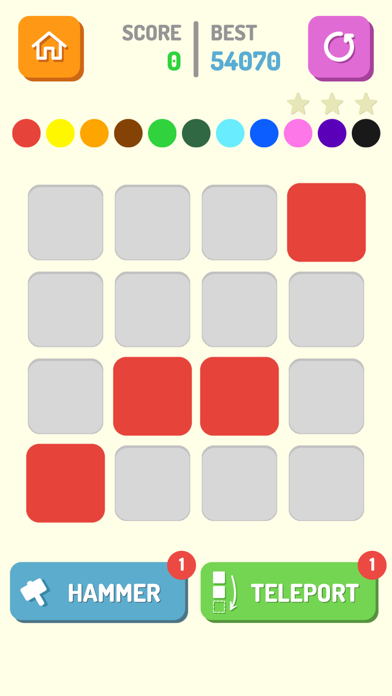
Do you love game 2048, but you are looking for something new? You came to the right place. Logic puzzle "Color cell connect" is what you need. How to play On a small playing field the size of 4x4 cells, you need to combine the same colors to get the new one. Initially, the field has a few red squares, and after the movement of the red square close to another color (only by one cell per turn), it absorbs around itself all the same colors, and you get a new color. After the move, on the field are generated two new red squares. The goal is to get the black, before red or other squares fill the entire field. But after reaching the black game is not over, and you can continue to play to take high places in the leaderboard. In the game you can make combos of color transformations, for which you get extra points. There are two functions in case of difficult situation: hammer - allows you to break any color, and teleport - you can move the color by any distance. Features - Simple one finger gameplay - Different game fields - Endless mode (you can continue playing after reaching black color) - Two helping functions (hammer and teleport) - You can play offline in anytime without connection - Achievements and leaderboard (Game Center) - Clean interface - Challenge - getting the black will not be easy! Enjoy this logic puzzle and get high scores!