
PC 용 Chili - Love at First Spice
- 카테고리: Social Networking
- 최근 업데이트: 2018-02-19
- 현재 버전: 1.4
- 파일 크기: 206.19 MB
- 개발자: Moveo Software Ltd
- 호환성: 필요 Windows XP, Windows Vista, Windows 7, Windows 8, Windows 8.1 and Windows 10, Windows 11




PC에서 Chili - Love at First Spice 용 호환 APK 다운로드
| 다운로드 | 개발자 | 평점 | 점수 | 현재 버전 | 성인 랭킹 |
|---|---|---|---|---|---|
| ↓ PC용 APK 다운로드 | Moveo Software Ltd | 0 | 0 | 1.4 | 17+ |
에뮬레이터의 중요성은 컴퓨터에서 안드로이드 환경을 흉내 내고 안드로이드 폰을 구입하지 않고도 안드로이드 앱을 설치하고 실행하는 것을 매우 쉽게 만들어주는 것입니다. 누가 당신이 두 세계를 즐길 수 없다고 말합니까? 우선 아래에있는 에뮬레이터 앱을 다운로드 할 수 있습니다.
A. Nox App . OR
B. Bluestacks App .
Bluestacks는 매우 대중적이므로 개인적으로 "B"옵션을 사용하는 것이 좋습니다. 문제가 발생하면 Google 또는 Naver.com에서 좋은 해결책을 찾을 수 있습니다.
Bluestacks.exe 또는 Nox.exe를 성공적으로 다운로드 한 경우 컴퓨터의 다운로드 폴더 또는 다운로드 한 파일을 일반적으로 저장하는 곳으로 이동하십시오.
찾으면 클릭하여 응용 프로그램을 설치하십시오. PC에서 설치 프로세스를 시작해야합니다.
다음을 클릭하여 EULA 라이센스 계약에 동의하십시오.
응용 프로그램을 설치하려면 화면 지시문을 따르십시오.
위 사항을 올바르게 수행하면 소프트웨어가 성공적으로 설치됩니다.
이제 설치 한 에뮬레이터 애플리케이션을 열고 검색 창을 찾으십시오. 지금 입력하십시오. - Chili - Love at First Spice 앱을 쉽게 볼 수 있습니다. 그것을 클릭하십시오. 응용 프로그램 창이 열리고 에뮬레이터 소프트웨어에 응용 프로그램이 표시됩니다. 설치 버튼을 누르면 응용 프로그램이 다운로드되기 시작합니다. 이제 우리는 모두 끝났습니다.
그런 다음 "모든 앱"아이콘이 표시됩니다.
클릭하면 설치된 모든 응용 프로그램이 포함 된 페이지로 이동합니다.
당신은 Chili - Love at First Spice 상. 그것을 클릭하고 응용 프로그램 사용을 시작하십시오.
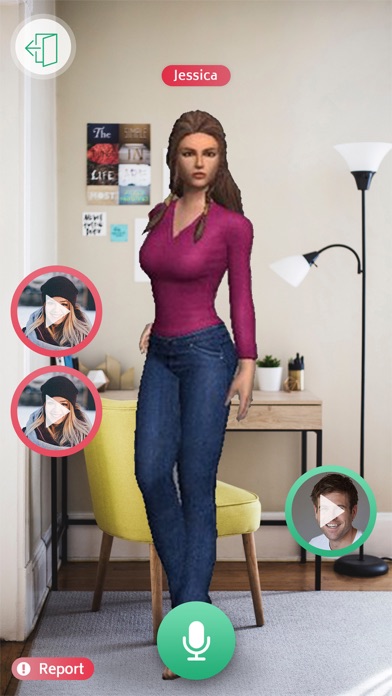
Chili is a revolutionary dating platform, which reinvents the way users meet, interact and eventually find love and relationships. Chili creates, yet recreates, a platform that combines the most disruptive technology today, the Augmented Reality ( AR ), with the good-old, familiar chat-rooms. Users are thus able to find both confidence in familiarity and excitement in the innovation, resulting in a convenient, inviting and thrilling free dating app. The tone of voice as a part of Chili’s refreshing user experience, users can only interact through voice messages, and are excluded the option of sending texts to an ever-waiting, always-cluttered inbox. By doing so, Chili reduces uncertainty or apprehension, and increases the chances at getting an instant impression, leading to an instant match. We also believe that pictures of the user are important but being yourself is more important, and the voice of the candidate changes everything. Finally, you don’t use a dating application to hangout with the picture that you are using (on the dating app) but to find love with someone who has a lot in common with you, gaining the possibility of finding great relationships, beyond any app and internet. Once logged-in, users create an avatar of their choice and add 3 of their Facebook pictures. This allows for a quicker process of decision-making, in contrast to other possibly deceiving dating apps. Moreover, Chili narrows down the endless profiles users encounter every day, but keeps the option of choosing: After having filtered through the desired options, users get to sit at a table with 3 other users, and record their messages; move on to a private room, or refresh to keep searching for your other half. With Chili, users are able to find an instant connection and true love in an almost real-life, real-time manner, if two users decide to go to a private room, the application cares that the focus in the chat is between the two users without interruption of the other users to the conversation. In the private room the user gets the opportunity to charm his “chosen” match. If the user decides to stop the chat and move on searching then he is going back to his searches, and all that without leaving the convenience and safety of their home. Safety and control Chili does not allow for an inbox which is an opening for harassments, but only enables controlled and safe choices based on users’ taste and intuition. Even once in a private room, the “refresh” button will make sure users are out as soon as they got in, and ensures access only when granted by the user. These values should be reflected in clear instructions for call-to-action buttons, which explain when and how to use them, to create a safe and personally-supervised virtual environment.