
PC 용 Bible Study Together
- 카테고리: Book
- 최근 업데이트: 2026-11-12
- 현재 버전: 7.19.1
- 파일 크기: 44.94 MB
- 개발자: Create Disciples Inc
- 호환성: 필요 Windows XP, Windows Vista, Windows 7, Windows 8, Windows 8.1 and Windows 10, Windows 11



PC에서 Bible Study Together 용 호환 APK 다운로드
| 다운로드 | 개발자 | 평점 | 점수 | 현재 버전 | 성인 랭킹 |
|---|---|---|---|---|---|
| ↓ PC용 APK 다운로드 | Create Disciples Inc | 0 | 0 | 7.19.1 | 4+ |
에뮬레이터의 중요성은 컴퓨터에서 안드로이드 환경을 흉내 내고 안드로이드 폰을 구입하지 않고도 안드로이드 앱을 설치하고 실행하는 것을 매우 쉽게 만들어주는 것입니다. 누가 당신이 두 세계를 즐길 수 없다고 말합니까? 우선 아래에있는 에뮬레이터 앱을 다운로드 할 수 있습니다.
A. Nox App . OR
B. Bluestacks App .
Bluestacks는 매우 대중적이므로 개인적으로 "B"옵션을 사용하는 것이 좋습니다. 문제가 발생하면 Google 또는 Naver.com에서 좋은 해결책을 찾을 수 있습니다.
Bluestacks.exe 또는 Nox.exe를 성공적으로 다운로드 한 경우 컴퓨터의 다운로드 폴더 또는 다운로드 한 파일을 일반적으로 저장하는 곳으로 이동하십시오.
찾으면 클릭하여 응용 프로그램을 설치하십시오. PC에서 설치 프로세스를 시작해야합니다.
다음을 클릭하여 EULA 라이센스 계약에 동의하십시오.
응용 프로그램을 설치하려면 화면 지시문을 따르십시오.
위 사항을 올바르게 수행하면 소프트웨어가 성공적으로 설치됩니다.
이제 설치 한 에뮬레이터 애플리케이션을 열고 검색 창을 찾으십시오. 지금 입력하십시오. - Bible Study Together 앱을 쉽게 볼 수 있습니다. 그것을 클릭하십시오. 응용 프로그램 창이 열리고 에뮬레이터 소프트웨어에 응용 프로그램이 표시됩니다. 설치 버튼을 누르면 응용 프로그램이 다운로드되기 시작합니다. 이제 우리는 모두 끝났습니다.
그런 다음 "모든 앱"아이콘이 표시됩니다.
클릭하면 설치된 모든 응용 프로그램이 포함 된 페이지로 이동합니다.
당신은 Bible Study Together 상. 그것을 클릭하고 응용 프로그램 사용을 시작하십시오.
Mac OS 에서 Bible Study Together 다운로드
| 다운로드 | 개발자 | 점수 | 현재 버전 | 성인 랭킹 |
|---|---|---|---|---|
| 무료 - Mac 에서 다운로드 | Create Disciples Inc | 0 |
7.19.1 | 4+ |
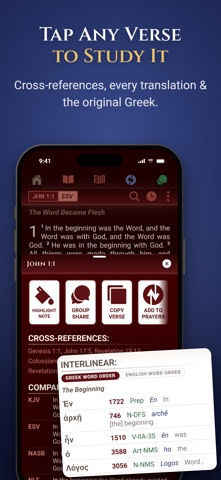
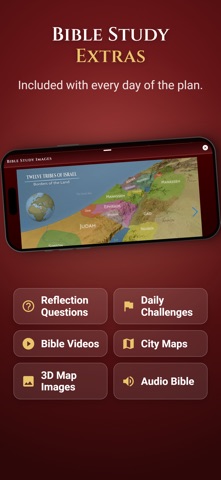
Bible Study App: Chronological Bible Reading Plan, Study Tools & Prayer Read the Bible, study it deeply, pray, and fellowship — all in one Bible app! BIBLE STUDY APP: BIBLE READING PLANS Our daily Bible study connects the New and Old Testament while ordering the Bible chronologically. Each day is broken into 10-minute readings with open-ended questions to help pull out insights. Contextual maps, videos, and daily challenges help you understand the Bible and grow spiritually. BIBLE STUDY TOOLS Go deeper in any verse without leaving your Bible reading plan. Tap a verse for cross-references, commentaries, side-by-side comparison in every translation, and a Greek & Hebrew interlinear, or read a whole chapter in it. Tap any Greek or Hebrew word for a full word study: its meaning, its origin, related words in both languages, and every verse in the Bible where that word appears. Search verses, topics, Strong's numbers, words & 4 Bible dictionaries at once. PRAYER APP FEATURES Deepen your daily walk with God with prayer lists and distraction-free prayer sessions that keep time for you. FELLOWSHIP APP: GROUP CHAT FEATURES Stay connected in private fellowship groups for your friends or small group (up to 500 users). Share what you are reading and your prayer requests, away from the distractions of big social networks. PRINTED STUDY GUIDE Get our printed Chronological study guide and journal at www.BibleStudyTogether.com. CHRONOLOGICAL CROSS-REFERENCE BIBLE READING PLAN - Daily readings from the New and Old Testament - Gospels woven into a single story - Chronological: read psalms & prophecies in context - Daily passages connected to show how the New Testament fulfills the Old - Choose your pace: 2 years, 1 year, 6 months, or 92 days - Daily open-ended Bible study questions BIBLE STUDY TOOL FEATURES - Cross-references & classic Bible commentaries - Parallel Bible: compare verses across all translations - Greek & Hebrew interlinear, plus the Septuagint - Word study: Thayer, Brown-Driver-Briggs & Liddell-Scott - Related Greek & Hebrew words - Every verse a Greek or Hebrew word appears in - Highlight in 6 colors, take notes, copy passages - Bible dictionaries: ISBE, Easton, Smith & Hitchcock - Search verses, topics, Strong's & words PRAYER TOOL FEATURES - Prayer lists of your own & for your group - Pray in ACTS order with prayer categories - Timed prayer sessions & prayer streaks - Answered prayers shared with your group FELLOWSHIP GROUP CHAT FEATURES - Post prayer requests, thoughts & Bible insights - Sync your Bible reading plan with your group - Group announcements & meeting reminders - Owner & admin group roles MORE APP FEATURES - Verse of the Day & reminders to read and pray - Read any chapter in its own Bible App tab - Read in ESV®, NLT®, NASB®, KJV & Berean Standard - Audio Bible for every reading, highlighted as it reads - Page mode: read like a paper Bible - Maps of the places in each reading - Videos on every Bible book & the Holy Land - Reading schedule, progress & streaks - Prayers & highlights sync across devices MORE BIBLE READING PLANS - Rapid Chronological Cross-Reference Bible Reading Plan - One Year Bible Reading Plan & M'Cheyne Plan - 30-Day Gospel Harmony & The Synthesized Gospels - 26 topical plans: prayer, hope, anxiety & more - The 90 Day Big Bible Story & more Bible Study Together is a complete Bible app for personal Bible study, small groups, and churches. Scripture quotations are from the ESV® Bible (The Holy Bible, English Standard Version®), copyright © 2001 by Crossway, a publishing ministry of Good News Publishers. Used by permission. All rights reserved. New Living Translation®, NLT®, and the New Living Translation® logo are registered trademarks of Tyndale House Ministries. New American Standard Bible Copyright © 1960, 1971, 1977, 1995, 2020 by The Lockman Foundation. All rights reserved. http://www.lockman.org



