PC 용 Scary Chat Stories - Addicted
- 카테고리: Book
- 최근 업데이트: 2026-04-24
- 현재 버전: 4.3.0
- 파일 크기: 25.46 MB
- 개발자: Taras Kalkovets
- 호환성: 필요 Windows XP, Windows Vista, Windows 7, Windows 8, Windows 8.1 and Windows 10, Windows 11





PC에서 Scary Chat Stories - Addicted 용 호환 APK 다운로드
| 다운로드 | 개발자 | 평점 | 점수 | 현재 버전 | 성인 랭킹 |
|---|---|---|---|---|---|
| ↓ PC용 APK 다운로드 | Taras Kalkovets | 2 | 3.5 | 4.3.0 | 12+ |
에뮬레이터의 중요성은 컴퓨터에서 안드로이드 환경을 흉내 내고 안드로이드 폰을 구입하지 않고도 안드로이드 앱을 설치하고 실행하는 것을 매우 쉽게 만들어주는 것입니다. 누가 당신이 두 세계를 즐길 수 없다고 말합니까? 우선 아래에있는 에뮬레이터 앱을 다운로드 할 수 있습니다.
A. Nox App . OR
B. Bluestacks App .
Bluestacks는 매우 대중적이므로 개인적으로 "B"옵션을 사용하는 것이 좋습니다. 문제가 발생하면 Google 또는 Naver.com에서 좋은 해결책을 찾을 수 있습니다.
Bluestacks.exe 또는 Nox.exe를 성공적으로 다운로드 한 경우 컴퓨터의 다운로드 폴더 또는 다운로드 한 파일을 일반적으로 저장하는 곳으로 이동하십시오.
찾으면 클릭하여 응용 프로그램을 설치하십시오. PC에서 설치 프로세스를 시작해야합니다.
다음을 클릭하여 EULA 라이센스 계약에 동의하십시오.
응용 프로그램을 설치하려면 화면 지시문을 따르십시오.
위 사항을 올바르게 수행하면 소프트웨어가 성공적으로 설치됩니다.
이제 설치 한 에뮬레이터 애플리케이션을 열고 검색 창을 찾으십시오. 지금 입력하십시오. - Scary Chat Stories - Addicted 앱을 쉽게 볼 수 있습니다. 그것을 클릭하십시오. 응용 프로그램 창이 열리고 에뮬레이터 소프트웨어에 응용 프로그램이 표시됩니다. 설치 버튼을 누르면 응용 프로그램이 다운로드되기 시작합니다. 이제 우리는 모두 끝났습니다.
그런 다음 "모든 앱"아이콘이 표시됩니다.
클릭하면 설치된 모든 응용 프로그램이 포함 된 페이지로 이동합니다.
당신은 Scary Chat Stories - Addicted 상. 그것을 클릭하고 응용 프로그램 사용을 시작하십시오.
Mac OS 에서 Scary Chat Stories 다운로드
| 다운로드 | 개발자 | 점수 | 현재 버전 | 성인 랭킹 |
|---|---|---|---|---|
| 무료 - Mac 에서 다운로드 | Taras Kalkovets | 3.5 |
4.3.0 | 12+ |
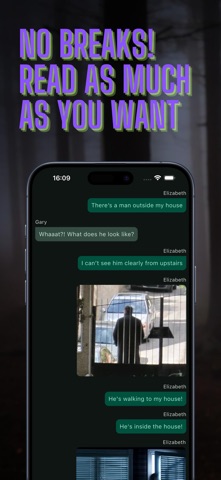
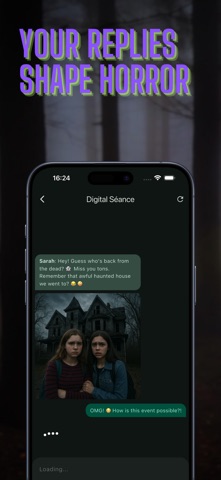
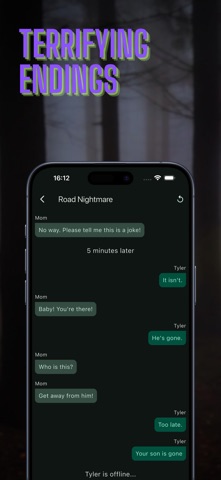
Addicted — scary chat stories two ways: Addicted lets you enjoy horror chat fiction exactly how you like: - Binge read short, scary chat stories free with no waiting screens. - Switch to interactive mode and type your own replies while an AI acts as every other character, turning the conversation into a living interactive story. What you can do - Read continuous chat threads that feel like someone else’s phone, complete with photos. - Guide the plot: type any line or tap a quick reply and watch the AI adapt in real time. - Experience a compact text adventure where each decision can change the ending. - Replay to choose your story again and uncover new paths or hidden achievements. - Browse a growing catalogue of ghost hauntings, stalker thrillers and cursed-tech mysteries; new chapters arrive each week. - Use dark-theme design and large chat bubbles for comfortable night reading. - Play offline after the first download; an optional pass removes ads and unlocks extra image clues. - Tired of ads? You can now subscribe to disable them for uninterrupted play. Why it stands out Interactive mode feels like a mini roleplay game inside a messenger: the AI remembers what you write and responds with natural dialogue, so no two play-throughs are the same. If you just want a quick scare, stay in reading mode and finish a full story during any short break. Download Addicted and decide whether you simply read the next horror tale—or become part of it by typing the very messages that decide who survives. Terms of use: https://www.apple.com/legal/internet-services/itunes/dev/stdeula/




