PC 용 HomeAtmo : The Netatmo client
- 카테고리: Weather
- 최근 업데이트: 2026-10-26
- 현재 버전: 2.9.8
- 파일 크기: 10.55 MB
- 개발자: Alexandre Caillet
- 호환성: 필요 Windows XP, Windows Vista, Windows 7, Windows 8, Windows 8.1 and Windows 10, Windows 11


PC에서 HomeAtmo : The Netatmo client 용 호환 APK 다운로드
| 다운로드 | 개발자 | 평점 | 점수 | 현재 버전 | 성인 랭킹 |
|---|---|---|---|---|---|
| ↓ PC용 APK 다운로드 | Alexandre Caillet | 0 | 0 | 2.9.8 | 4+ |
에뮬레이터의 중요성은 컴퓨터에서 안드로이드 환경을 흉내 내고 안드로이드 폰을 구입하지 않고도 안드로이드 앱을 설치하고 실행하는 것을 매우 쉽게 만들어주는 것입니다. 누가 당신이 두 세계를 즐길 수 없다고 말합니까? 우선 아래에있는 에뮬레이터 앱을 다운로드 할 수 있습니다.
A. Nox App . OR
B. Bluestacks App .
Bluestacks는 매우 대중적이므로 개인적으로 "B"옵션을 사용하는 것이 좋습니다. 문제가 발생하면 Google 또는 Naver.com에서 좋은 해결책을 찾을 수 있습니다.
Bluestacks.exe 또는 Nox.exe를 성공적으로 다운로드 한 경우 컴퓨터의 다운로드 폴더 또는 다운로드 한 파일을 일반적으로 저장하는 곳으로 이동하십시오.
찾으면 클릭하여 응용 프로그램을 설치하십시오. PC에서 설치 프로세스를 시작해야합니다.
다음을 클릭하여 EULA 라이센스 계약에 동의하십시오.
응용 프로그램을 설치하려면 화면 지시문을 따르십시오.
위 사항을 올바르게 수행하면 소프트웨어가 성공적으로 설치됩니다.
이제 설치 한 에뮬레이터 애플리케이션을 열고 검색 창을 찾으십시오. 지금 입력하십시오. - HomeAtmo : The Netatmo client 앱을 쉽게 볼 수 있습니다. 그것을 클릭하십시오. 응용 프로그램 창이 열리고 에뮬레이터 소프트웨어에 응용 프로그램이 표시됩니다. 설치 버튼을 누르면 응용 프로그램이 다운로드되기 시작합니다. 이제 우리는 모두 끝났습니다.
그런 다음 "모든 앱"아이콘이 표시됩니다.
클릭하면 설치된 모든 응용 프로그램이 포함 된 페이지로 이동합니다.
당신은 HomeAtmo : The Netatmo client 상. 그것을 클릭하고 응용 프로그램 사용을 시작하십시오.
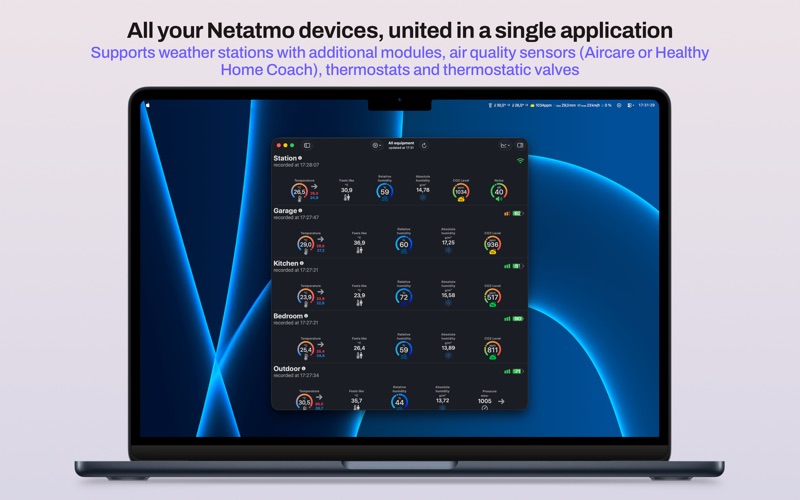
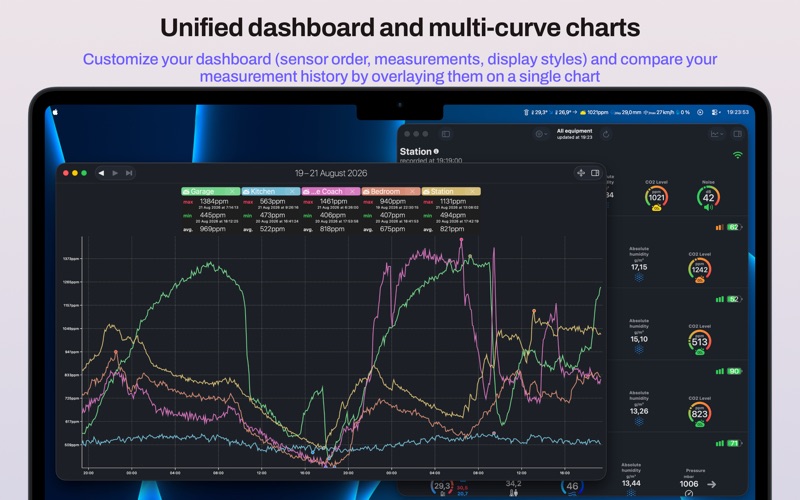
The HomeAtmo app supports the full range of Netatmo devices: weather stations and all their additional modules (indoor sensors, wind gauge, rain gauge), air quality sensors (Aircare or Healthy Home Coach), thermostats, and thermostatic valves. There is no limit to the number of supported devices. No additional account creation is required: simply use your existing Netatmo account. SMART DASHBOARD HomeAtmo offers a clear, ergonomic dashboard to view all your measurements: * Interface designed to give a global view and compare the values of all your sensors at the same time * Automatic adaptation to any Mac window size * Filtering by device, by location, or a global view * Full customization: color or monochrome mode, optional title display, font and gauge size, display order for measurements and sensors * Automatic dark or light theme based on your system preferences The "i" icon next to each sensor shows detailed information: ID, firmware version, location, installation date, and timestamp of the last measurement. Automatic refresh based on each sensor's reporting period. MULTI-CURVE CHARTS (full version) * Up to 5 curves shown simultaneously on the same chart * All available measurements: temperature, target temperature, CO2, relative and absolute humidity, noise, atmospheric pressure, rainfall, wind, and gusts * Customizable periods: preset range, calendar, or custom dates * Full navigation through your history * Ability to create shortcuts to display your favorite charts in a single click CUSTOMIZABLE MENU BAR HomeAtmo lets you display measurements in the menu bar and customize them: You can configure a measurement bar for each display filter. By default, you can select a measurement in the menu bar from the current temperature, with or without trend, for the main station and the outdoor sensor. The display order is configurable. In the full version, you can select up to 6 measurements to display in the menu bar from any sensor and measurement type you own, and choose their display order. You can also configure the appearance and size of the measurement bar. Hovering your mouse over one of the values displayed in the bar for more than 2 seconds gives you access to additional information. CUSTOMIZABLE WIDGETS Widgets available: * Unlimited number of widgets * Small and medium sizes * Sensor selection and display customization for each widget FLEXIBLE PRICING MODEL HomeAtmo is free, with the option of a monthly subscription or a one-time lifetime purchase: * Free version: one measurement per sensor (temperature, rainfall, wind speed) * Full version: unlimited access to all measurements from all your sensors. The subscription includes a free trial period COMPATIBILITY * Languages: English, French, German, Czech, Dutch, Italian, Spanish, Swedish * Netatmo units respected: temperature (°C/°F), pressure (mbar/inHg/mmHg), rainfall (mm/inches), wind (km/h/mph/m/s/knots/Beaufort) * macOS 13.5 minimum ----- Legal notices ----- Terms of use: https://www.apple.com/legal/internet-services/itunes/dev/stdeula/