PC 용 DrawingEZ: Color the World
- 카테고리: Entertainment
- 최근 업데이트: 2026-11-16
- 현재 버전: 3.0
- 파일 크기: 157.14 MB
- 개발자: Duy Xuan
- 호환성: 필요 Windows XP, Windows Vista, Windows 7, Windows 8, Windows 8.1 and Windows 10, Windows 11




PC에서 DrawingEZ: Color the World 용 호환 APK 다운로드
| 다운로드 | 개발자 | 평점 | 점수 | 현재 버전 | 성인 랭킹 |
|---|---|---|---|---|---|
| ↓ PC용 APK 다운로드 | Duy Xuan | 3 | 4 | 3.0 | 4+ |
에뮬레이터의 중요성은 컴퓨터에서 안드로이드 환경을 흉내 내고 안드로이드 폰을 구입하지 않고도 안드로이드 앱을 설치하고 실행하는 것을 매우 쉽게 만들어주는 것입니다. 누가 당신이 두 세계를 즐길 수 없다고 말합니까? 우선 아래에있는 에뮬레이터 앱을 다운로드 할 수 있습니다.
A. Nox App . OR
B. Bluestacks App .
Bluestacks는 매우 대중적이므로 개인적으로 "B"옵션을 사용하는 것이 좋습니다. 문제가 발생하면 Google 또는 Naver.com에서 좋은 해결책을 찾을 수 있습니다.
Bluestacks.exe 또는 Nox.exe를 성공적으로 다운로드 한 경우 컴퓨터의 다운로드 폴더 또는 다운로드 한 파일을 일반적으로 저장하는 곳으로 이동하십시오.
찾으면 클릭하여 응용 프로그램을 설치하십시오. PC에서 설치 프로세스를 시작해야합니다.
다음을 클릭하여 EULA 라이센스 계약에 동의하십시오.
응용 프로그램을 설치하려면 화면 지시문을 따르십시오.
위 사항을 올바르게 수행하면 소프트웨어가 성공적으로 설치됩니다.
이제 설치 한 에뮬레이터 애플리케이션을 열고 검색 창을 찾으십시오. 지금 입력하십시오. - DrawingEZ: Color the World 앱을 쉽게 볼 수 있습니다. 그것을 클릭하십시오. 응용 프로그램 창이 열리고 에뮬레이터 소프트웨어에 응용 프로그램이 표시됩니다. 설치 버튼을 누르면 응용 프로그램이 다운로드되기 시작합니다. 이제 우리는 모두 끝났습니다.
그런 다음 "모든 앱"아이콘이 표시됩니다.
클릭하면 설치된 모든 응용 프로그램이 포함 된 페이지로 이동합니다.
당신은 DrawingEZ: Color the World 상. 그것을 클릭하고 응용 프로그램 사용을 시작하십시오.
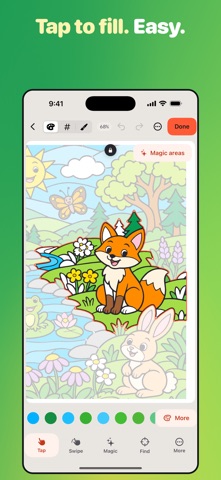
Color big illustrated worlds one piece at a time, and learn to draw step by step. DrawingEZ is a coloring book with a paper globe: spin it, pick a place, then color a whole scene piece by piece or all at once. Tap to fill, try Magic color, or color by number. Easy pages for kids, detailed scenes for adults, dot to dot and puzzles, and a free Starter world to begin. WORLDS AND THE GLOBE - Worlds are big illustrated scenes: Woodland Animals, Thanksgiving Feast, a Classic Diner, Small-Town Main Street, Route 66, Ice Cream Parlor, Pancake Breakfast, St. Patrick's Day and Halloween Town. - Color a world piece by piece, or color the whole picture at once. - The World tab is a paper globe. Spin it and tap a stamp to open that place. - Finish a world to collect its stamp in your Passport, and learn a small fact about it as you go. COLOR YOUR WAY - Quick color: tap a zone and it fills. Swipe to fill, use Magic color for ideas that fit the picture, or color by number. - Free pages every day, plus more than 200 single pages: animals, landscapes, stained glass, mandalas and more. HOW TO DRAW - More than 30 step-by-step lessons. Every step is explained in words, in seven languages. - A read-aloud button, and a finger magnifier to see fine detail under your hand. - Trace, copy or use a grid, and see your drawing next to the guide. DRAW AND ANIMATE - Free drawing with pencil, ink, marker, watercolor, chalk, paint and glow brushes, symmetry, layers, lasso and shapes. - 50 Composition Guides: rule of thirds, golden spiral, perspective grids, head and figure proportions and more. - Flipbook animation. PLAY - Dot to dot, puzzle and spot the difference, built from the same art, with a daily game and stars to collect. COMMUNITY - Share a finished picture as a pin on the globe. Shared pictures must be mostly your own colors. - Like and comment. No account needed: pick a user name. - Report a picture, comment or name, and block a user. You agree to the in-app Community Guidelines before your first share. You can delete your shared pictures at any time. KEEP AND SHOW - My Art keeps everything you make. Watch a time-lapse, make your picture move, and export video, GIF or Live Photo. FREE AND PRO One Starter world and fresh pages every day are free. DrawingEZ Pro unlocks every world and page, takes the watermark off your exports and adds 4K video export. DrawingEZ Pro is an auto-renewing subscription (weekly, monthly or annual). Payment is charged to your Apple ID at confirmation of purchase. The subscription renews unless it is canceled at least 24 hours before the end of the current period. Manage or cancel it in your Apple ID settings. Subscribed in 2.x? You are already Pro: tap Restore. Available in English, Deutsch, Tiếng Việt, 日本語, Русский, العربية and 繁體中文. Terms of Use: https://drawingez.app/terms EULA: https://www.apple.com/legal/internet-services/itunes/dev/stdeula/ Privacy Policy: https://drawingez.app/privacy