PC 용 OneCast
- 카테고리: Entertainment
- 최근 업데이트: 2026-11-02
- 현재 버전: 3.5
- 파일 크기: 14.86 MB
- 개발자: Owen Stanley
- 호환성: 필요 Windows XP, Windows Vista, Windows 7, Windows 8, Windows 8.1 and Windows 10, Windows 11



PC에서 OneCast 용 호환 APK 다운로드
| 다운로드 | 개발자 | 평점 | 점수 | 현재 버전 | 성인 랭킹 |
|---|---|---|---|---|---|
| ↓ PC용 APK 다운로드 | Owen Stanley | 102 | 4.62744 | 3.5 | 4+ |
에뮬레이터의 중요성은 컴퓨터에서 안드로이드 환경을 흉내 내고 안드로이드 폰을 구입하지 않고도 안드로이드 앱을 설치하고 실행하는 것을 매우 쉽게 만들어주는 것입니다. 누가 당신이 두 세계를 즐길 수 없다고 말합니까? 우선 아래에있는 에뮬레이터 앱을 다운로드 할 수 있습니다.
A. Nox App . OR
B. Bluestacks App .
Bluestacks는 매우 대중적이므로 개인적으로 "B"옵션을 사용하는 것이 좋습니다. 문제가 발생하면 Google 또는 Naver.com에서 좋은 해결책을 찾을 수 있습니다.
Bluestacks.exe 또는 Nox.exe를 성공적으로 다운로드 한 경우 컴퓨터의 다운로드 폴더 또는 다운로드 한 파일을 일반적으로 저장하는 곳으로 이동하십시오.
찾으면 클릭하여 응용 프로그램을 설치하십시오. PC에서 설치 프로세스를 시작해야합니다.
다음을 클릭하여 EULA 라이센스 계약에 동의하십시오.
응용 프로그램을 설치하려면 화면 지시문을 따르십시오.
위 사항을 올바르게 수행하면 소프트웨어가 성공적으로 설치됩니다.
이제 설치 한 에뮬레이터 애플리케이션을 열고 검색 창을 찾으십시오. 지금 입력하십시오. - OneCast 앱을 쉽게 볼 수 있습니다. 그것을 클릭하십시오. 응용 프로그램 창이 열리고 에뮬레이터 소프트웨어에 응용 프로그램이 표시됩니다. 설치 버튼을 누르면 응용 프로그램이 다운로드되기 시작합니다. 이제 우리는 모두 끝났습니다.
그런 다음 "모든 앱"아이콘이 표시됩니다.
클릭하면 설치된 모든 응용 프로그램이 포함 된 페이지로 이동합니다.
당신은 OneCast 상. 그것을 클릭하고 응용 프로그램 사용을 시작하십시오.
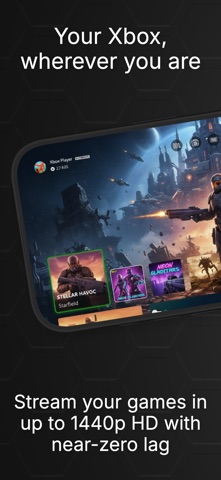
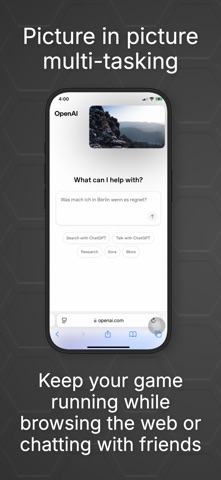
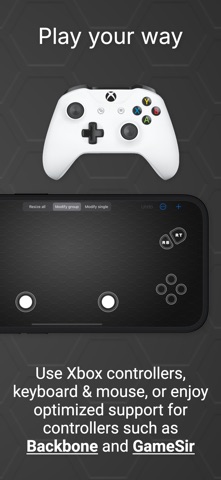
Transform your iPhone or iPad into the ultimate Xbox companion with OneCast. Whether the TV is unavailable, you're craving the comfort of another room, or you're away from home – OneCast puts your gaming session at your fingertips. YOUR GAMES, EVERYWHERE • Stream directly from your personal Xbox console with near-zero latency in up to 1440p • Play Xbox games from the cloud, no console required • Access your Xbox library from anywhere – at home or on the go • Favorite cloud games sync between your iPhone, iPad, Apple TV and Mac via iCloud • Home Screen widgets start a favorite cloud game or connect to your console with a single tap • Choose which Xbox Cloud Gaming server region your games run in to reduce ping STUNNING VISUAL FIDELITY • Special High Quality video mode delivers exceptionally crisp and detailed visuals • Adjustable video quality settings to optimize performance for any network condition • Full-screen display option eliminates black bars for maximum immersion ULTIMATE CONTROL • Full support for Xbox controllers via Bluetooth or USB-C, with optimized experience for form-fitting controllers like Backbone and GameSir • Advanced keyboard and mouse support with Native Passthrough for games with built-in K&M support and Virtual Controller mode for precision aiming in any game (including proper mouse pointer lock on iPad) • Fully customizable on-screen controller with adjustable layout, opacity, and size • Stick anti-deadzone setting makes small thumbstick movements register in games with a large built-in deadzone FULL-FEATURED GAMEPLAY • Xbox Party Chat with sophisticated echo cancellation technology • Play Xbox 360 classics on your iOS devices • Enjoy local co-op gaming with multiple controllers on a single device • External display support for big-screen gaming anywhere: connect a TV or monitor with a USB-C to HDMI adapter or a USB-C display, and the game plays full screen while your device's screen dims SEAMLESS MULTITASKING • Picture-in-Picture mode keeps your game visible while you use other apps • Quickly switch between your game and guides, messages, or social media Compatible with Xbox Series X|S and Xbox One consoles. Note: For optimal performance, connect your Xbox via ethernet cable and use a 5GHz WiFi connection for your iOS device. Free 7-day trial, then unlock unlimited access with a one-time purchase. OneCast is an independent app designed for use with Xbox systems, but it is not affiliated with, endorsed by, or sponsored by Microsoft Corporation or the Xbox brand. Any queries or requests for support or technical assistance should be directed solely to the OneCast development team, as Microsoft is not involved in or responsible for this application.


