PC 용 Callie Bundy
- 카테고리: Health & Fitness
- 최근 업데이트: 2019-01-11
- 현재 버전: 1.1
- 파일 크기: 146.87 MB
- 개발자: Plankk Technologies Inc.
- 호환성: 필요 Windows XP, Windows Vista, Windows 7, Windows 8, Windows 8.1 and Windows 10, Windows 11




PC에서 Callie Bundy 용 호환 APK 다운로드
| 다운로드 | 개발자 | 평점 | 점수 | 현재 버전 | 성인 랭킹 |
|---|---|---|---|---|---|
| ↓ PC용 APK 다운로드 | Plankk Technologies Inc. | 0 | 1.1 | 4+ |
에뮬레이터의 중요성은 컴퓨터에서 안드로이드 환경을 흉내 내고 안드로이드 폰을 구입하지 않고도 안드로이드 앱을 설치하고 실행하는 것을 매우 쉽게 만들어주는 것입니다. 누가 당신이 두 세계를 즐길 수 없다고 말합니까? 우선 아래에있는 에뮬레이터 앱을 다운로드 할 수 있습니다.
A. Nox App . OR
B. Bluestacks App .
Bluestacks는 매우 대중적이므로 개인적으로 "B"옵션을 사용하는 것이 좋습니다. 문제가 발생하면 Google 또는 Naver.com에서 좋은 해결책을 찾을 수 있습니다.
Bluestacks.exe 또는 Nox.exe를 성공적으로 다운로드 한 경우 컴퓨터의 다운로드 폴더 또는 다운로드 한 파일을 일반적으로 저장하는 곳으로 이동하십시오.
찾으면 클릭하여 응용 프로그램을 설치하십시오. PC에서 설치 프로세스를 시작해야합니다.
다음을 클릭하여 EULA 라이센스 계약에 동의하십시오.
응용 프로그램을 설치하려면 화면 지시문을 따르십시오.
위 사항을 올바르게 수행하면 소프트웨어가 성공적으로 설치됩니다.
이제 설치 한 에뮬레이터 애플리케이션을 열고 검색 창을 찾으십시오. 지금 입력하십시오. - Callie Bundy 앱을 쉽게 볼 수 있습니다. 그것을 클릭하십시오. 응용 프로그램 창이 열리고 에뮬레이터 소프트웨어에 응용 프로그램이 표시됩니다. 설치 버튼을 누르면 응용 프로그램이 다운로드되기 시작합니다. 이제 우리는 모두 끝났습니다.
그런 다음 "모든 앱"아이콘이 표시됩니다.
클릭하면 설치된 모든 응용 프로그램이 포함 된 페이지로 이동합니다.
당신은 Callie Bundy 상. 그것을 클릭하고 응용 프로그램 사용을 시작하십시오.
Mac OS 에서 Callie Bundy 다운로드
| 다운로드 | 개발자 | 점수 | 현재 버전 | 성인 랭킹 |
|---|---|---|---|---|
| 무료 - Mac 에서 다운로드 | Plankk Technologies Inc. | 1.1 | 4+ |
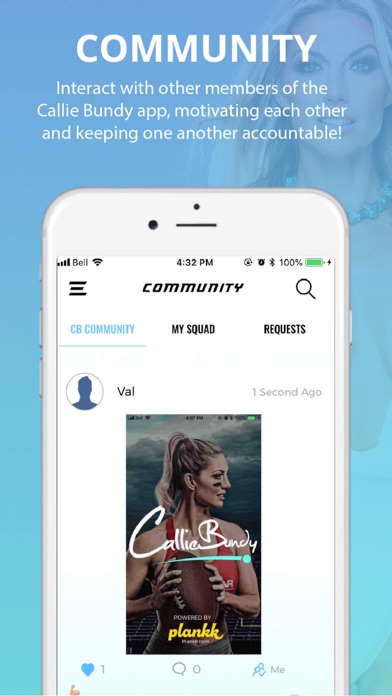
The #1 Fitness App for busy people (men and women!), who are looking for a great workout that they can do any time, any where! Workouts that are specifically designed to train and tone your whole body in the least amount of time, so you can get your workout in and get back to life! No counting macros or packing your food in Tupperware, just healthy recipes that you'll actually enjoy. This is the fitness plan you'll WANT to stick too! Some key features of the program include: - Accessible workouts that will make you sweat - Follow-along workouts, thats like having a personal trainer in your pocket - Videos for each exercise, which will show you correct form - Equipment lists for each workout Additional app features include: - Recipes for breakfast, lunch, dinner and juices - Ability to track your workout progress - Ability to set workout goals for the week - An in-app Community that allows you to interact with other app users - A Progress Pic section, that will allow you to track your fitness journey - Exclusive videos - Callie's favorite playlists Health App (HealthKit) Integration the shows you the following data: - Steps - Walking + Running Distance Download the app today, try a workout, and starting seeing results! The Callie Bundy app is a $12.99 USD monthly, $29.99 USD Quarterly and $89.99 USD yearly subscription that will auto-renew 24 hours for each term of one month, 3 months, or 1 year respectively after your initial term ends. Payment for your chosen subscription of the Callie Bundy app will be charged to your iTunes Account at confirmation of purchase. Your iTunes account will be charged for one month renewal of $12.99 USD, for three months renewal of $29.99 USD and for one year renewal of $89.99 USD within 24-hours prior to the end of the current period respectively according to the plan subscribed. Subscriptions may be managed in your iTunes settings and auto-renewal may be turned off by going to your iTunes Account Settings after purchase. Privacy Policy: https://calliebundyapp.com/privacy-policy.html Terms of Use: https://calliebundyapp.com/terms-of-use.html