
PC 용 Surge 5
- 카테고리: Developer Tools
- 최근 업데이트: 2026-10-12
- 현재 버전: 5.23.0
- 파일 크기: 51.76 MB
- 개발자: Surge Networks Inc.
- 호환성: 필요 Windows XP, Windows Vista, Windows 7, Windows 8, Windows 8.1 and Windows 10, Windows 11


PC에서 Surge 5 용 호환 APK 다운로드
| 다운로드 | 개발자 | 평점 | 점수 | 현재 버전 | 성인 랭킹 |
|---|---|---|---|---|---|
| ↓ PC용 APK 다운로드 | Surge Networks Inc. | 6 | 3.16667 | 5.23.0 | 4+ |
에뮬레이터의 중요성은 컴퓨터에서 안드로이드 환경을 흉내 내고 안드로이드 폰을 구입하지 않고도 안드로이드 앱을 설치하고 실행하는 것을 매우 쉽게 만들어주는 것입니다. 누가 당신이 두 세계를 즐길 수 없다고 말합니까? 우선 아래에있는 에뮬레이터 앱을 다운로드 할 수 있습니다.
A. Nox App . OR
B. Bluestacks App .
Bluestacks는 매우 대중적이므로 개인적으로 "B"옵션을 사용하는 것이 좋습니다. 문제가 발생하면 Google 또는 Naver.com에서 좋은 해결책을 찾을 수 있습니다.
Bluestacks.exe 또는 Nox.exe를 성공적으로 다운로드 한 경우 컴퓨터의 다운로드 폴더 또는 다운로드 한 파일을 일반적으로 저장하는 곳으로 이동하십시오.
찾으면 클릭하여 응용 프로그램을 설치하십시오. PC에서 설치 프로세스를 시작해야합니다.
다음을 클릭하여 EULA 라이센스 계약에 동의하십시오.
응용 프로그램을 설치하려면 화면 지시문을 따르십시오.
위 사항을 올바르게 수행하면 소프트웨어가 성공적으로 설치됩니다.
이제 설치 한 에뮬레이터 애플리케이션을 열고 검색 창을 찾으십시오. 지금 입력하십시오. - Surge 5 앱을 쉽게 볼 수 있습니다. 그것을 클릭하십시오. 응용 프로그램 창이 열리고 에뮬레이터 소프트웨어에 응용 프로그램이 표시됩니다. 설치 버튼을 누르면 응용 프로그램이 다운로드되기 시작합니다. 이제 우리는 모두 끝났습니다.
그런 다음 "모든 앱"아이콘이 표시됩니다.
클릭하면 설치된 모든 응용 프로그램이 포함 된 페이지로 이동합니다.
당신은 Surge 5 상. 그것을 클릭하고 응용 프로그램 사용을 시작하십시오.
Mac OS 에서 Surge 5 다운로드
| 다운로드 | 개발자 | 점수 | 현재 버전 | 성인 랭킹 |
|---|---|---|---|---|
| 무료 - Mac 에서 다운로드 | Surge Networks Inc. | 3.16667 |
5.23.0 | 4+ |
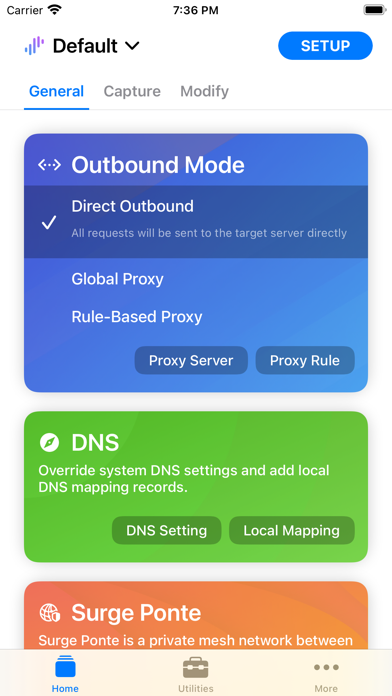
Surge is an advanced network toolbox and proxy utility. It is designed for developers and therefore requires professional knowledge to use. These four capabilities form the core workflow of Surge: · Takeover: Take over the network connections sent by the device. Surge supports both proxy service and virtual NIC takeover, capturing HTTP, HTTPS, TCP, and UDP traffic from any app — even those ignoring proxy settings. All features work on the cellular network. · Processing: Modify the requests and responses that have been taken over: URL rewrite, header and body rewrite, local file mapping, custom DNS answers, and JavaScript-based modification. · Forwarding: Forward requests to proxy servers, either globally or driven by a flexible rule system. Policy groups select the best server automatically by latency, availability, or learned connection quality. · Intercept: Record and inspect requests and responses, including headers and bodies, and decrypt HTTPS traffic with MITM. Highlighted Features · Proxy protocols: HTTP/HTTPS, SOCKS5, SOCKS5-TLS, HTTP2 CONNECT, TrustTunnel, Shadowsocks, Snell, Trojan, Hysteria 2, AnyTLS, and SSH, with UDP relay support. · Used as a WireGuard or Tailscale client, converting the L3 VPN into a proxy policy. · Rules based on domain match/suffix/keyword/wildcard, CIDR IP range, GeoIP, ASN, protocol, port, and logical combinations; reusable rule sets hosted locally or remotely. · Policy groups: manual selection, automatic latency testing, fallback, load balancing, and the self-learning Smart group. · Complete DNS suite: DNS-over-HTTPS, DNS-over-HTTP/3, DNS-over-QUIC, DNS-over-TLS, and concurrent queries for the fastest answer. · Local DNS mapping (equivalent to /etc/hosts) with wildcards, aliases, and per-domain DNS servers. Switch your app between production and development environments without changing any code. · Decrypt HTTPS traffic with Man-in-the-Middle and a built-in CA certificate generator. · Record and display HTTP requests and responses with JSON, text, image, and video viewers for the captured body; album mode for the request list; pre-filter for capturing. · Raw L3 packet capture. · Scripting: extend Surge with JavaScript — modify requests and responses, write custom rules, customize DNS answers, and run scheduled tasks. · Block unwanted requests by rules with high-performance pre-matching. · Measure traffic usage and network speed on Wi-Fi, cellular, and proxy connections. · Remote Dashboard: observe and debug traffic in real time from a Mac via Wi-Fi or USB, including cellular traffic. · Surge Ponte: access your home or office network remotely via your own devices, with no third-party service involved. · HTTPS proxy protocol supports client-side TLS certificate validation. · Safari extension to add rules; widgets and Information Panel for quick control. · Sync profiles across devices with iCloud Drive or Dropbox. · Full IPv6 support, TLS 1.3, HTTP/2, and QUIC. · High performance and industrial-grade stability, suitable for intensive use. Surge does not provide any proxy or VPN service; you need to configure your own servers. You may read the online manual for more information: https://nssurge.com/support Terms and Conditions: https://nssurge.com/legal/terms Privacy Policy: https://nssurge.com/legal/privacy