PC 용 Dolby On: Record Audio & Video
- 카테고리: Music
- 최근 업데이트: 2026-08-14
- 현재 버전: 2.0
- 파일 크기: 122.19 MB
- 개발자: Dolby Laboratories
- 호환성: 필요 Windows XP, Windows Vista, Windows 7, Windows 8, Windows 8.1 and Windows 10, Windows 11




PC에서 Dolby On: Record Audio & Video 용 호환 APK 다운로드
| 다운로드 | 개발자 | 평점 | 점수 | 현재 버전 | 성인 랭킹 |
|---|---|---|---|---|---|
| ↓ PC용 APK 다운로드 | Dolby Laboratories | 148 | 4.78378 | 2.0 | 4+ |
에뮬레이터의 중요성은 컴퓨터에서 안드로이드 환경을 흉내 내고 안드로이드 폰을 구입하지 않고도 안드로이드 앱을 설치하고 실행하는 것을 매우 쉽게 만들어주는 것입니다. 누가 당신이 두 세계를 즐길 수 없다고 말합니까? 우선 아래에있는 에뮬레이터 앱을 다운로드 할 수 있습니다.
A. Nox App . OR
B. Bluestacks App .
Bluestacks는 매우 대중적이므로 개인적으로 "B"옵션을 사용하는 것이 좋습니다. 문제가 발생하면 Google 또는 Naver.com에서 좋은 해결책을 찾을 수 있습니다.
Bluestacks.exe 또는 Nox.exe를 성공적으로 다운로드 한 경우 컴퓨터의 다운로드 폴더 또는 다운로드 한 파일을 일반적으로 저장하는 곳으로 이동하십시오.
찾으면 클릭하여 응용 프로그램을 설치하십시오. PC에서 설치 프로세스를 시작해야합니다.
다음을 클릭하여 EULA 라이센스 계약에 동의하십시오.
응용 프로그램을 설치하려면 화면 지시문을 따르십시오.
위 사항을 올바르게 수행하면 소프트웨어가 성공적으로 설치됩니다.
이제 설치 한 에뮬레이터 애플리케이션을 열고 검색 창을 찾으십시오. 지금 입력하십시오. - Dolby On: Record Audio & Video 앱을 쉽게 볼 수 있습니다. 그것을 클릭하십시오. 응용 프로그램 창이 열리고 에뮬레이터 소프트웨어에 응용 프로그램이 표시됩니다. 설치 버튼을 누르면 응용 프로그램이 다운로드되기 시작합니다. 이제 우리는 모두 끝났습니다.
그런 다음 "모든 앱"아이콘이 표시됩니다.
클릭하면 설치된 모든 응용 프로그램이 포함 된 페이지로 이동합니다.
당신은 Dolby On: Record Audio & Video 상. 그것을 클릭하고 응용 프로그램 사용을 시작하십시오.
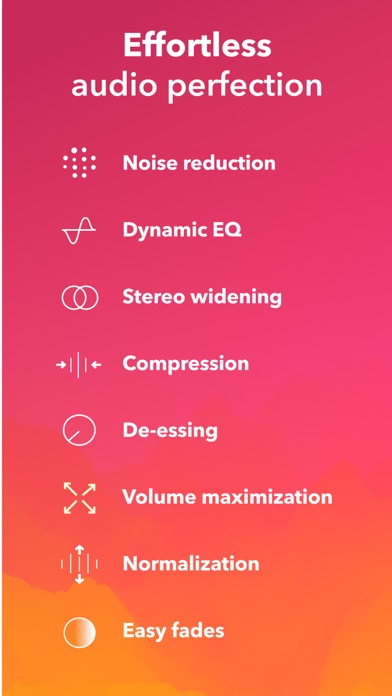
Dolby On is the only free audio recorder and sound editor for voice, music, video, and more with cutting-edge Dolby audio technology. Effortlessly record live music & videos, import from your library, or livestream to Twitch or Facebook Live to apply a suite of automatic studio effects including noise reduction, limiting, spatial audio, EQ, and more. Get incredible audio quality through a studio recorder on your phone! A RECORDING APP & AUDIO EDITOR WITH INCREDIBLE SOUND, AUTOMATICALLY Effortlessly record live music & videos with a suite of automatic studio effects in an easy-to-use recorder. You can even record in other apps and import into Dolby On to edit, enhance, and improve songs with Dolby technology. When you’re ready, share your creations with your fans on your favorite social channels, send to collaborators, upload directly to SoundCloud, export lossless audio, or even livestream right to Facebook; all with spectacular audio in an accessible recorder. RECORD & EDIT AUDIO & VIDEO WITH AN EASY-TO-USE RECORDER • Clears up the audio quality with noise reduction, de-essing, and a fade in/out: record music and voice • Shapes your recording with Dolby’s unique Dynamic EQ and spatial audio for tone and space • Boosts fullness and cut through with compression and pro limiting designed for live music to achieve ideal loudness • Optimizes the sound for popular music platforms, Facebook live streaming, and other social media • Record and export in lossless audio for even better sound • VoiceOver support on Track Details and Sound Tools to improve usability for the vision impaired MAKE IT YOUR OWN WITH POWERFUL SOUND EDITING IN YOUR POCKET • Customize your voice and video recording with free music studio audio effects and vocal editor • Six custom-designed, unique sound styles to apply to your music recording — like photography filters for audio, Styles are professionally designed sound presets based on analyzing thousands of songs • Use Dolby’s Dynamic EQ to get fine-tuned treble, bass and mids control and tune your recording • Use the free audio editor to trim the recording to edit out slow starts and stops • Animated cover art so that you can share your audio tracks directly to social media or SoundCloud • Use your favorite external mic to color your voice memo, music recording, or video recording RECORD AUDIO. RECORD VOICE. RECORD VIDEO. RECORD MUSIC. • Capture ideas and demo recordings. Record your voice memos and music memos in a simple recording studio app! • Document rehearsals or the gig for your archive with audio & video recordings captured in studio microphone sound • Grab sounds and inspirations in the field to sample in your next music creation. Select lossless audio for even better recording quality • Record high-quality shareable audio & record video content for your fans • Use free demo tracks to hear the full effects of Dolby on and test out our easy-to-use, powerful Sound Tools • Import videos or audio captured in other apps to reduce background noise and improve sound quality • Host amazing sounding livestreams without extra gear or technical skills YOUR CREATIONS, ANYWHERE YOU WANT THEM • Share voice or music recording to fans directly to Soundcloud, Instagram, and Facebook. • Livestream to Facebook Live or Twitch with amazing sound quality • Send ideas, demos, rehearsal and show recordings directly to your band and collaborators via text message or email • Export your recordings, songs, and videos for additional editing: take your ideas into your favorite audio editor (DAW) or video editor ONE RECORD BUTTON, 60 YEARS OF DOLBY INNOVATION We’ve used six decades worth of audio innovation to give you one powerful audio recorder and video app. Advanced Dolby audio processing takes care of the sound quality, so you can focus on the fun part: creating.