PC 용 Altimeter for Aviators
- 카테고리: Navigation
- 최근 업데이트: 2024-05-10
- 현재 버전: 2.6
- 파일 크기: 2.02 MB
- 개발자: STEARsoft
- 호환성: 필요 Windows XP, Windows Vista, Windows 7, Windows 8, Windows 8.1 and Windows 10, Windows 11




PC에서 Altimeter for Aviators 용 호환 APK 다운로드
| 다운로드 | 개발자 | 평점 | 점수 | 현재 버전 | 성인 랭킹 |
|---|---|---|---|---|---|
| ↓ PC용 APK 다운로드 | STEARsoft | 1 | 5 | 2.6 | 4+ |
에뮬레이터의 중요성은 컴퓨터에서 안드로이드 환경을 흉내 내고 안드로이드 폰을 구입하지 않고도 안드로이드 앱을 설치하고 실행하는 것을 매우 쉽게 만들어주는 것입니다. 누가 당신이 두 세계를 즐길 수 없다고 말합니까? 우선 아래에있는 에뮬레이터 앱을 다운로드 할 수 있습니다.
A. Nox App . OR
B. Bluestacks App .
Bluestacks는 매우 대중적이므로 개인적으로 "B"옵션을 사용하는 것이 좋습니다. 문제가 발생하면 Google 또는 Naver.com에서 좋은 해결책을 찾을 수 있습니다.
Bluestacks.exe 또는 Nox.exe를 성공적으로 다운로드 한 경우 컴퓨터의 다운로드 폴더 또는 다운로드 한 파일을 일반적으로 저장하는 곳으로 이동하십시오.
찾으면 클릭하여 응용 프로그램을 설치하십시오. PC에서 설치 프로세스를 시작해야합니다.
다음을 클릭하여 EULA 라이센스 계약에 동의하십시오.
응용 프로그램을 설치하려면 화면 지시문을 따르십시오.
위 사항을 올바르게 수행하면 소프트웨어가 성공적으로 설치됩니다.
이제 설치 한 에뮬레이터 애플리케이션을 열고 검색 창을 찾으십시오. 지금 입력하십시오. - Altimeter for Aviators 앱을 쉽게 볼 수 있습니다. 그것을 클릭하십시오. 응용 프로그램 창이 열리고 에뮬레이터 소프트웨어에 응용 프로그램이 표시됩니다. 설치 버튼을 누르면 응용 프로그램이 다운로드되기 시작합니다. 이제 우리는 모두 끝났습니다.
그런 다음 "모든 앱"아이콘이 표시됩니다.
클릭하면 설치된 모든 응용 프로그램이 포함 된 페이지로 이동합니다.
당신은 Altimeter for Aviators 상. 그것을 클릭하고 응용 프로그램 사용을 시작하십시오.
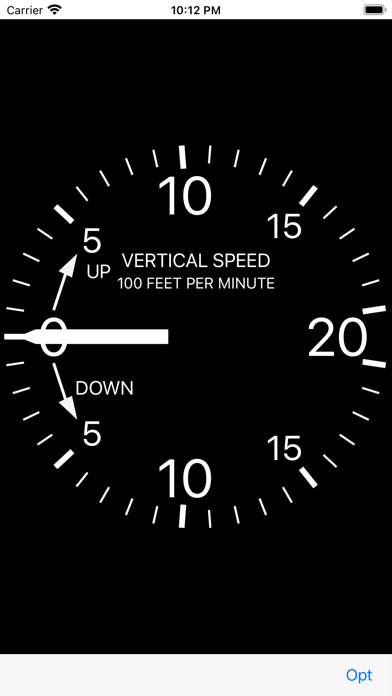
If you want a 'real' Altimeter, look no further. No GPS used here. Learn how a real pressure Altimeter works such as you would find in an aircraft. Altimeter for Aviators is primarily designed as an Apple Watch application, although it does also work on iPhones or iPads that have a barometer. Provided your watch has a Barometer it will even run stand-alone (no iPhone needed). Student and instructor pilots will find this App to be a valuable training tool, while those knowing how to use an altimeter will enjoy having it on their wrist. To obtain your Altitude (height above sea level): Set the 'pressure setting' to the current air pressure at sea level. Weather forecasts often give this (eg the BBC Weather App includes pressure in mb). You can also obtain the pressure from weather pressure charts or from METAR reports from airports (eg Q1017). In aviation speak, this is known as the QNH. Set the pressure setting by rotating the 'crown' on your watch. You can then 'Lock' this setting so you don't accidentally change it by doing a long-press and choosing 'Lock'. Alternatively, if you know the altitude of the point that you are currently at, you can rotate the watch crown until the Altimeter reads the correct altitude. To obtain your height above a certain location: Set the 'station' pressure for that location (the actual air pressure at that very point). Aviation language calls this pressure setting QFE. If you are at that location, you can just rotate the crown of the watch until the Altimeter reads zero. As a short-cut you can alternatively long-press and then pick "Zero (QFE)". To obtain your Flight Level (FL): Another setting that pilots use is the standard setting of 1013.25mb. This is used above 3000ft roughly and instead of giving you an accurate 'Altitude' gives you what is known as a 'Flight level'. Long-press and select the "STP (FL)" option as a short cut (FL stands for Flight Level. STP stands for 'Standard Temperature and Pressure'). If you are more familiar with inches of mercury (inHg) rather than hectapascals (hPa) or millibars (mb) then toggle this with the 'Units' menu item. Note that mb and hPa are the same unit. ACCURACY WARNING: Your watch (or iPhone) pressure sensing device has not been calibrated in the same way that the expensive altimeters found in aircraft have been. Your electronic device also has more points of failure and error being miniature and electrically based so this App in no way replaces or can be used for actual flying. If you run this App side by side on two different iOS devices, the chances are they'll give you slightly different altitudes. Further, if you're a pilot the pressure in your cockpit is unlikely to be as accurate as the location of the static pitot tube and will be susceptible to changes due to air vents being opened, doors with gaps, any climate control, your speed and any vibration. WEATHER WARNING: Air pressure changes throughout the day can cause readings to drift by up to 1 foot per minute, so keep the pressure-setting up-to-date by updating it whenever you can; as you get to any locations of known altitude or hourly if receiving pressure settings in some other way. Colours: Altimeter for Aviators shows how recent the altitude was calculated (it's not constant) White = updated in the last 10 seconds Yellow = updated between 10 and 60 seconds ago. Pink = updated between 1 and 10 minutes ago. Dark Red = updated more than 10 minutes ago. Altitude units: The long hand shows 100s of feet. The short hand 1000s of feet. The inward pointing edge arrow shows 10000s of feet. The barber pole (stripe at the bottom) is visible below 10000 feet, so if it disappears you are at risk of Hypoxia.