PC 용 Mystic Tarot Reading & Cards
- 카테고리: Lifestyle
- 최근 업데이트: 2026-01-29
- 현재 버전: 2.6.2
- 파일 크기: 30.45 MB
- 개발자: Igor Yarovoy
- 호환성: 필요 Windows XP, Windows Vista, Windows 7, Windows 8, Windows 8.1 and Windows 10, Windows 11



PC에서 Mystic Tarot Reading & Cards 용 호환 APK 다운로드
| 다운로드 | 개발자 | 평점 | 점수 | 현재 버전 | 성인 랭킹 |
|---|---|---|---|---|---|
| ↓ PC용 APK 다운로드 | Igor Yarovoy | 3 | 5 | 2.6.2 | 12+ |
에뮬레이터의 중요성은 컴퓨터에서 안드로이드 환경을 흉내 내고 안드로이드 폰을 구입하지 않고도 안드로이드 앱을 설치하고 실행하는 것을 매우 쉽게 만들어주는 것입니다. 누가 당신이 두 세계를 즐길 수 없다고 말합니까? 우선 아래에있는 에뮬레이터 앱을 다운로드 할 수 있습니다.
A. Nox App . OR
B. Bluestacks App .
Bluestacks는 매우 대중적이므로 개인적으로 "B"옵션을 사용하는 것이 좋습니다. 문제가 발생하면 Google 또는 Naver.com에서 좋은 해결책을 찾을 수 있습니다.
Bluestacks.exe 또는 Nox.exe를 성공적으로 다운로드 한 경우 컴퓨터의 다운로드 폴더 또는 다운로드 한 파일을 일반적으로 저장하는 곳으로 이동하십시오.
찾으면 클릭하여 응용 프로그램을 설치하십시오. PC에서 설치 프로세스를 시작해야합니다.
다음을 클릭하여 EULA 라이센스 계약에 동의하십시오.
응용 프로그램을 설치하려면 화면 지시문을 따르십시오.
위 사항을 올바르게 수행하면 소프트웨어가 성공적으로 설치됩니다.
이제 설치 한 에뮬레이터 애플리케이션을 열고 검색 창을 찾으십시오. 지금 입력하십시오. - Mystic Tarot Reading & Cards 앱을 쉽게 볼 수 있습니다. 그것을 클릭하십시오. 응용 프로그램 창이 열리고 에뮬레이터 소프트웨어에 응용 프로그램이 표시됩니다. 설치 버튼을 누르면 응용 프로그램이 다운로드되기 시작합니다. 이제 우리는 모두 끝났습니다.
그런 다음 "모든 앱"아이콘이 표시됩니다.
클릭하면 설치된 모든 응용 프로그램이 포함 된 페이지로 이동합니다.
당신은 Mystic Tarot Reading & Cards 상. 그것을 클릭하고 응용 프로그램 사용을 시작하십시오.
Mac OS 에서 Mystic Tarot Reading & Cards 다운로드
| 다운로드 | 개발자 | 점수 | 현재 버전 | 성인 랭킹 |
|---|---|---|---|---|
| 무료 - Mac 에서 다운로드 | Igor Yarovoy | 5 |
2.6.2 | 12+ |
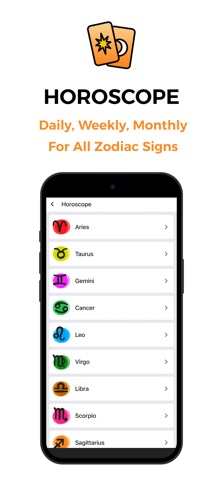
Unlock daily guidance with Tarot and Astrology – always with you on your phone. Created with authentic Tarot techniques and crafted by a professional astrologer, this app helps you find clarity, answers, and inspiration. Features you’ll love: • Daily Horoscopes with accurate insights • Tarot Card of the Day • Tarot Readings anytime • Love & Relationship Guidance • Learn Tarot Card Meanings Whether you’re starting a new week, a new month, or simply a new day, a reading can set the right tone and help you welcome positive changes. Popular Tarot readings: Tarot for the Future Tarot for Relationships Tarot Card of the Day Popular Horoscopes: Daily Horoscope Horoscope by Zodiac Sign Weekly Horoscope Monthly Horoscope Learn Tarot Easily Every Tarot deck has its own style and symbolism. Beginners often start with Rider–Waite or Sharman–Caselli, while experienced readers choose the decks that resonate with them most. With time, you’ll discover the cards in your own way. The Magic of Lenormand Cards The Lenormand deck, created by the French reader Marie Anne Lenormand, was used for guidance by both ordinary people and royalty. Today, it remains one of the most beloved systems alongside Tarot. Tarot & Astrology Together Tarot and Astrology complement each other. Both are rooted in symbols and archetypes, offering valuable insight into your path. Astrology requires study, while Tarot often speaks directly through intuition. Combined, they provide the clearest perspective. Your reading is always with you No need to search for fortune-tellers or pay for guidance. Get free Tarot and Horoscope readings anytime – and explore your journey with just one tap. If you have any questions or suggestions on how to improve our astrology app, feel free to contact us at [email protected]. Terms of Use: https://tarot.jiy-apps.com/static/legal/privacy.