
PC 용 QSpace
- 카테고리: Productivity
- 최근 업데이트: 2024-07-11
- 현재 버전: 5.0.3
- 파일 크기: 8.53 MB
- 개발자: Wenda Tian
- 호환성: 필요 Windows XP, Windows Vista, Windows 7, Windows 8, Windows 8.1 and Windows 10, Windows 11





에뮬레이터의 중요성은 컴퓨터에서 안드로이드 환경을 흉내 내고 안드로이드 폰을 구입하지 않고도 안드로이드 앱을 설치하고 실행하는 것을 매우 쉽게 만들어주는 것입니다. 누가 당신이 두 세계를 즐길 수 없다고 말합니까? 우선 아래에있는 에뮬레이터 앱을 다운로드 할 수 있습니다.
A. Nox App . OR
B. Bluestacks App .
Bluestacks는 매우 대중적이므로 개인적으로 "B"옵션을 사용하는 것이 좋습니다. 문제가 발생하면 Google 또는 Naver.com에서 좋은 해결책을 찾을 수 있습니다.
Bluestacks.exe 또는 Nox.exe를 성공적으로 다운로드 한 경우 컴퓨터의 다운로드 폴더 또는 다운로드 한 파일을 일반적으로 저장하는 곳으로 이동하십시오.
찾으면 클릭하여 응용 프로그램을 설치하십시오. PC에서 설치 프로세스를 시작해야합니다.
다음을 클릭하여 EULA 라이센스 계약에 동의하십시오.
응용 프로그램을 설치하려면 화면 지시문을 따르십시오.
위 사항을 올바르게 수행하면 소프트웨어가 성공적으로 설치됩니다.
이제 설치 한 에뮬레이터 애플리케이션을 열고 검색 창을 찾으십시오. 지금 입력하십시오. - QSpace 앱을 쉽게 볼 수 있습니다. 그것을 클릭하십시오. 응용 프로그램 창이 열리고 에뮬레이터 소프트웨어에 응용 프로그램이 표시됩니다. 설치 버튼을 누르면 응용 프로그램이 다운로드되기 시작합니다. 이제 우리는 모두 끝났습니다.
그런 다음 "모든 앱"아이콘이 표시됩니다.
클릭하면 설치된 모든 응용 프로그램이 포함 된 페이지로 이동합니다.
당신은 QSpace 상. 그것을 클릭하고 응용 프로그램 사용을 시작하십시오.
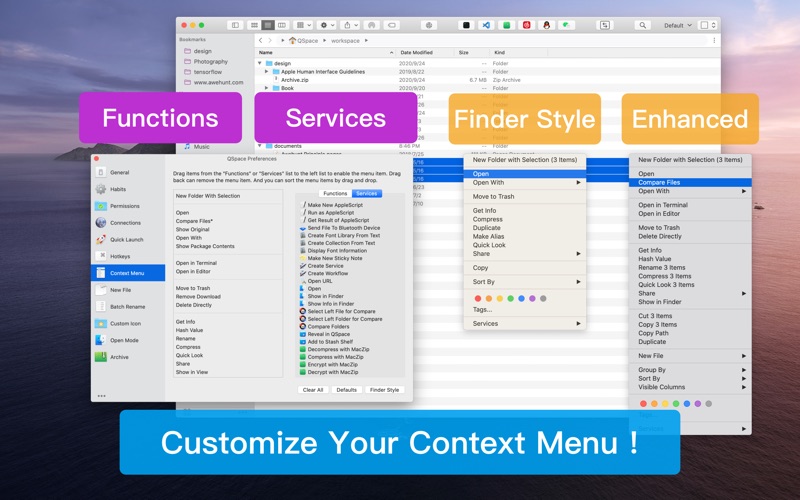
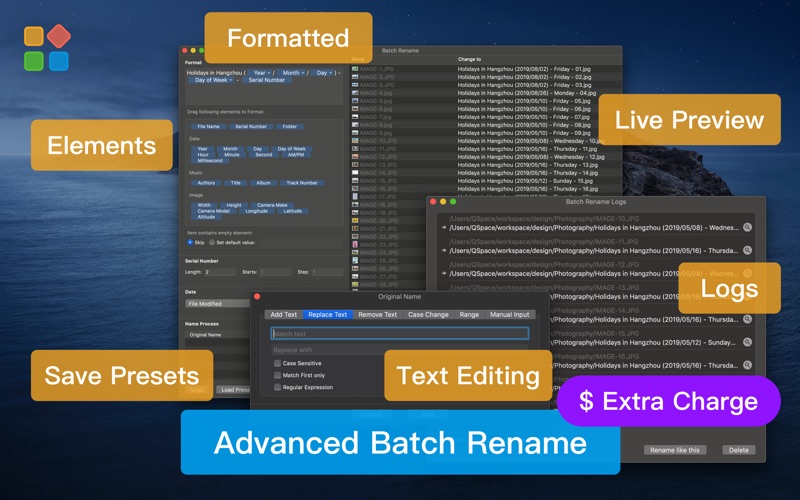
QSpace is a clean and efficient Multi-Pane File Manager, also can connect to FTP, SFTP, WebDAV, Dropbox, OneDrive, Google Drive, Aliyun Drive, Amazon S3(and S3 compatible), Aliyun OSS. It has the same operating habits and interface presentation as Finder, but also supports more flexible and practical features. With QSpace, you can easily get rid of the cumbersome switching back and forth between multiple windows, and find the target when you drag and drop! QSpace has powerful Multi-Pane state Auto-save and Restore capabilities, which makes it not only a file manager, but also a secretary for your work status management. Make your work easier and more efficient. In addition, QSpace also supports a wealth of personalized settings: customize Context Menu, customize Toolbar, custom Touch Bar, customize Hotkeys, customize Quick Launcher. Here, you can follow your own way~ The interface is more concise and the operation is more efficient! -------- Multi-Pane Workspace -------- * Support 12 window layouts with one-click flexible switching. * Support to create multiple workspaces, and you can set independent hotkey for each workspace. * The status of the workspace supports automatic saving and can be restored by opening it again! * Support window tabs, you can put multiple workspaces into one window. -------- File Management Enhancement -------- * Segmented Interactive Address Bar: Quick access to every level of directories, support forward and backward operations. * Editable Address Bar: Supports copying, editing, or directly entering the path. * Quick Access: One-click access to the system's common directories and support for directory bookmarking. * Customized Sidebar: Create custom bookmark group, support drag and drop sorting items, set different accent colors. * Customized Context Menu: You can set any menu item display switch and its position. * Customized Quick Launcher: You can place commonly used applications or services in the Toolbar with one click to open. * Quick Search: Supports global search or specified workspace search, and context menu actions on results. * Terminal shortcut: Open selected directories in the specified terminal with one click (support Terminal, iTerm) * Editor shortcut: Open selected files or directories in the specified editor with one click (supports VSCode, Atom, Sublime) * File hash value calculation supports MD5/SHA256/SHA128/SHA224/SHA384/SHA512/CRC32. * Support for creating new files and folders anywhere. * Support for customize new file templates, customizable file names and its contents, and file name support date variables. * Support cutting, copying, pasting, dragging, etc. between panes. -------- Extensions -------- 【Enhanced Archiver】 Browse the contents of an archive, just like browsing a folder! You can compress files into zip or 7z. Supports encryption and multiple volumes. Supports unarchiving more than 20 popular archive formats such as rar, zip, 7z, tar, gz, bz2, xz, lzma, lz4 etc. 【Stash Shelf】 You can drag local items and web images to the “Stash Shelf”, and then perform unified processing: copy or move to somewhere, share via AirDrop, batch rename, calculate hash values, run services etc. Support Quick Launch variable “$stash_items”. 【Advanced Batch Rename】 Supports real-time preview of modified results. Supports multiple text additions, replacements, and removals, and regular expression options. Supports saving and loading preset rules. Each batch operation will automatically record logs for reviewing previous names. 【Server Connections】 Connect to servers and currently support FTP, SFTP, WebDAV, Dropbox, OneDrive, Google Drive, Aliyun Drive, SMB, NFS, AFP, Amazon S3(and S3 compatible), Aliyun OSS. Similar to the operation experience of local files. -------- Feedback -------- In case of problems, you can get help in the following ways: Tutorials: https://qspace.awehunt.com/en-us/tutorial.html Email: [email protected]