
PC 용 HeartCast: Heart Rate Monitor
- 카테고리: Health & Fitness
- 최근 업데이트: 2026-10-06
- 현재 버전: 3.9.0
- 파일 크기: 4.44 MB
- 개발자: Shawn Carrillo
- 호환성: 필요 Windows XP, Windows Vista, Windows 7, Windows 8, Windows 8.1 and Windows 10, Windows 11




PC에서 HeartCast: Heart Rate Monitor 용 호환 APK 다운로드
| 다운로드 | 개발자 | 평점 | 점수 | 현재 버전 | 성인 랭킹 |
|---|---|---|---|---|---|
| ↓ PC용 APK 다운로드 | Shawn Carrillo | 3 | 5 | 3.9.0 | 4+ |
에뮬레이터의 중요성은 컴퓨터에서 안드로이드 환경을 흉내 내고 안드로이드 폰을 구입하지 않고도 안드로이드 앱을 설치하고 실행하는 것을 매우 쉽게 만들어주는 것입니다. 누가 당신이 두 세계를 즐길 수 없다고 말합니까? 우선 아래에있는 에뮬레이터 앱을 다운로드 할 수 있습니다.
A. Nox App . OR
B. Bluestacks App .
Bluestacks는 매우 대중적이므로 개인적으로 "B"옵션을 사용하는 것이 좋습니다. 문제가 발생하면 Google 또는 Naver.com에서 좋은 해결책을 찾을 수 있습니다.
Bluestacks.exe 또는 Nox.exe를 성공적으로 다운로드 한 경우 컴퓨터의 다운로드 폴더 또는 다운로드 한 파일을 일반적으로 저장하는 곳으로 이동하십시오.
찾으면 클릭하여 응용 프로그램을 설치하십시오. PC에서 설치 프로세스를 시작해야합니다.
다음을 클릭하여 EULA 라이센스 계약에 동의하십시오.
응용 프로그램을 설치하려면 화면 지시문을 따르십시오.
위 사항을 올바르게 수행하면 소프트웨어가 성공적으로 설치됩니다.
이제 설치 한 에뮬레이터 애플리케이션을 열고 검색 창을 찾으십시오. 지금 입력하십시오. - HeartCast: Heart Rate Monitor 앱을 쉽게 볼 수 있습니다. 그것을 클릭하십시오. 응용 프로그램 창이 열리고 에뮬레이터 소프트웨어에 응용 프로그램이 표시됩니다. 설치 버튼을 누르면 응용 프로그램이 다운로드되기 시작합니다. 이제 우리는 모두 끝났습니다.
그런 다음 "모든 앱"아이콘이 표시됩니다.
클릭하면 설치된 모든 응용 프로그램이 포함 된 페이지로 이동합니다.
당신은 HeartCast: Heart Rate Monitor 상. 그것을 클릭하고 응용 프로그램 사용을 시작하십시오.
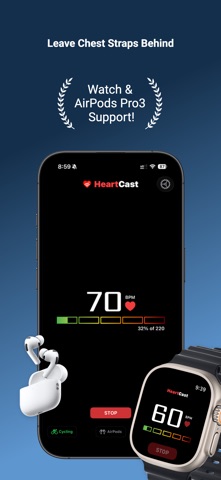
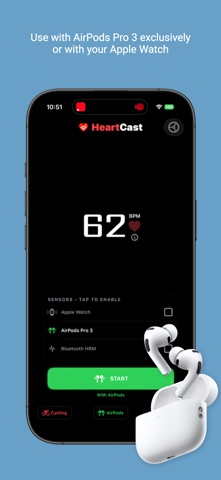
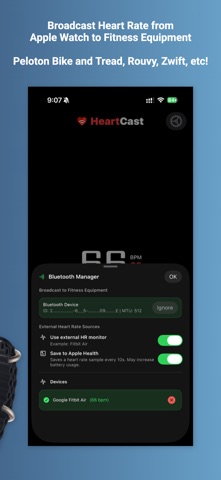
HeartCast broadcasts your heart rate from your Apple Watch or AirPods Pro 3 to Bluetooth-enabled fitness equipment and bike trainers, including Peloton Bike, Tread, Rouvy, and Zwift. Use the devices you already wear! Now supporting external Bluetooth Heart Rate Monitors, like the new Google Fitbit Air. Monitor your Heart Rate Zones in real-time on your Watch, AirPods Pro 3, and iPhone. Audio, Visual, and Haptic Heart Rate Zone alerts to stay on target during your workout. See your heart rate at a glance with Dynamic Island and Live Activity support on iPhone. HeartCast uses Bluetooth to communicate directly with your fitness equipment. Your heart rate data never leaves your devices. Ad-free, forever. Free to download and use! In-App Purchases - HeartCast is completely free to download and use as a heart rate monitor! - HeartCast Audible: Audible addon to announce your heart rate and heart rate zones without looking at your devices. Try it free in Preferences. - HeartCast Pro: If you'd like to support HeartCast development, please consider a HeartCast-Pro donation. - New features and improvements are always in the works. About Your Privacy - HeartCast monitors your heart rate and broadcasts it over Bluetooth to nearby compatible fitness equipment. - HeartCast does not monitor or collect any other personal information! - HeartCast can optionally save or discard your workouts. Apple Watch automatically saves some basic metrics during a workout and contributes directly to closing your Activity Rings. - HeartCast does not save, store, or transmit your heart rate data to any external services. It is only used within the app and your nearby Bluetooth-enabled devices. - HeartCast utilizes Google Analytics and Google Crashlytics to improve our features and identify and resolve critical issues with the application. - HeartCast is not affiliated with Peloton or any other fitness equipment provider. Getting Started with Apple Watch 1. Open HeartCast on your Watch and iPhone. 2. Press Start to begin a workout. - This also enables Bluetooth. 3. Connect your preferred fitness equipment (Peloton, Rouvy, Zwift, etc.). - Ensure HeartCast is visible on your iPhone when connecting to your devices. Getting Started with AirPods Pro 3 1. Put in your AirPods Pro 3 and be sure they are paired with your iPhone or iPad. 2. Open HeartCast on your iPhone or iPad. 3. Press Start to begin a workout. - This also enables Bluetooth. 4. Connect your preferred fitness equipment (Peloton, Rouvy, Zwift, etc.). - Ensure HeartCast is visible on your iPhone or iPad when connecting to your devices. Breathe easy and never wear an uncomfortable chest strap again. HeartCast will continue to run in the background during your workout. Requirements - An Apple Watch and iPhone, or AirPods Pro 3 and iPhone or iPad. - Access to Apple Health to create workouts and read your heart rate data. - Access to Bluetooth to cast to your fitness equipment. Supported Fitness Equipment - Peloton Bike, Bike+, and Tread - Peloton App on iPad and Amazon Firestick - Zwift (on iPad, Apple TV, or computer) - ROUVY (confirmed by ROUVY support and users) - TrainerRoad (iPad) - Wahoo Fitness App (iPad) - TacX Smart Trainer Software (Mac/iPad) - Hammerhead Karoo 2 and Karoo 3 - FulGaz App - Bryton Rider 450 - Lezyne Macro GPS - NordicTrack iFit equipment (C2950 Treadmill, RW850 Rower) - Echelon Fit App (iPad only) - iGPSPORT bike computers (user-reported, results may vary) Supported Bluetooth HRM - Google Fitbit Air 2026 Unsupported Devices - Known Compatibility Issues - Devices that do not support Bluetooth Low Energy (BLE) - Garmin Edge devices (830, 1030, others). - Echelon Bikes with integrated tablet. - Wahoo Elemnt Roam/Bolt. (Mixed results from users.) Please let us know if HeartCast works on your favorite fitness equipment! Please visit our website for FAQ and Support: https://help.heartcast.app/ HeartCast was built with love by an avid Peloton user.


