
PC 용 SmartWorkout - Workout Plans
- 카테고리: Health & Fitness
- 최근 업데이트: 2026-09-26
- 현재 버전: 5.0.13
- 파일 크기: 67.72 MB
- 개발자: Arkadiusz Chrabaszczewski Consulting
- 호환성: 필요 Windows XP, Windows Vista, Windows 7, Windows 8, Windows 8.1 and Windows 10, Windows 11




PC에서 SmartWorkout - Workout Plans 용 호환 APK 다운로드
| 다운로드 | 개발자 | 평점 | 점수 | 현재 버전 | 성인 랭킹 |
|---|---|---|---|---|---|
| ↓ PC용 APK 다운로드 | Arkadiusz Chrabaszczewski Consulting | 1 | 5 | 5.0.13 | 4+ |
호환되는 PC 앱 또는 대안 확인
| 소프트웨어 | 다운로드 | 평점 | 개발자 |
|---|---|---|---|
| SmartWorkout |
PC 앱 받기 | 5/5 1 리뷰 5 |
Arkadiusz Chrabaszczewski Consulting |
에뮬레이터의 중요성은 컴퓨터에서 안드로이드 환경을 흉내 내고 안드로이드 폰을 구입하지 않고도 안드로이드 앱을 설치하고 실행하는 것을 매우 쉽게 만들어주는 것입니다. 누가 당신이 두 세계를 즐길 수 없다고 말합니까? 우선 아래에있는 에뮬레이터 앱을 다운로드 할 수 있습니다.
A. Nox App . OR
B. Bluestacks App .
Bluestacks는 매우 대중적이므로 개인적으로 "B"옵션을 사용하는 것이 좋습니다. 문제가 발생하면 Google 또는 Naver.com에서 좋은 해결책을 찾을 수 있습니다.
Bluestacks.exe 또는 Nox.exe를 성공적으로 다운로드 한 경우 컴퓨터의 다운로드 폴더 또는 다운로드 한 파일을 일반적으로 저장하는 곳으로 이동하십시오.
찾으면 클릭하여 응용 프로그램을 설치하십시오. PC에서 설치 프로세스를 시작해야합니다.
다음을 클릭하여 EULA 라이센스 계약에 동의하십시오.
응용 프로그램을 설치하려면 화면 지시문을 따르십시오.
위 사항을 올바르게 수행하면 소프트웨어가 성공적으로 설치됩니다.
이제 설치 한 에뮬레이터 애플리케이션을 열고 검색 창을 찾으십시오. 지금 입력하십시오. - SmartWorkout - Workout Plans 앱을 쉽게 볼 수 있습니다. 그것을 클릭하십시오. 응용 프로그램 창이 열리고 에뮬레이터 소프트웨어에 응용 프로그램이 표시됩니다. 설치 버튼을 누르면 응용 프로그램이 다운로드되기 시작합니다. 이제 우리는 모두 끝났습니다.
그런 다음 "모든 앱"아이콘이 표시됩니다.
클릭하면 설치된 모든 응용 프로그램이 포함 된 페이지로 이동합니다.
당신은 SmartWorkout - Workout Plans 상. 그것을 클릭하고 응용 프로그램 사용을 시작하십시오.
Mac OS 에서 SmartWorkout 다운로드
| 다운로드 | 개발자 | 점수 | 현재 버전 | 성인 랭킹 |
|---|---|---|---|---|
| 무료 - Mac 에서 다운로드 | Arkadiusz Chrabaszczewski Consulting | 5 |
5.0.13 | 4+ |
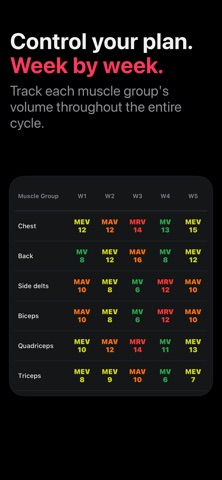
SmartWorkout is an advanced workout log and gym app designed for people looking for a tool to track workouts, strength progress, and workout planning. If you are looking for the best workout log to control your progress and progressive overload, or if you are currently building muscle or increasing strength, SmartWorkout helps you monitor weights, reps, training volume, RIR/RPE, and progress from every workout for free. SmartWorkout works both as a simple workout log for beginners and as an advanced tool for creating workout plans and analyzing progress for users who want to consciously control their gym performance. FREE FEATURES: * Unlimited workout routines and workouts. * Create custom exercises without limits. * Track all workout parameters: reps, weights, RIR, RPE, tempo, and rest time between sets. * Full workout log customization. * 2 workout log modes: simplified and advanced. * Muscle engagement map in workout summaries. * Thousands of exercises with video previews, descriptions, and training tips. * Exercise charts showing training volume, e1RM, best reps, best weight, and best time. * Quickly repeat workouts from history or workout routines. * Automatic rest timer based on your previous workouts. * Exercise notes and training guidelines. * Advanced exercise search engine, search by muscle groups and sort exercises by weight, body part types, alphabetical order, and popularity. * 7-day graphical muscle volume map. * Double-counted training volume and 1RM calculations for unilateral exercises. * Built-in calculators: 1RM, Plate Calculator, and RIR/RPE. * Advanced workout keyboard with: * Built-in timer and stopwatch. * RIR/RPE keyboard. * Buttons for quickly copying previous results. * Buttons for increasing and decreasing reps and weight. * Configurable weight increment buttons, for example increase dumbbell exercises by 1 kg or barbell exercises by 2.5 kg. ADDITIONAL FEATURES: * MEV, MAV, and MRV training volume zone analysis. * Add photos and videos to your exercises. * AI workout plan generation. * Ready-to-use workout plans. * Weight suggestions powered by the built-in RIR/RPE calculator to support progressive overload. * Workout plan creator: * Create microcycles, mesocycles, and macrocycles. * Program workouts using progressive overload, RIR/RPE, and 1RM. PERFECT APP FOR: * Tracking gym workouts. * Building muscle mass. * Increasing strength. * Controlling progressive overload. * Monitoring training volume. * Creating workout plans. * Analyzing strength progress. * Logging weights and reps. * Bodybuilding and hypertrophy training. SmartWorkout Pro and Premium are available as monthly and yearly subscriptions. Your subscription will automatically renew unless canceled at least 24 hours before the end of the current subscription period. You can cancel at any time through your iTunes account settings. Any unused portion of a free trial period will be forfeited when purchasing a subscription. Integrate SmartWorkout with the Apple Health App to sync your body measurements and workouts. Standard EULA Apple terms of use apply to this application. You comply with its terms using this app. Terms of Service: https://smartworkout.app/en/terms Privacy Policy: https://smartworkout.app/en/privacy


