PC 용 Mockup - UI/UX Design
- 카테고리: Graphics & Design
- 최근 업데이트: 2026-11-14
- 현재 버전: 4.6.3
- 파일 크기: 46.51 MB
- 개발자: Apprime Studio sarl
- 호환성: 필요 Windows XP, Windows Vista, Windows 7, Windows 8, Windows 8.1 and Windows 10, Windows 11


PC에서 Mockup - UI/UX Design 용 호환 APK 다운로드
| 다운로드 | 개발자 | 평점 | 점수 | 현재 버전 | 성인 랭킹 |
|---|---|---|---|---|---|
| ↓ PC용 APK 다운로드 | Apprime Studio sarl | 54 | 4.25926 | 4.6.3 | 4+ |
에뮬레이터의 중요성은 컴퓨터에서 안드로이드 환경을 흉내 내고 안드로이드 폰을 구입하지 않고도 안드로이드 앱을 설치하고 실행하는 것을 매우 쉽게 만들어주는 것입니다. 누가 당신이 두 세계를 즐길 수 없다고 말합니까? 우선 아래에있는 에뮬레이터 앱을 다운로드 할 수 있습니다.
A. Nox App . OR
B. Bluestacks App .
Bluestacks는 매우 대중적이므로 개인적으로 "B"옵션을 사용하는 것이 좋습니다. 문제가 발생하면 Google 또는 Naver.com에서 좋은 해결책을 찾을 수 있습니다.
Bluestacks.exe 또는 Nox.exe를 성공적으로 다운로드 한 경우 컴퓨터의 다운로드 폴더 또는 다운로드 한 파일을 일반적으로 저장하는 곳으로 이동하십시오.
찾으면 클릭하여 응용 프로그램을 설치하십시오. PC에서 설치 프로세스를 시작해야합니다.
다음을 클릭하여 EULA 라이센스 계약에 동의하십시오.
응용 프로그램을 설치하려면 화면 지시문을 따르십시오.
위 사항을 올바르게 수행하면 소프트웨어가 성공적으로 설치됩니다.
이제 설치 한 에뮬레이터 애플리케이션을 열고 검색 창을 찾으십시오. 지금 입력하십시오. - Mockup - UI/UX Design 앱을 쉽게 볼 수 있습니다. 그것을 클릭하십시오. 응용 프로그램 창이 열리고 에뮬레이터 소프트웨어에 응용 프로그램이 표시됩니다. 설치 버튼을 누르면 응용 프로그램이 다운로드되기 시작합니다. 이제 우리는 모두 끝났습니다.
그런 다음 "모든 앱"아이콘이 표시됩니다.
클릭하면 설치된 모든 응용 프로그램이 포함 된 페이지로 이동합니다.
당신은 Mockup - UI/UX Design 상. 그것을 클릭하고 응용 프로그램 사용을 시작하십시오.
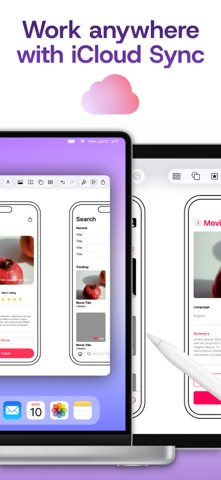
Mockup helps you sketch, wireframe, and prototype apps and websites across iPad, iPhone, and Mac. Built specifically for UI/UX design and Apple Pencil, Mockup combines a flexible canvas with reusable UI elements and interactive prototypes in one seamless workflow. Featured by Apple and recognized as App of the Day, Mockup is trusted by 500,000+ designers, developers, and product teams worldwide to sketch and wireframe interfaces faster. Design interfaces for mobile, tablet, desktop, watch, TV, and the web. - Sketch naturally with Apple Pencil using versatile drawing tools and a complete color palette. - Work with 45+ device frames in portrait and landscape. - Draw perfect shapes with Shape Detection and Snap to Grid for cleaner layouts. - Write and edit text directly on the canvas using Scribble. - Customize grids, frames, and backgrounds to match your workflow. Build Better Wireframes - Use ready-to-use UI elements or create, save, and reuse your own custom element sets. - Add text, images, shapes, and over 4,000 SF Symbols. - Save reusable text styles for a consistent design system. - Drag and drop text or images directly from other apps. Prototype User Flows - Connect screens to create interactive flows. - Preview prototypes in full-screen mode. - Validate navigation and user experience before development. Export, Share & Continue Anywhere - Export high-quality PDF and PNG files. - Share Mockup files with other users. - Collaborate in real time using SharePlay. - Sync sketches and projects across iPad, iPhone, and Mac with iCloud. - Access recent sketches and preview your work from Home Screen widgets. Optimized for Apple Pencil & iPad - Use Apple Pencil Hover to preview and switch drawing tools with greater precision and control. - Use Apple Pencil Pro squeeze to access canvas controls, adjust tools, select objects, or undo and redo actions. - Enjoy a desktop-class experience with external keyboard and trackpad support. - Work across multiple windows for greater productivity. Start creating for free with unlimited sketches and projects, or unlock the complete Mockup experience with Mockup Studio. Mockup Studio includes: - All device frames - Interactive prototypes - Unlimited custom element sets - Exclusive UI elements - Shape Detection - 4,000+ customizable SF Symbols - Watermark-free PDF export - PNG export - Nested projects - Priority support Terms of Service: https://apprime.studio/terms-of-service/ Privacy Policy: https://apprime.studio/privacy-policy/