
PC 용 National Theatre at Home
- 카테고리: Entertainment
- 최근 업데이트: 2026-09-17
- 현재 버전: 10.420.1
- 파일 크기: 40.48 MB
- 개발자: National Theatre
- 호환성: 필요 Windows XP, Windows Vista, Windows 7, Windows 8, Windows 8.1 and Windows 10, Windows 11






PC에서 National Theatre at Home 용 호환 APK 다운로드
| 다운로드 | 개발자 | 평점 | 점수 | 현재 버전 | 성인 랭킹 |
|---|---|---|---|---|---|
| ↓ PC용 APK 다운로드 | National Theatre | 6 | 4.33333 | 10.420.1 | 4+ |
호환되는 PC 앱 또는 대안 확인
| 소프트웨어 | 다운로드 | 평점 | 개발자 |
|---|---|---|---|
| National Theatre at Home |
PC 앱 받기 | 4.33333/5 6 리뷰 4.33333 |
National Theatre |
에뮬레이터의 중요성은 컴퓨터에서 안드로이드 환경을 흉내 내고 안드로이드 폰을 구입하지 않고도 안드로이드 앱을 설치하고 실행하는 것을 매우 쉽게 만들어주는 것입니다. 누가 당신이 두 세계를 즐길 수 없다고 말합니까? 우선 아래에있는 에뮬레이터 앱을 다운로드 할 수 있습니다.
A. Nox App . OR
B. Bluestacks App .
Bluestacks는 매우 대중적이므로 개인적으로 "B"옵션을 사용하는 것이 좋습니다. 문제가 발생하면 Google 또는 Naver.com에서 좋은 해결책을 찾을 수 있습니다.
Bluestacks.exe 또는 Nox.exe를 성공적으로 다운로드 한 경우 컴퓨터의 다운로드 폴더 또는 다운로드 한 파일을 일반적으로 저장하는 곳으로 이동하십시오.
찾으면 클릭하여 응용 프로그램을 설치하십시오. PC에서 설치 프로세스를 시작해야합니다.
다음을 클릭하여 EULA 라이센스 계약에 동의하십시오.
응용 프로그램을 설치하려면 화면 지시문을 따르십시오.
위 사항을 올바르게 수행하면 소프트웨어가 성공적으로 설치됩니다.
이제 설치 한 에뮬레이터 애플리케이션을 열고 검색 창을 찾으십시오. 지금 입력하십시오. - National Theatre at Home 앱을 쉽게 볼 수 있습니다. 그것을 클릭하십시오. 응용 프로그램 창이 열리고 에뮬레이터 소프트웨어에 응용 프로그램이 표시됩니다. 설치 버튼을 누르면 응용 프로그램이 다운로드되기 시작합니다. 이제 우리는 모두 끝났습니다.
그런 다음 "모든 앱"아이콘이 표시됩니다.
클릭하면 설치된 모든 응용 프로그램이 포함 된 페이지로 이동합니다.
당신은 National Theatre at Home 상. 그것을 클릭하고 응용 프로그램 사용을 시작하십시오.
Mac OS 에서 National Theatre at Home 다운로드
| 다운로드 | 개발자 | 점수 | 현재 버전 | 성인 랭킹 |
|---|---|---|---|---|
| 무료 - Mac 에서 다운로드 | National Theatre | 4.33333 |
10.420.1 | 4+ |
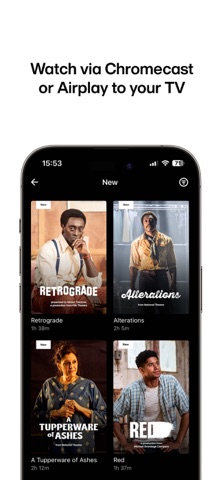
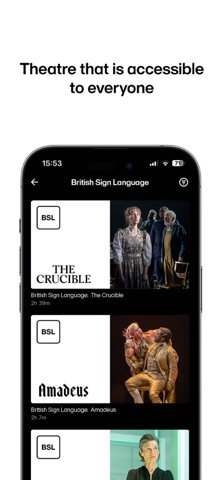
Stream our exclusive collection of unforgettable British theatre whenever you want it with National Theatre at Home. It works like any other streaming service, you can choose to subscribe by month or save with annual subscription and get 12 months for the price of 10. Watch National Theatre Live recordings filmed in high definition and made for cinema to capture all the twists and turns, laughter and heartbreak. From Shakespeare classics like A Midsummer Night's Dream to modern productions including All About Eve and Best of Enemies. Our vast library has something for every theatre enthusiast. Plus, for the first time ever, we’re releasing a treasure trove of plays from the National Theatre Archive. We’ll put you at the heart of the action – and up close with stars like Tom Hiddleston, Michaela Coel, Adrian Lester and Helen Mirren. All from the comfort of your sofa. Subscribe today and enjoy: · New plays every month, so there’s always something new to look forward to. · Unlimited access. Watch whatever you want, whenever you want with no time-limits. · Early access to new theatre titles and exclusive behind-the-scenes content · Watch at home, or on-the-go on any internet browser or through the National Theatre at Home app right here. But that’s not all. You’ll also become part of a huge worldwide audience, watching together and sharing your favourite scenes, lines, and breath-taking moments. So join in, and share the magic of unmissable theatre with friends and family today. National Theatre at Home is your theatre, any time, anywhere. To access all features and content you can subscribe to National Theatre at Home on a monthly or yearly basis with an auto-renewing subscription right inside the app.* Pricing can vary by region and will be confirmed before purchase in the app. In app subscriptions will automatically renew at the end of their cycle. * All payments will be paid through your iTunes Account and may be managed under Account Settings after the initial payment. Subscription payments will automatically renew unless deactivated at least 24-hours before the end of the current cycle. Your account will be charged for renewal at least 24-hours prior to the end of the current cycle. Any unused portion of your free trial will be forfeited upon payment. Cancellations are incurred by disabling auto-renewal. Terms of Service: https://www.ntathome.com/tos Privacy Policy: https://www.ntathome.com/privacy


