
PC 용 Theraview - Track ADHD Meds
- 카테고리: Health & Fitness
- 최근 업데이트: 2023-08-20
- 현재 버전: 5
- 파일 크기: 38.68 MB
- 개발자: Theraview LLC
- 호환성: 필요 Windows XP, Windows Vista, Windows 7, Windows 8, Windows 8.1 and Windows 10, Windows 11


PC에서 Theraview - Track ADHD Meds 용 호환 APK 다운로드
| 다운로드 | 개발자 | 평점 | 점수 | 현재 버전 | 성인 랭킹 |
|---|---|---|---|---|---|
| ↓ PC용 APK 다운로드 | Theraview LLC | 1 | 5 | 5 | 12+ |
에뮬레이터의 중요성은 컴퓨터에서 안드로이드 환경을 흉내 내고 안드로이드 폰을 구입하지 않고도 안드로이드 앱을 설치하고 실행하는 것을 매우 쉽게 만들어주는 것입니다. 누가 당신이 두 세계를 즐길 수 없다고 말합니까? 우선 아래에있는 에뮬레이터 앱을 다운로드 할 수 있습니다.
A. Nox App . OR
B. Bluestacks App .
Bluestacks는 매우 대중적이므로 개인적으로 "B"옵션을 사용하는 것이 좋습니다. 문제가 발생하면 Google 또는 Naver.com에서 좋은 해결책을 찾을 수 있습니다.
Bluestacks.exe 또는 Nox.exe를 성공적으로 다운로드 한 경우 컴퓨터의 다운로드 폴더 또는 다운로드 한 파일을 일반적으로 저장하는 곳으로 이동하십시오.
찾으면 클릭하여 응용 프로그램을 설치하십시오. PC에서 설치 프로세스를 시작해야합니다.
다음을 클릭하여 EULA 라이센스 계약에 동의하십시오.
응용 프로그램을 설치하려면 화면 지시문을 따르십시오.
위 사항을 올바르게 수행하면 소프트웨어가 성공적으로 설치됩니다.
이제 설치 한 에뮬레이터 애플리케이션을 열고 검색 창을 찾으십시오. 지금 입력하십시오. - Theraview - Track ADHD Meds 앱을 쉽게 볼 수 있습니다. 그것을 클릭하십시오. 응용 프로그램 창이 열리고 에뮬레이터 소프트웨어에 응용 프로그램이 표시됩니다. 설치 버튼을 누르면 응용 프로그램이 다운로드되기 시작합니다. 이제 우리는 모두 끝났습니다.
그런 다음 "모든 앱"아이콘이 표시됩니다.
클릭하면 설치된 모든 응용 프로그램이 포함 된 페이지로 이동합니다.
당신은 Theraview - Track ADHD Meds 상. 그것을 클릭하고 응용 프로그램 사용을 시작하십시오.
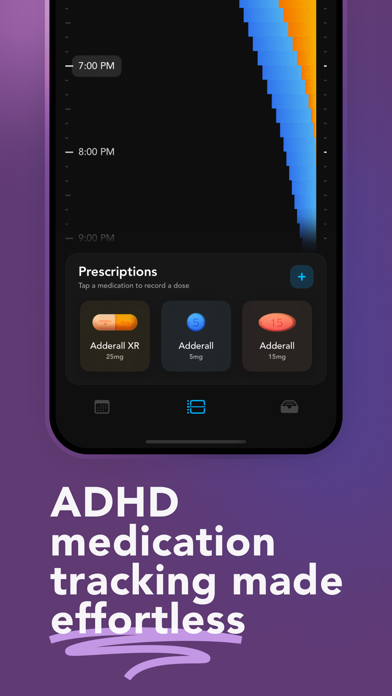
Theraview is the all-in-one medication management and tracking app for ADHD meds. Easily visualize your prescribed doses and see how long each dose will last. The app's intuitive design makes it simple to keep a record of all your doses. You can always view your dose history with just a tap. Plus, with built-in reminders, you'll never miss a scheduled dose or forget when your medication is wearing off. For parents, Theraview offers Parent Mode to help you track your child's medication. Supported medications: - Adderall - Adderall XR - Concerta - Dexedrine Spansules - Focalin IR - MYDAYIS - Ritalin - Ritalin LA - Vyvanse / Elvanse / Tyvense All Features: - Track Medications: Easily track and visualize your prescribed Adderall, Concerta, Focalin IR, MYDAYIS, Ritalin or Vyvanse doses - Convenient Record Keeping: Keep track of all your previous doses with the easy-to-use history tab - Customizable Reminders: Never forget to take your medication again with reminders for scheduled doses and when your medication is wearing off - Parent Mode: An optional feature that allows you to track your child's medication - Privacy: With our commitment to privacy, all your Theraview data is securely stored on your phone and isn't tied to an account - Anticipate Side Effects: Know when to expect reduced appetite, nervousness, or other common side effects of ADHD medication - Notes: Take notes on any previous dose about side effects, effectiveness or whatever you want to remember - Sleep Time Estimates: Know when you'll likely fall asleep after a dose of medication Benefits for patients: - Plan your schedule without needing to worry about your meds - Anticipate upcoming side effects associated with doses of medication wearing off - Organize your medication history in one convenient location - Make sure your medication isn't interfering with your bedtime or sleep schedule - If your stimulant medication messes with your appetite, Theraview's insights can help you plan your meal schedule Benefits for parents: - Help your child determine the optimal time to take their stimulant medication - Anticipate changes in your child's mood, or side effects associated with doses wearing off - Easily organize your child's medication and dose history and be prepared to meet with your child's prescriber - Have a record of side effects and mood changes caused by your child's medication - Make sure your child's medication isn't interfering with their bedtime or sleep schedule - Plan your family's meal schedule to accommodate your child's appetite (which is more than likely impacted by their medication)


