PC 용 Match Fit Pass
- 카테고리: Sports
- 최근 업데이트: 2021-09-14
- 현재 버전: 1.6.0
- 파일 크기: 11.81 MB
- 개발자: University of Salford
- 호환성: 필요 Windows XP, Windows Vista, Windows 7, Windows 8, Windows 8.1 and Windows 10, Windows 11



PC에서 Match Fit Pass 용 호환 APK 다운로드
| 다운로드 | 개발자 | 평점 | 점수 | 현재 버전 | 성인 랭킹 |
|---|---|---|---|---|---|
| ↓ PC용 APK 다운로드 | University of Salford | 0 | 1.6.0 | 4+ |
에뮬레이터의 중요성은 컴퓨터에서 안드로이드 환경을 흉내 내고 안드로이드 폰을 구입하지 않고도 안드로이드 앱을 설치하고 실행하는 것을 매우 쉽게 만들어주는 것입니다. 누가 당신이 두 세계를 즐길 수 없다고 말합니까? 우선 아래에있는 에뮬레이터 앱을 다운로드 할 수 있습니다.
A. Nox App . OR
B. Bluestacks App .
Bluestacks는 매우 대중적이므로 개인적으로 "B"옵션을 사용하는 것이 좋습니다. 문제가 발생하면 Google 또는 Naver.com에서 좋은 해결책을 찾을 수 있습니다.
Bluestacks.exe 또는 Nox.exe를 성공적으로 다운로드 한 경우 컴퓨터의 다운로드 폴더 또는 다운로드 한 파일을 일반적으로 저장하는 곳으로 이동하십시오.
찾으면 클릭하여 응용 프로그램을 설치하십시오. PC에서 설치 프로세스를 시작해야합니다.
다음을 클릭하여 EULA 라이센스 계약에 동의하십시오.
응용 프로그램을 설치하려면 화면 지시문을 따르십시오.
위 사항을 올바르게 수행하면 소프트웨어가 성공적으로 설치됩니다.
이제 설치 한 에뮬레이터 애플리케이션을 열고 검색 창을 찾으십시오. 지금 입력하십시오. - Match Fit Pass 앱을 쉽게 볼 수 있습니다. 그것을 클릭하십시오. 응용 프로그램 창이 열리고 에뮬레이터 소프트웨어에 응용 프로그램이 표시됩니다. 설치 버튼을 누르면 응용 프로그램이 다운로드되기 시작합니다. 이제 우리는 모두 끝났습니다.
그런 다음 "모든 앱"아이콘이 표시됩니다.
클릭하면 설치된 모든 응용 프로그램이 포함 된 페이지로 이동합니다.
당신은 Match Fit Pass 상. 그것을 클릭하고 응용 프로그램 사용을 시작하십시오.
Mac OS 에서 Match Fit Pass 다운로드
| 다운로드 | 개발자 | 점수 | 현재 버전 | 성인 랭킹 |
|---|---|---|---|---|
| 무료 - Mac 에서 다운로드 | University of Salford | 1.6.0 | 4+ |
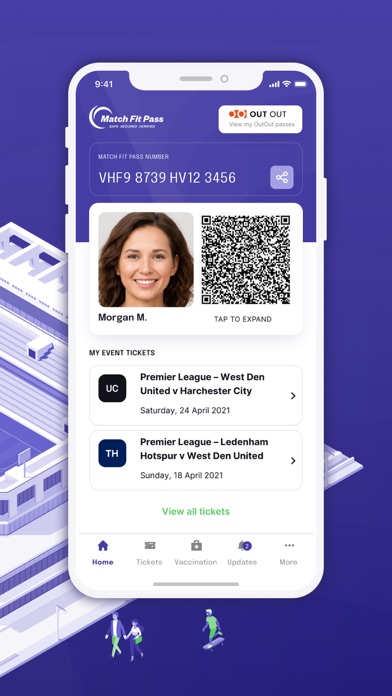
Access into events and venues safely and seamlessly Verifying each individual attending an event is often a time-consuming, inaccurate process. With Match Fit Pass, bespoke AI software is used to identify event attendees from their ID, generating a Secure QR Code (SQRC) to permit entry and record attendance. No need for paper tickets, no more ticket resales – just fast, secure event entry. Manage all your tickets, identity, and public health compliance within a secure pass on your mobile All of your tickets are conveniently stored on the Match Fit Pass app in an easy-to-use format, and your identity and age are verified – no need to carry around ID to purchase alcohol within an event. Secure ID verification with face recognition and SQRC (Secure QR code) Our facial recognition checks are 99.9% accurate, and our SQRC scanning and encrypted images offer streamlined, hassle-free verification. Proactive counter-terrorism considerations ensure venues can guarantee the identity and traceability of everyone attending an event through our ID verification with facial recognition system. Digital ticket wallet imported and ready View all of your upcoming and attended events in an easy-to-navigate format, so that you can see all the events you have to look forward to, and those you’ve already enjoyed. There are no potential last-minute panics over forgotten tickets, as they are all stored safely and conveniently on the app. Direct communication from the venues See all updates from venues in the updates section of the app, which can include public health messaging, or localised safety announcements. You are notified by your seat number, so you can rest assured that your personal information is secure and not available to the venue. Avoid lengthy queues, as entry times are staggered You will be given a specific entry window to events, so that you can avoid lengthy queues and complicated entry procedures. You simply check your ticket to see if your entry window is active and arrive in the allocated time, without the fuss.