
PC 용 A320 Checklist: Flight Logbook
- 카테고리: Reference
- 최근 업데이트: 2026-10-19
- 현재 버전: 4.0
- 파일 크기: 10.56 MB
- 개발자: Wojciech Olszewski
- 호환성: 필요 Windows XP, Windows Vista, Windows 7, Windows 8, Windows 8.1 and Windows 10, Windows 11



PC에서 A320 Checklist: Flight Logbook 용 호환 APK 다운로드
| 다운로드 | 개발자 | 평점 | 점수 | 현재 버전 | 성인 랭킹 |
|---|---|---|---|---|---|
| ↓ PC용 APK 다운로드 | Wojciech Olszewski | 0 | 0 | 4.0 | 4+ |
에뮬레이터의 중요성은 컴퓨터에서 안드로이드 환경을 흉내 내고 안드로이드 폰을 구입하지 않고도 안드로이드 앱을 설치하고 실행하는 것을 매우 쉽게 만들어주는 것입니다. 누가 당신이 두 세계를 즐길 수 없다고 말합니까? 우선 아래에있는 에뮬레이터 앱을 다운로드 할 수 있습니다.
A. Nox App . OR
B. Bluestacks App .
Bluestacks는 매우 대중적이므로 개인적으로 "B"옵션을 사용하는 것이 좋습니다. 문제가 발생하면 Google 또는 Naver.com에서 좋은 해결책을 찾을 수 있습니다.
Bluestacks.exe 또는 Nox.exe를 성공적으로 다운로드 한 경우 컴퓨터의 다운로드 폴더 또는 다운로드 한 파일을 일반적으로 저장하는 곳으로 이동하십시오.
찾으면 클릭하여 응용 프로그램을 설치하십시오. PC에서 설치 프로세스를 시작해야합니다.
다음을 클릭하여 EULA 라이센스 계약에 동의하십시오.
응용 프로그램을 설치하려면 화면 지시문을 따르십시오.
위 사항을 올바르게 수행하면 소프트웨어가 성공적으로 설치됩니다.
이제 설치 한 에뮬레이터 애플리케이션을 열고 검색 창을 찾으십시오. 지금 입력하십시오. - A320 Checklist: Flight Logbook 앱을 쉽게 볼 수 있습니다. 그것을 클릭하십시오. 응용 프로그램 창이 열리고 에뮬레이터 소프트웨어에 응용 프로그램이 표시됩니다. 설치 버튼을 누르면 응용 프로그램이 다운로드되기 시작합니다. 이제 우리는 모두 끝났습니다.
그런 다음 "모든 앱"아이콘이 표시됩니다.
클릭하면 설치된 모든 응용 프로그램이 포함 된 페이지로 이동합니다.
당신은 A320 Checklist: Flight Logbook 상. 그것을 클릭하고 응용 프로그램 사용을 시작하십시오.
Mac OS 에서 A320 Checklist 다운로드
| 다운로드 | 개발자 | 점수 | 현재 버전 | 성인 랭킹 |
|---|---|---|---|---|
| ₩2,500 - Mac 에서 다운로드 | Wojciech Olszewski | 0 |
4.0 | 4+ |
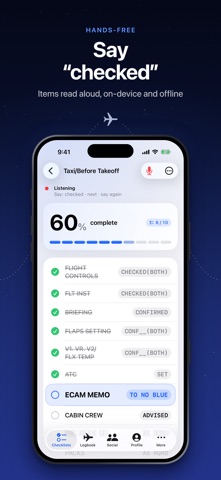
Run every A320 checklist in flight order, hands-free if you like, and keep each sim flight as a boarding pass. A320 Checklist is the iPhone and iPad companion for pilots who fly the A318, A319, A320 and A321 in a flight simulator. Keep it next to Microsoft Flight Simulator, X-Plane or Prepar3D, with the default aircraft or your favorite add-on. CHECKLISTS IN FLIGHT ORDER • 9 normal checklists on one timeline, from Before Start to Securing the Aircraft • Tap to tick an item, or go hands-free: the app reads each item aloud and you answer “checked”, “next” or “say again” • Speech recognition runs on your device and works offline (voice commands in English) • Build your own checklists for other aircraft or your own flows • QRH with 51 abnormal and emergency procedures, as a training reference A LOGBOOK WORTH OPENING • Every flight becomes a boarding pass, and the stub tears off as you scroll • Import a SimBrief OFP to fill in the route, aircraft and times • Flight timer: start it before taxi, stop it on arrival, and the entry fills itself in • Route map, total hours, landing ratings, activity heatmap and countries visited • Syncs through iCloud, works offline, exports to CSV and JSON AT A GLANCE • Home Screen widgets in small, medium and large, plus Lock Screen widgets: last landing, total hours, this month’s flights • Live Activity on the Lock Screen and in the Dynamic Island while the timer runs • Flight timer control in Control Center • Siri, Shortcuts and Spotlight COMMUNITY • See where other sim pilots fly, follow them and like their flights • Your flights stay private until you share one • Share cards for Instagram Stories: profile, weekly recap, countries visited PROGRESS AND EXTRAS • Ranks from Cadet to Commander, achievements and streaks • Aviation quiz, fun facts and over 1,200 aviation abbreviations explained • Decoded METAR weather by ICAO code BUILT FOR EVERY SCREEN • iPhone Duo: use it folded or unfolded; unfolded, list and detail sit side by side • iPad: list and detail side by side in a wide window • Large text sizes supported throughout • In English, Polish, German, Spanish, French and Italian FOR SIMULATION ONLY A320 Checklist is for flight simulation and entertainment. Don’t use it for real-world flight operations or flight training. Not affiliated with or endorsed by Airbus, Microsoft, Laminar Research, Lockheed Martin or Navigraph. All trademarks belong to their owners.


