PC 용 Calligraphy Practice · Cursive
- 카테고리: Graphics & Design
- 최근 업데이트: 2026-10-29
- 현재 버전: 10.3
- 파일 크기: 67.27 MB
- 개발자: Lidwien Veugen
- 호환성: 필요 Windows XP, Windows Vista, Windows 7, Windows 8, Windows 8.1 and Windows 10, Windows 11





PC에서 Calligraphy Practice · Cursive 용 호환 APK 다운로드
| 다운로드 | 개발자 | 평점 | 점수 | 현재 버전 | 성인 랭킹 |
|---|---|---|---|---|---|
| ↓ PC용 APK 다운로드 | Lidwien Veugen | 9 | 4.22222 | 10.3 | 4+ |
호환되는 PC 앱 또는 대안 확인
| 소프트웨어 | 다운로드 | 평점 | 개발자 |
|---|---|---|---|
| Calligraphy Practice · Cursive |
PC 앱 받기 | 4.22222/5 9 리뷰 4.22222 |
Lidwien Veugen |
에뮬레이터의 중요성은 컴퓨터에서 안드로이드 환경을 흉내 내고 안드로이드 폰을 구입하지 않고도 안드로이드 앱을 설치하고 실행하는 것을 매우 쉽게 만들어주는 것입니다. 누가 당신이 두 세계를 즐길 수 없다고 말합니까? 우선 아래에있는 에뮬레이터 앱을 다운로드 할 수 있습니다.
A. Nox App . OR
B. Bluestacks App .
Bluestacks는 매우 대중적이므로 개인적으로 "B"옵션을 사용하는 것이 좋습니다. 문제가 발생하면 Google 또는 Naver.com에서 좋은 해결책을 찾을 수 있습니다.
Bluestacks.exe 또는 Nox.exe를 성공적으로 다운로드 한 경우 컴퓨터의 다운로드 폴더 또는 다운로드 한 파일을 일반적으로 저장하는 곳으로 이동하십시오.
찾으면 클릭하여 응용 프로그램을 설치하십시오. PC에서 설치 프로세스를 시작해야합니다.
다음을 클릭하여 EULA 라이센스 계약에 동의하십시오.
응용 프로그램을 설치하려면 화면 지시문을 따르십시오.
위 사항을 올바르게 수행하면 소프트웨어가 성공적으로 설치됩니다.
이제 설치 한 에뮬레이터 애플리케이션을 열고 검색 창을 찾으십시오. 지금 입력하십시오. - Calligraphy Practice · Cursive 앱을 쉽게 볼 수 있습니다. 그것을 클릭하십시오. 응용 프로그램 창이 열리고 에뮬레이터 소프트웨어에 응용 프로그램이 표시됩니다. 설치 버튼을 누르면 응용 프로그램이 다운로드되기 시작합니다. 이제 우리는 모두 끝났습니다.
그런 다음 "모든 앱"아이콘이 표시됩니다.
클릭하면 설치된 모든 응용 프로그램이 포함 된 페이지로 이동합니다.
당신은 Calligraphy Practice · Cursive 상. 그것을 클릭하고 응용 프로그램 사용을 시작하십시오.
Mac OS 에서 Calligraphy Practice · Cursive 다운로드
| 다운로드 | 개발자 | 점수 | 현재 버전 | 성인 랭킹 |
|---|---|---|---|---|
| 무료 - Mac 에서 다운로드 | Lidwien Veugen | 4.22222 |
10.3 | 4+ |
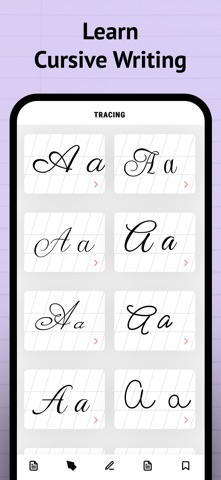
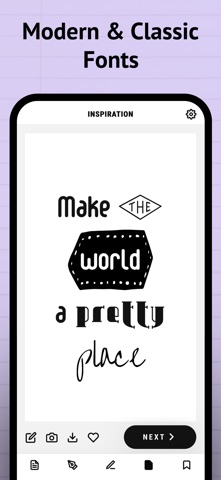
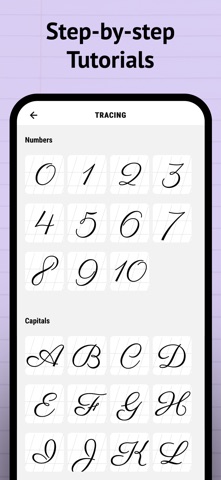
Looking to improve your calligraphy, hand lettering, or cursive writing? This powerful calligraphy practice & writing app lets you explore, customize, and trace fonts and alphabets in a wide range of cursive writing styles — perfect for beginners, hobby artists, and anyone wanting to master beautiful handwriting. Choose from hundreds of calligraphy fonts, lettering styles, and typography templates. Trace individual letters, full alphabets, or complete words in the app or directly on paper using the AR tracing mode. Just place your device above your page and follow the lines to practice calligraphy strokes, shapes, and letterforms with ease. You can also create stunning word art, quotes, tattoo ideas, and decorative typography. Enter your own text, adjust the style in the font editor, and design unique lettering compositions. This calligraphy practice app & text art designer supports the following features: - A large library of writing styles, lettering fonts, and cursive handwriting examples - Full alphabet tracing for handwriting practice (A–Z) - Animated letter tracing tutorials to learn strokes step by step - AR tracing mode to practice cursive writing directly on paper - Add your own text for custom lettering, quotes, names, or tattoo ideas - Hundreds of handwriting styles: brush lettering, cursive, ornamental, modern writing & more - Word art creation with adjustable size, spacing, rotation, and layout - Customize colors, backgrounds, or use your own images - Save your favorite designs and handwriting practice sheets - Add emojis, import photos, or design typography posters - Works as both a cursive writing practice app and a lettering font design app The Pro-version of this text art maker app also offers: - Unlock all calligraphy fonts and styles - Add unlimited custom words and text - Remove ads Calligraphy is an ancient penmanship art form focused on beautiful handwriting and word art. Today, this decorative type of hand-writing is still popular. It is used to decorate texts, logo’s, menus, postcards, wedding stationery and documents by forming, arranging and decorating the shapes and symbols of words. Cursive handwriting is a great way to relax and let your typography creativity flow. Explore both traditional and modern calligraphy examples in this text designer app. Traditional calligraphy involves the practice of certain script styles and aims for a uniform shape of letters with fixed proportions. Modern lettering, sometimes called ‘faux calligraphy’, is a big trend over the last few years. In modern caligraphy, often different styles are combined in one composition. Whether you're new to calligraphy or a master calligrapher, learn to write and boost your typography creativity with this caligraphy text designer app, endless word art templates, tattoo designs, font editor and quotes creator. Start creating! If you have any questions, comments or suggestions, please contact support @ wienelware.nl