PC 용 Lock Screen 27: Widgets & Icon
- 카테고리: Graphics & Design
- 최근 업데이트: 2026-11-05
- 현재 버전: 1.8.13
- 파일 크기: 60.76 MB
- 개발자: Protools LLP
- 호환성: 필요 Windows XP, Windows Vista, Windows 7, Windows 8, Windows 8.1 and Windows 10, Windows 11



PC에서 Lock Screen 27: Widgets & Icon 용 호환 APK 다운로드
| 다운로드 | 개발자 | 평점 | 점수 | 현재 버전 | 성인 랭킹 |
|---|---|---|---|---|---|
| ↓ PC용 APK 다운로드 | Protools LLP | 7 | 4 | 1.8.13 | 4+ |
에뮬레이터의 중요성은 컴퓨터에서 안드로이드 환경을 흉내 내고 안드로이드 폰을 구입하지 않고도 안드로이드 앱을 설치하고 실행하는 것을 매우 쉽게 만들어주는 것입니다. 누가 당신이 두 세계를 즐길 수 없다고 말합니까? 우선 아래에있는 에뮬레이터 앱을 다운로드 할 수 있습니다.
A. Nox App . OR
B. Bluestacks App .
Bluestacks는 매우 대중적이므로 개인적으로 "B"옵션을 사용하는 것이 좋습니다. 문제가 발생하면 Google 또는 Naver.com에서 좋은 해결책을 찾을 수 있습니다.
Bluestacks.exe 또는 Nox.exe를 성공적으로 다운로드 한 경우 컴퓨터의 다운로드 폴더 또는 다운로드 한 파일을 일반적으로 저장하는 곳으로 이동하십시오.
찾으면 클릭하여 응용 프로그램을 설치하십시오. PC에서 설치 프로세스를 시작해야합니다.
다음을 클릭하여 EULA 라이센스 계약에 동의하십시오.
응용 프로그램을 설치하려면 화면 지시문을 따르십시오.
위 사항을 올바르게 수행하면 소프트웨어가 성공적으로 설치됩니다.
이제 설치 한 에뮬레이터 애플리케이션을 열고 검색 창을 찾으십시오. 지금 입력하십시오. - Lock Screen 27: Widgets & Icon 앱을 쉽게 볼 수 있습니다. 그것을 클릭하십시오. 응용 프로그램 창이 열리고 에뮬레이터 소프트웨어에 응용 프로그램이 표시됩니다. 설치 버튼을 누르면 응용 프로그램이 다운로드되기 시작합니다. 이제 우리는 모두 끝났습니다.
그런 다음 "모든 앱"아이콘이 표시됩니다.
클릭하면 설치된 모든 응용 프로그램이 포함 된 페이지로 이동합니다.
당신은 Lock Screen 27: Widgets & Icon 상. 그것을 클릭하고 응용 프로그램 사용을 시작하십시오.
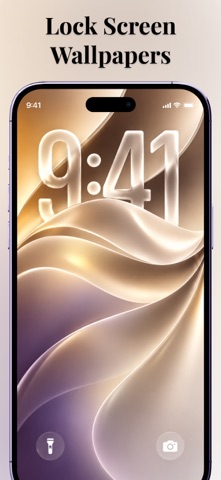
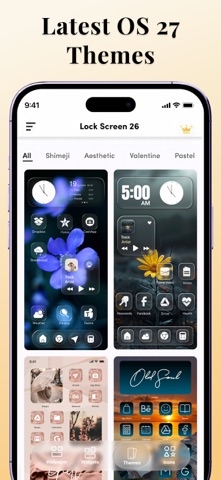
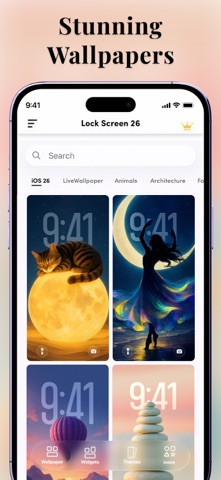
Style Your iPhone & iPad with Custom Icons, Aesthetic Widgets & Live Wallpapers With Lock Screen & Widgets 26, transforming the look of your iPhone or iPad has never been easier — or more fun. Choose from beautifully designed icon packs, interactive widgets, animated wallpapers, and trendy themes, all in one simple app. What You Get Custom Themes Curated home screen setups with matching icons, widgets, and wallpapers. One tap and your device looks brand new. Aesthetic Widgets Add stylish widgets like Neon clocks, Daily Quotes, Custom Settings panels, and more. Mix, match, and layer your look. 50+ Icon Packs Change how your apps appear with over 50 stunning icon collections in various styles — minimalist, bold, vintage, glassy, and more. Live Wallpapers Bring your screen to life with high-quality animated wallpapers designed to make your lock and home screen stand out. Glassy UI Elements Experience the latest iOS design trends with sleek, translucent UI that gives your device a premium, futuristic feel. Custom Icon Creator Design your own icons — pick a background, choose from hundreds of icons, and add them directly to your home screen. How It Works 1. Choose a Theme – Tap to preview and install your favorite setup 2. Customize Icons – Select individual icons or full icon packs 3. Apply Wallpaper – Save and set static or live wallpapers 4. Create Icons – Use the built-in icon maker for a fully custom look Why Users Love It Simple & Intuitive – Designed for effortless customization Regular Updates – New icon packs, widgets, and themes added frequently All-in-One Solution – Everything you need in one beautifully designed app Built for iOS – Optimized for iPhone & iPad with smooth performance Your iPhone. Your Style. Subscription Details: Lock screen offers premium features through auto-renewable subscriptions. Payment will be charged to your Apple ID account upon confirmation of purchase. Subscriptions automatically renew unless canceled at least 24 hours before the end of the current period. You can manage your subscription and turn off auto-renewal in your account settings. For more details on managing subscriptions, visit: https://support.apple.com/en-us/HT202039 Privacy Policy - https://api.posterapp.org/IconThemer/privacy-policy.html Terms of Service - https://api.posterapp.org/IconThemer/terms-and-conditions.html Don’t settle for a boring home screen. Download Lock Screen & Widgets 26 and turn your device into a design masterpiece — no design skills required.