PC 용 Box Box Club: Racing Companion
- 카테고리: Sports
- 최근 업데이트: 2026-11-07
- 현재 버전: 5.5.6
- 파일 크기: 26.74 MB
- 개발자: Kamal Kumar Lakshmanan
- 호환성: 필요 Windows XP, Windows Vista, Windows 7, Windows 8, Windows 8.1 and Windows 10, Windows 11




PC에서 Box Box Club: Racing Companion 용 호환 APK 다운로드
| 다운로드 | 개발자 | 평점 | 점수 | 현재 버전 | 성인 랭킹 |
|---|---|---|---|---|---|
| ↓ PC용 APK 다운로드 | Kamal Kumar Lakshmanan | 474 | 4.76159 | 5.5.6 | 4+ |
호환되는 PC 앱 또는 대안 확인
| 소프트웨어 | 다운로드 | 평점 | 개발자 |
|---|---|---|---|
| Box Box Club |
PC 앱 받기 | 4.76159/5 474 리뷰 4.76159 |
Kamal Kumar Lakshmanan |
에뮬레이터의 중요성은 컴퓨터에서 안드로이드 환경을 흉내 내고 안드로이드 폰을 구입하지 않고도 안드로이드 앱을 설치하고 실행하는 것을 매우 쉽게 만들어주는 것입니다. 누가 당신이 두 세계를 즐길 수 없다고 말합니까? 우선 아래에있는 에뮬레이터 앱을 다운로드 할 수 있습니다.
A. Nox App . OR
B. Bluestacks App .
Bluestacks는 매우 대중적이므로 개인적으로 "B"옵션을 사용하는 것이 좋습니다. 문제가 발생하면 Google 또는 Naver.com에서 좋은 해결책을 찾을 수 있습니다.
Bluestacks.exe 또는 Nox.exe를 성공적으로 다운로드 한 경우 컴퓨터의 다운로드 폴더 또는 다운로드 한 파일을 일반적으로 저장하는 곳으로 이동하십시오.
찾으면 클릭하여 응용 프로그램을 설치하십시오. PC에서 설치 프로세스를 시작해야합니다.
다음을 클릭하여 EULA 라이센스 계약에 동의하십시오.
응용 프로그램을 설치하려면 화면 지시문을 따르십시오.
위 사항을 올바르게 수행하면 소프트웨어가 성공적으로 설치됩니다.
이제 설치 한 에뮬레이터 애플리케이션을 열고 검색 창을 찾으십시오. 지금 입력하십시오. - Box Box Club: Racing Companion 앱을 쉽게 볼 수 있습니다. 그것을 클릭하십시오. 응용 프로그램 창이 열리고 에뮬레이터 소프트웨어에 응용 프로그램이 표시됩니다. 설치 버튼을 누르면 응용 프로그램이 다운로드되기 시작합니다. 이제 우리는 모두 끝났습니다.
그런 다음 "모든 앱"아이콘이 표시됩니다.
클릭하면 설치된 모든 응용 프로그램이 포함 된 페이지로 이동합니다.
당신은 Box Box Club: Racing Companion 상. 그것을 클릭하고 응용 프로그램 사용을 시작하십시오.
Mac OS 에서 Box Box Club 다운로드
| 다운로드 | 개발자 | 점수 | 현재 버전 | 성인 랭킹 |
|---|---|---|---|---|
| 무료 - Mac 에서 다운로드 | Kamal Kumar Lakshmanan | 4.76159 |
5.5.6 | 4+ |
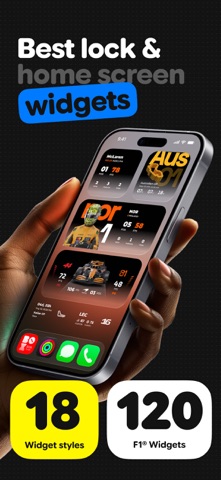
Join over 4 million racing fans with Box Box Club, your ultimate Formula One® racing companion. Follow live race updates, track every race weekend, explore driver statistics, check championship standings, and stay connected to the world of motorsport. From live race timing and personalised widgets to race schedules, breaking news, and community ratings, Box Box Club brings everything racing fans need into one beautifully designed app. NEVER MISS A RACE WEEKEND Stay ahead of every race with a complete racing calendar, live session updates, and personalised notifications. → Live race updates and session tracking → Full race calendar with practice, qualifying, sprint, and race schedules → Race start times automatically adjusted to your local time → Countdown timers for upcoming sessions → Personalised race reminders and notifications → Live timing and session information BEAUTIFUL F1® WIDGETS Bring the excitement of racing to your Home Screen, Lock Screen, and Apple Watch. Personalise your device with beautifully designed widgets featuring: → Live race updates and results → Upcoming race schedules and countdowns → Driver Championship standings → Constructor Championship standings → Favourite drivers and teams → Driver photos and team badges F1® CHAMPIONSHIP STANDINGS → Driver Championship standings → Constructor Championship standings → Championship points and rankings → Driver and team performance statistics → Season-long championship tracking DRIVER, TEAM & CIRCUIT STATISTICS → Detailed driver profiles and career statistics → Driver head-to-head comparisons → Season and career performance data → Team profiles and championship history → Circuit information and racing statistics → Qualifying and race performance insights RATE & REVIEW EVERY F1® RACE → Rate races and race weekends → Write your own race reviews → Explore community race ratings → Discover the highest-rated races → Compare your opinions with fellow fans F1® RACING NEWS & UPDATES → Breaking motorsport news → Driver and team updates → Race weekend previews and insights → Racing guides, facts, and explanations → A motorsport glossary for new and experienced fans FOLLOW MULTIPLE FORMULA ONE® CHAMPIONSHIPS Stay connected to the world of single-seater racing with Formula 1, Formula 2, Formula 3, and F1 Academy. Follow every race weekend with live updates, schedules, driver standings, and more. Follow race weekends, schedules, drivers, and championship updates across supported series. One app. Every race weekend. --- Privacy Policy: https://boxbox.club/Privacy.html Terms of Use: https://boxbox.club/Terms.html DISCLAIMER Box Box Club is an independent, unofficial Formula 1 companion app and is not affiliated with or endorsed by Formula One, Formula One Licensing B.V., the FIA, any Formula 1 team, or any Formula 1 driver. F1®, Formula 1®, FORMULA ONE®, FIA Formula One World Championship®, Grand Prix®, and related trademarks are the property of their respective owners. Team names, including McLaren, Mercedes-AMG PETRONAS, Scuderia Ferrari, Red Bull Racing, Williams, Alpine, Aston Martin, Haas, Racing Bulls (VCARB), and Stake F1 Team Kick Sauber, along with driver names including Lewis Hamilton, Max Verstappen, Charles Leclerc, Lando Norris, Oscar Piastri, George Russell, Kimi Antonelli, Carlos Sainz, Alexander Albon, Fernando Alonso, Lance Stroll, Pierre Gasly, Franco Colapinto, Esteban Ocon, Oliver Bearman, Yuki Tsunoda, Isack Hadjar, Liam Lawson, Gabriel Bortoleto, and Nico Hülkenberg, are used solely for editorial and informational purposes. All trademarks, logos, images, and other intellectual property remain the property of their respective owners and do not imply any endorsement, sponsorship, or affiliation with Box Box.