PC 용 Sleep System 2.0
- 카테고리: Health & Fitness
- 최근 업데이트: 2021-10-31
- 현재 버전: 2.8
- 파일 크기: 38.79 MB
- 개발자: Brian Zeleniak
- 호환성: 필요 Windows XP, Windows Vista, Windows 7, Windows 8, Windows 8.1 and Windows 10, Windows 11

PC에서 Sleep System 2.0 용 호환 APK 다운로드
| 다운로드 | 개발자 | 평점 | 점수 | 현재 버전 | 성인 랭킹 |
|---|---|---|---|---|---|
| ↓ PC용 APK 다운로드 | Brian Zeleniak | 0 | 0 | 2.8 | 4+ |
에뮬레이터의 중요성은 컴퓨터에서 안드로이드 환경을 흉내 내고 안드로이드 폰을 구입하지 않고도 안드로이드 앱을 설치하고 실행하는 것을 매우 쉽게 만들어주는 것입니다. 누가 당신이 두 세계를 즐길 수 없다고 말합니까? 우선 아래에있는 에뮬레이터 앱을 다운로드 할 수 있습니다.
A. Nox App . OR
B. Bluestacks App .
Bluestacks는 매우 대중적이므로 개인적으로 "B"옵션을 사용하는 것이 좋습니다. 문제가 발생하면 Google 또는 Naver.com에서 좋은 해결책을 찾을 수 있습니다.
Bluestacks.exe 또는 Nox.exe를 성공적으로 다운로드 한 경우 컴퓨터의 다운로드 폴더 또는 다운로드 한 파일을 일반적으로 저장하는 곳으로 이동하십시오.
찾으면 클릭하여 응용 프로그램을 설치하십시오. PC에서 설치 프로세스를 시작해야합니다.
다음을 클릭하여 EULA 라이센스 계약에 동의하십시오.
응용 프로그램을 설치하려면 화면 지시문을 따르십시오.
위 사항을 올바르게 수행하면 소프트웨어가 성공적으로 설치됩니다.
이제 설치 한 에뮬레이터 애플리케이션을 열고 검색 창을 찾으십시오. 지금 입력하십시오. - Sleep System 2.0 앱을 쉽게 볼 수 있습니다. 그것을 클릭하십시오. 응용 프로그램 창이 열리고 에뮬레이터 소프트웨어에 응용 프로그램이 표시됩니다. 설치 버튼을 누르면 응용 프로그램이 다운로드되기 시작합니다. 이제 우리는 모두 끝났습니다.
그런 다음 "모든 앱"아이콘이 표시됩니다.
클릭하면 설치된 모든 응용 프로그램이 포함 된 페이지로 이동합니다.
당신은 Sleep System 2.0 상. 그것을 클릭하고 응용 프로그램 사용을 시작하십시오.
Mac OS 에서 Sleep System 2.0 다운로드
| 다운로드 | 개발자 | 점수 | 현재 버전 | 성인 랭킹 |
|---|---|---|---|---|
| ₩3,900 - Mac 에서 다운로드 | Brian Zeleniak | 0 |
2.8 | 4+ |
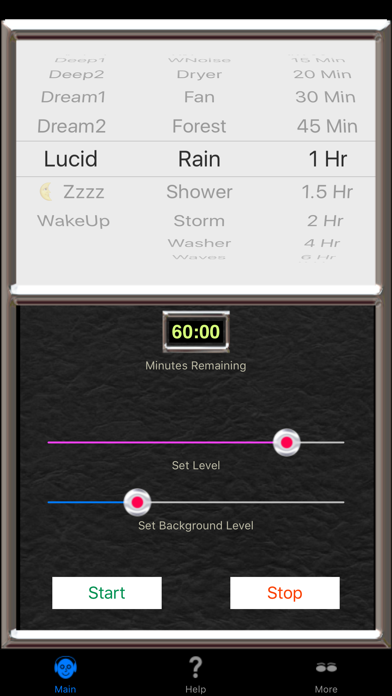
For less than the cost of a cheeseburger, you'll get the deep, restful sleep that you need and wake up refreshed and revived - WITHOUT SIDE EFFECTS. All you do is run these special frequencies through your headphones for a few minutes before bedtime and you'll be out like a light. (Note : you don't run the frequencies while you're sleeping - there's no need to) Using the latest Binaural Beat (TBSW) technology, all of the insomniacs out there now have a perfect solution for getting into a DEEP dreamless or dream-state sleep. It's Also great for those experimenting with Lucid dreaming and Astral states. The built-in timer goes up to 4 hours for people meditating on these specific states. IT'S POWERFUL! To make Sleep System 2.0 complete - a new Wake Up Preset has also been added to get you going when you finally wake up. Sleep System 2.0 is an entirely different type of solution than other binaural apps. Using the same TBSW technology as Pain Killer 2.0, this system is the finest available. The background sounds are very unique and originally recorded. These are specific to city dwellers as well as urbanites. Some city dwellers find that the same old Forest and Stream sounds are annoying or even disturbing. City Dwellers are covered, with sounds from home that will help put you to sleep in conjunction with the awesome binaural beats. Also, the Forest, Rain and Wave sounds are there too... Also, there are special Noise settings used by audio professionals to drown out environmental sounds like TVs, Radios, Traffic or people. More Great Features : * EASY to use - no switching between window after window. A three column spinner does all of the interface work. * Long audio fade at the session end so you aren't jolted out of your sleep * Smooth audio transitions * New interface with chrome guards Need sleep? GET Sleep System 2.0 today!