
PC 용 Bike Repair
- 카테고리: Sports
- 최근 업데이트: 2025-02-14
- 현재 버전: 7.28
- 파일 크기: 106.56 MB
- 개발자: Atomic Softwares
- 호환성: 필요 Windows XP, Windows Vista, Windows 7, Windows 8, Windows 8.1 and Windows 10, Windows 11


PC에서 Bike Repair 용 호환 APK 다운로드
| 다운로드 | 개발자 | 평점 | 점수 | 현재 버전 | 성인 랭킹 |
|---|---|---|---|---|---|
| ↓ PC용 APK 다운로드 | Atomic Softwares | 7 | 4.85714 | 7.28 | 4+ |
에뮬레이터의 중요성은 컴퓨터에서 안드로이드 환경을 흉내 내고 안드로이드 폰을 구입하지 않고도 안드로이드 앱을 설치하고 실행하는 것을 매우 쉽게 만들어주는 것입니다. 누가 당신이 두 세계를 즐길 수 없다고 말합니까? 우선 아래에있는 에뮬레이터 앱을 다운로드 할 수 있습니다.
A. Nox App . OR
B. Bluestacks App .
Bluestacks는 매우 대중적이므로 개인적으로 "B"옵션을 사용하는 것이 좋습니다. 문제가 발생하면 Google 또는 Naver.com에서 좋은 해결책을 찾을 수 있습니다.
Bluestacks.exe 또는 Nox.exe를 성공적으로 다운로드 한 경우 컴퓨터의 다운로드 폴더 또는 다운로드 한 파일을 일반적으로 저장하는 곳으로 이동하십시오.
찾으면 클릭하여 응용 프로그램을 설치하십시오. PC에서 설치 프로세스를 시작해야합니다.
다음을 클릭하여 EULA 라이센스 계약에 동의하십시오.
응용 프로그램을 설치하려면 화면 지시문을 따르십시오.
위 사항을 올바르게 수행하면 소프트웨어가 성공적으로 설치됩니다.
이제 설치 한 에뮬레이터 애플리케이션을 열고 검색 창을 찾으십시오. 지금 입력하십시오. - Bike Repair 앱을 쉽게 볼 수 있습니다. 그것을 클릭하십시오. 응용 프로그램 창이 열리고 에뮬레이터 소프트웨어에 응용 프로그램이 표시됩니다. 설치 버튼을 누르면 응용 프로그램이 다운로드되기 시작합니다. 이제 우리는 모두 끝났습니다.
그런 다음 "모든 앱"아이콘이 표시됩니다.
클릭하면 설치된 모든 응용 프로그램이 포함 된 페이지로 이동합니다.
당신은 Bike Repair 상. 그것을 클릭하고 응용 프로그램 사용을 시작하십시오.
Mac OS 에서 Bike Repair 다운로드
| 다운로드 | 개발자 | 점수 | 현재 버전 | 성인 랭킹 |
|---|---|---|---|---|
| ₩4,900 - Mac 에서 다운로드 | Atomic Softwares | 4.85714 |
7.28 | 4+ |
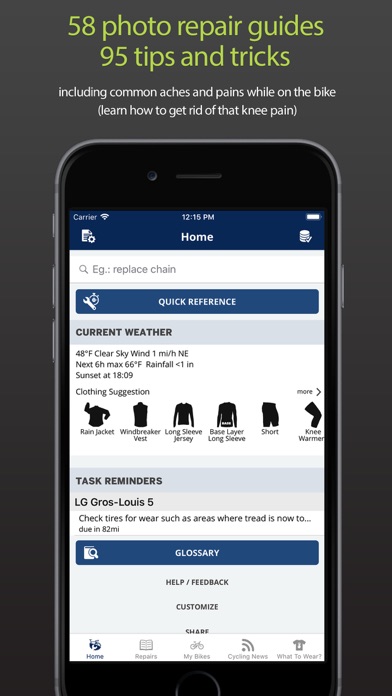
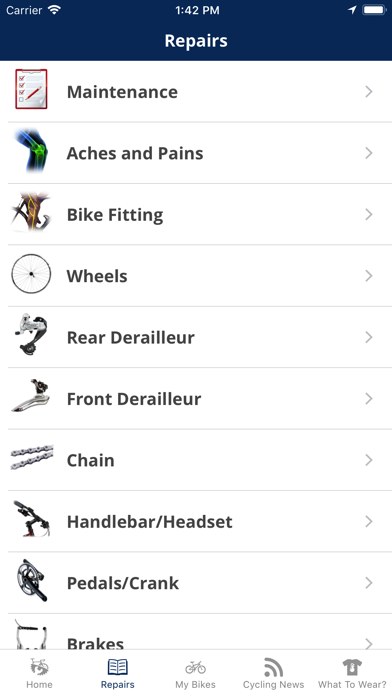
THE MOST SIMPLE AND COMPLETE BICYCLE REPAIR AND MAINTENANCE GUIDE ON THE APP STORE REPAIRS • 58 highly detailed photo repair guides, with over 300 studio quality photos (with parts highlighted). • 95 bicycle tips and tricks, including common aches and pains while on the bike (there are simple things to do to get rid of that knee pain). WEATHER • From the main screen, you have access to your current local weather and today's forecast. It also suggests what to wear based on the temperature. QUICK REFERENCE • For things we often do but can’t remember, like, what's the side to turn the wrench to remove the pedals? Or should I tighten the H or the L screw? WHAT SHOULD I WEAR • You don't remember what you should wear when it's 8°C (46°F)? Don't worry, check our suggestions list, or even better, check your own outfits list. • Keep track of the clothes you wear at a certain weather condition and rate them. Next time, you'll know what to wear or not OTHER FEATURES • Save money the first time you use Bike Repair App by doing the repairs yourself. • Fixing your shifting problem, derailleur noises, brakes rubbing on the wheel, flat tire, broken chain, pedal removal, hydraulic brakes, etc has never been easier. • Bike Repair demystifies every basic repair and maintenance routine, plus some intermediate to advanced ones. • Written in plain English, the easy-to-understand instruction guides are perfect for casual and serious riders alike. • Most of the repairs don't require any special tools. • The full list of all guides and problems covered is available at www.bikerepairapp.com


