PC 용 ScreenFloat—Pro Screen Capture
- 카테고리: Productivity
- 최근 업데이트: 2026-11-17
- 현재 버전: 2.3.12
- 파일 크기: 3.99 MB
- 개발자: Matthias Gansrigler
- 호환성: 필요 Windows XP, Windows Vista, Windows 7, Windows 8, Windows 8.1 and Windows 10, Windows 11



PC에서 ScreenFloat—Pro Screen Capture 용 호환 APK 다운로드
| 다운로드 | 개발자 | 평점 | 점수 | 현재 버전 | 성인 랭킹 |
|---|---|---|---|---|---|
| ↓ PC용 APK 다운로드 | Matthias Gansrigler | 0 | 0 | 2.3.12 | 4+ |
호환되는 PC 앱 또는 대안 확인
| 소프트웨어 | 다운로드 | 평점 | 개발자 |
|---|---|---|---|
| ScreenFloat—Pro Screen Capture |
PC 앱 받기 | 0/5 0 리뷰 0 |
Matthias Gansrigler |
에뮬레이터의 중요성은 컴퓨터에서 안드로이드 환경을 흉내 내고 안드로이드 폰을 구입하지 않고도 안드로이드 앱을 설치하고 실행하는 것을 매우 쉽게 만들어주는 것입니다. 누가 당신이 두 세계를 즐길 수 없다고 말합니까? 우선 아래에있는 에뮬레이터 앱을 다운로드 할 수 있습니다.
A. Nox App . OR
B. Bluestacks App .
Bluestacks는 매우 대중적이므로 개인적으로 "B"옵션을 사용하는 것이 좋습니다. 문제가 발생하면 Google 또는 Naver.com에서 좋은 해결책을 찾을 수 있습니다.
Bluestacks.exe 또는 Nox.exe를 성공적으로 다운로드 한 경우 컴퓨터의 다운로드 폴더 또는 다운로드 한 파일을 일반적으로 저장하는 곳으로 이동하십시오.
찾으면 클릭하여 응용 프로그램을 설치하십시오. PC에서 설치 프로세스를 시작해야합니다.
다음을 클릭하여 EULA 라이센스 계약에 동의하십시오.
응용 프로그램을 설치하려면 화면 지시문을 따르십시오.
위 사항을 올바르게 수행하면 소프트웨어가 성공적으로 설치됩니다.
이제 설치 한 에뮬레이터 애플리케이션을 열고 검색 창을 찾으십시오. 지금 입력하십시오. - ScreenFloat—Pro Screen Capture 앱을 쉽게 볼 수 있습니다. 그것을 클릭하십시오. 응용 프로그램 창이 열리고 에뮬레이터 소프트웨어에 응용 프로그램이 표시됩니다. 설치 버튼을 누르면 응용 프로그램이 다운로드되기 시작합니다. 이제 우리는 모두 끝났습니다.
그런 다음 "모든 앱"아이콘이 표시됩니다.
클릭하면 설치된 모든 응용 프로그램이 포함 된 페이지로 이동합니다.
당신은 ScreenFloat—Pro Screen Capture 상. 그것을 클릭하고 응용 프로그램 사용을 시작하십시오.
Mac OS 에서 ScreenFloat—Pro Screen Capture 다운로드
| 다운로드 | 개발자 | 점수 | 현재 버전 | 성인 랭킹 |
|---|---|---|---|---|
| ₩11,000 - Mac 에서 다운로드 | Matthias Gansrigler | 0 |
2.3.12 | 4+ |
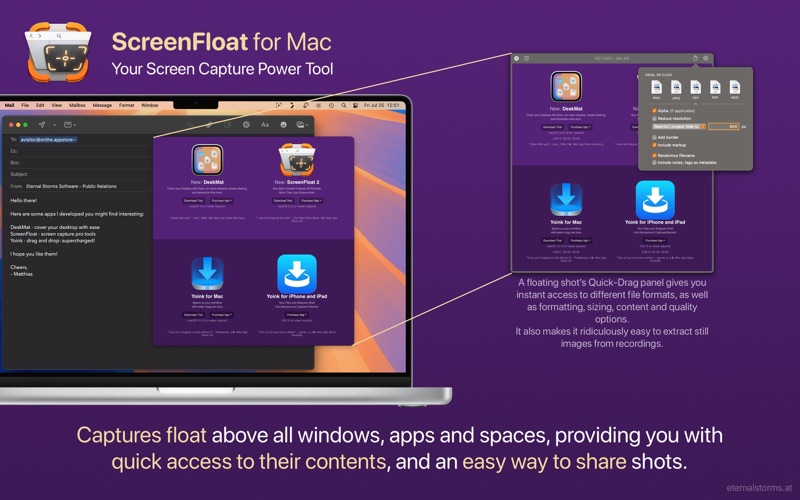
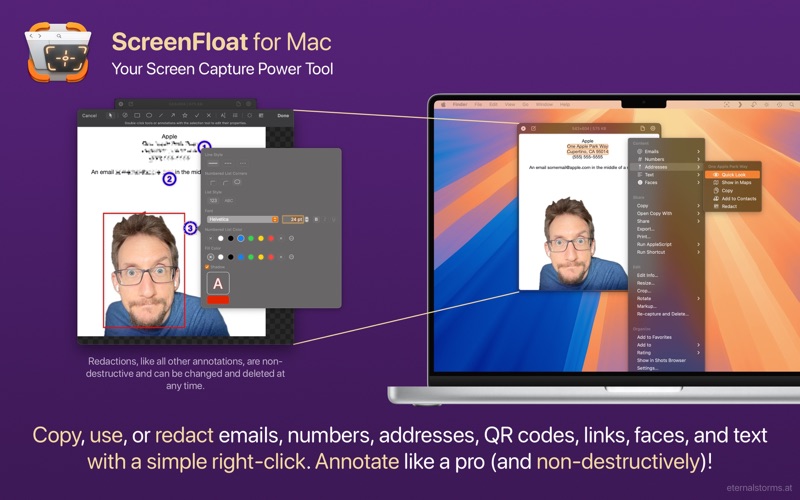
ScreenFloat 2 is your screenshot and screen recording all-rounder power tool. From capturing screenshots and recordings over editing, annotating, redacting and running data-detection on them to storing, organizing and syncing them, ScreenFloat is your all-in-one screen capture tool. “Game-changer for managing screenshots” - Man.Osman “Outstanding app. Buy this and use it for a week and you will love it” - Chuck's Review = CAPTURE = Capture screenshots, timed screenshots and screen recordings with a keyboard shortcut, the menu bar icon, or a widget. Create Shots from content on your clipboard, or import from your iPhone or iPad. Effortlessly recapture shots without having to painstakingly reframe the capture area. “Accountant's Friend! Worth every penny!” - Savyasaci = FLOAT = By default, shots you capture float above all apps so you can reference their contents, or use them as a reminder. Data-detection allows for quick copying, opening and even quicksmart-redacting of links, emails, phone numbers, addresses and QR codes Option-right-click to pick colors Run powerful, custom workflows with Double-Click Actions “An animator's best friend!” - rengland77 = EDIT = Crop, "fold", rotate, resize, trim and "de-retinize" shots Annotate screenshots non-destructively Trim and cut recordings, with microphone and system audio editable separately “2 Gems: The app itself and User Support” - A Bostonian Visual Thinker = SHARE = Easily share shots to other apps via drag and drop, copy-paste or export from floating shots, or the Shots Browser Share larger shots as a link via iCloud, ImageKit or Cloudinary When dragging from a floating shot, adjust the format, quality, and other options on-the-fly “One of my most used Apps” - paradox2222 = STORE = ScreenFloat's Shots Browser keeps a library of your captures, where you can name, tag, rate, favorite and organize them. Collect Shots in folders Use Smart Folders to intelligently collect Shots by certain criteria, including whether they contain faces, or certain text, or which device you captured them on Extensive search functionality (with Spotlight indexing) Sync everything over iCloud “Its Essential - what else is there to write” - JR123§123§12 = INTEGRATE = Automate capturing your screen, importing, and managing your floating shots using Siri Shortcuts Use widgets to get access to ScreenFloat's capture functionality, as well as shots, picked colors, tags, folders, and more Run your own Siri Shortcuts and Apple Scripts on your shots “I've used many similar apps over the years, and this is the best” - nodisorder *** And so much more. ScreenFloat 2: More than just screenshots. *** = System Requirements = - macOS 12 Monterey or newer (some features require macOS 13 Ventura or newer) - An iCloud account if you wish to sync your library over iCloud = What the Press Says = “One of the most comprehensive screenshot apps that there are” - Elaine Giles, MacBites After Hours “Sometimes I'll cover an app that I just have to put in my war-chest of applications that I use every day - ScreenFloat 2 is one such app” - Lee Garrett, ScreenCastsOnline.com “You may never go back to the Mac's default screenshot system” - MacFormat.com “I have used numerous screenshot applications. ScreenFloat is the one I use daily” - MacAutomationTips.com “Trounces most of the competition” - ScottWillsey.com “Packed with loads of useful, flexible features” - MacStories.net = What do YOU say? = All this aside: ultimately, software needs to be tested personally to see if it fits one's needs. So please download the free, 28-day trial from the website, and feel free to get in touch with me if you have any questions or feedback - I look forward to hearing from you: https://eternalstorms.at/contact = About In-App Purchases = The available in-app purchases are completely voluntary tips and do not unlock any additional features. Your one-time purchase of ScreenFloat gives you its full functionality.