PC 용 Bible Offline JFA
- 카테고리: Reference
- 최근 업데이트: 2026-11-19
- 현재 버전: 8.10.25
- 파일 크기: 96.92 MB
- 개발자: MR ROCCO INTERNET LTDA
- 호환성: 필요 Windows XP, Windows Vista, Windows 7, Windows 8, Windows 8.1 and Windows 10, Windows 11





PC에서 Bible Offline JFA 용 호환 APK 다운로드
| 다운로드 | 개발자 | 평점 | 점수 | 현재 버전 | 성인 랭킹 |
|---|---|---|---|---|---|
| ↓ PC용 APK 다운로드 | MR ROCCO INTERNET LTDA | 2 | 5 | 8.10.25 | 4+ |
에뮬레이터의 중요성은 컴퓨터에서 안드로이드 환경을 흉내 내고 안드로이드 폰을 구입하지 않고도 안드로이드 앱을 설치하고 실행하는 것을 매우 쉽게 만들어주는 것입니다. 누가 당신이 두 세계를 즐길 수 없다고 말합니까? 우선 아래에있는 에뮬레이터 앱을 다운로드 할 수 있습니다.
A. Nox App . OR
B. Bluestacks App .
Bluestacks는 매우 대중적이므로 개인적으로 "B"옵션을 사용하는 것이 좋습니다. 문제가 발생하면 Google 또는 Naver.com에서 좋은 해결책을 찾을 수 있습니다.
Bluestacks.exe 또는 Nox.exe를 성공적으로 다운로드 한 경우 컴퓨터의 다운로드 폴더 또는 다운로드 한 파일을 일반적으로 저장하는 곳으로 이동하십시오.
찾으면 클릭하여 응용 프로그램을 설치하십시오. PC에서 설치 프로세스를 시작해야합니다.
다음을 클릭하여 EULA 라이센스 계약에 동의하십시오.
응용 프로그램을 설치하려면 화면 지시문을 따르십시오.
위 사항을 올바르게 수행하면 소프트웨어가 성공적으로 설치됩니다.
이제 설치 한 에뮬레이터 애플리케이션을 열고 검색 창을 찾으십시오. 지금 입력하십시오. - Bible Offline JFA 앱을 쉽게 볼 수 있습니다. 그것을 클릭하십시오. 응용 프로그램 창이 열리고 에뮬레이터 소프트웨어에 응용 프로그램이 표시됩니다. 설치 버튼을 누르면 응용 프로그램이 다운로드되기 시작합니다. 이제 우리는 모두 끝났습니다.
그런 다음 "모든 앱"아이콘이 표시됩니다.
클릭하면 설치된 모든 응용 프로그램이 포함 된 페이지로 이동합니다.
당신은 Bible Offline JFA 상. 그것을 클릭하고 응용 프로그램 사용을 시작하십시오.
Mac OS 에서 Bible Offline JFA 다운로드
| 다운로드 | 개발자 | 점수 | 현재 버전 | 성인 랭킹 |
|---|---|---|---|---|
| 무료 - Mac 에서 다운로드 | MR ROCCO INTERNET LTDA | 5 |
8.10.25 | 4+ |
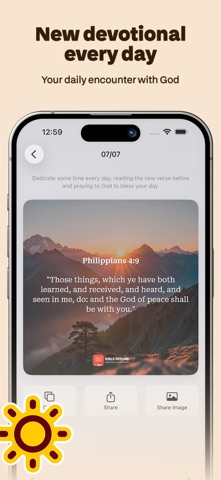
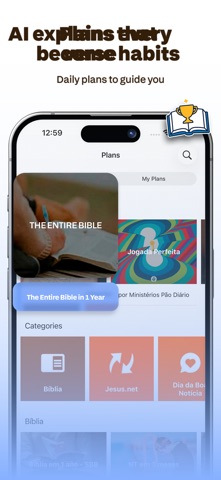
Read and listen to the Holy Bible offline, no internet needed: King James Version (KJV), New International Version (NIV), New American Standard Bible (NASB), Amplified Bible (AMP), Christian Standard Bible (CSB) and many more, with audio, reading plans and AI-powered Bible study. Over 100 million downloads. 100% free. Prefer reading without ads? A one-time purchase removes them all, forever. Light and easy to use, Bible Offline JFA was the first offline Bible on the app stores and is used today by Christians in more than 168 countries. Our team believes God's Word should reach everyone easily, quickly and clearly. ENGLISH BIBLE VERSIONS - King James Version (KJV) - New International Version (NIV 2011) with Live Bible Audio - New American Standard Bible (NASB 1995 and NASB 2020) - Amplified Bible (AMP) - Christian Standard Bible (CSB) - Berean Standard Bible (BSB) - American Standard Version (ASV) - World English Bible (WEB) - Young's Literal Translation (YLT) - Darby Version - Douay-Rheims (DRC) - Webster's Bible (WBT) - Weymouth New Testament (WEY) - Basic English Bible (BEB) KEY FEATURES • Offline Bible: read every downloaded version without internet, anywhere. • Audio Bible: every translation has audio you can download and listen to in sync with the verses. Includes the dramatized NIV Live Bible Audio, recorded with an Oscar-winning cast and renowned pastors. • AI Bible study: in-depth AI-generated studies for every verse and chapter, plus an AI search to ask any Bible question and get your answers. • Reading Plans: many plans to study the Bible text or specific topics. • Verses: highlight, mark with colors, create your own colors, save to Favorites, copy, share on social media and add personal notes. Verse of the Day widget. • Search: search the whole Bible or filter by Old Testament, New Testament or a single book. You can also type parts of a verse in the search field. • Reading comfort: adjust text size and font, and turn on night mode. MORE FEATURES • Words of Jesus in red • Introductions to all 66 books of the Bible • Devotionals and daily verses • Bible dictionary with more than 900 words • Bible map • Reading progress • Books in alphabetical order • Two versions side by side on the same screen • Nearby churches BIBLES IN 247 LANGUAGES Including: - Spanish: Nueva Versión Internacional (NVI), Reina Valera (RVC, RVES and RVR95), La Biblia de las Américas (LBLA) and Nueva Biblia de las Américas (NBLA) - Portuguese: Almeida Corrigida Fiel (ACF), Almeida Revista e Atualizada (ARA), Almeida Revista e Corrigida (ARC), Nova Almeida Atualizada (NAA), Nova Versão Internacional (NVI), Nova Tradução na Linguagem de Hoje (NTLH), Nova Versão Transformadora (NVT) and more - German: Luther Bible - Original Greek and Hebrew ADS AND PURCHASES The app is free and shows ads. Removing ads is a one-time purchase, with no subscription. The Apostolic Bible (APO-AA, Portuguese) is an optional auto-renewable subscription of $2.99 per month, with a free first month for all users. Any unused portion of a free trial is forfeited when you purchase a subscription. Payment is charged to your Apple Account at confirmation of purchase. The subscription renews automatically unless auto-renew is turned off at least 24 hours before the end of the current period, and your account is charged for renewal within 24 hours before the end of the current period. You can manage your subscription and turn off auto-renew in your Apple Account settings after purchase. Privacy Policy: http://bibliajfa.com.br/privacy/ Terms of Use: http://bibliajfa.com.br/terms/