PC 용 Bowel Mover Classic
- 카테고리: Health & Fitness
- 최근 업데이트: 2018-06-02
- 현재 버전: 7.5.0
- 파일 크기: 44.43 MB
- 개발자: Track & Share Apps, LLC
- 호환성: 필요 Windows XP, Windows Vista, Windows 7, Windows 8, Windows 8.1 and Windows 10, Windows 11



PC에서 Bowel Mover Classic 용 호환 APK 다운로드
| 다운로드 | 개발자 | 평점 | 점수 | 현재 버전 | 성인 랭킹 |
|---|---|---|---|---|---|
| ↓ PC용 APK 다운로드 | Track & Share Apps, LLC | 0 | 0 | 7.5.0 | 17+ |
에뮬레이터의 중요성은 컴퓨터에서 안드로이드 환경을 흉내 내고 안드로이드 폰을 구입하지 않고도 안드로이드 앱을 설치하고 실행하는 것을 매우 쉽게 만들어주는 것입니다. 누가 당신이 두 세계를 즐길 수 없다고 말합니까? 우선 아래에있는 에뮬레이터 앱을 다운로드 할 수 있습니다.
A. Nox App . OR
B. Bluestacks App .
Bluestacks는 매우 대중적이므로 개인적으로 "B"옵션을 사용하는 것이 좋습니다. 문제가 발생하면 Google 또는 Naver.com에서 좋은 해결책을 찾을 수 있습니다.
Bluestacks.exe 또는 Nox.exe를 성공적으로 다운로드 한 경우 컴퓨터의 다운로드 폴더 또는 다운로드 한 파일을 일반적으로 저장하는 곳으로 이동하십시오.
찾으면 클릭하여 응용 프로그램을 설치하십시오. PC에서 설치 프로세스를 시작해야합니다.
다음을 클릭하여 EULA 라이센스 계약에 동의하십시오.
응용 프로그램을 설치하려면 화면 지시문을 따르십시오.
위 사항을 올바르게 수행하면 소프트웨어가 성공적으로 설치됩니다.
이제 설치 한 에뮬레이터 애플리케이션을 열고 검색 창을 찾으십시오. 지금 입력하십시오. - Bowel Mover Classic 앱을 쉽게 볼 수 있습니다. 그것을 클릭하십시오. 응용 프로그램 창이 열리고 에뮬레이터 소프트웨어에 응용 프로그램이 표시됩니다. 설치 버튼을 누르면 응용 프로그램이 다운로드되기 시작합니다. 이제 우리는 모두 끝났습니다.
그런 다음 "모든 앱"아이콘이 표시됩니다.
클릭하면 설치된 모든 응용 프로그램이 포함 된 페이지로 이동합니다.
당신은 Bowel Mover Classic 상. 그것을 클릭하고 응용 프로그램 사용을 시작하십시오.
Mac OS 에서 Bowel Mover Classic 다운로드
| 다운로드 | 개발자 | 점수 | 현재 버전 | 성인 랭킹 |
|---|---|---|---|---|
| ₩1,200 - Mac 에서 다운로드 | Track & Share Apps, LLC | 0 |
7.5.0 | 17+ |
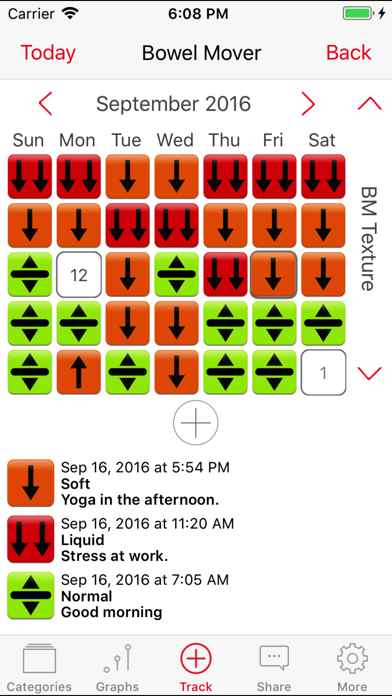
Award by Healthline: The Best Crohn's Disease Apps. Featured by Physicians Practi ce Journal. Also seen on Dr Oz and in Esquire Magazine. Track your digestion and health habits, look for patterns of what gets your bowels moving. Take control of your digestive health by tracking and better understanding what works. Also look for our Track & Share Symptom Tracker app to track anything. How does BM Classic compare to BM Pro? Unlimited entries: Lite and Pro Add new items: Pro The app now features the Bristol Stool Scale for new users. We set up a separate category for that. Select your favorite setup by switching categories. Patricia Salber, MD, MBA on TDWI about Track & Share Apps: "... it can be helpful in trying to make correlations between bad symptom days and other stuff going on in your life – diet, stress, coffee intake, and so forth. ... This type of information, often pooh-poohed (pun intended) by traditional medicine in the past, could lead to a deeper understanding of disorders only incompletely understood at the present time." Several items are already set up. You can relabel those within limitations to make them fit your needs: Bowel Movements - Water Intake - Stress - Gluten Free Day - BM Note - BM Texture For more advanced tracking needs, please look for our popular app TracknShare. Compare several items to each other in multi item graphs. Scroll back in time looking for patterns. One-tap cycling through statistics makes understanding the graphs simple. Share your results with your team via email. Share entire backups via email or Dropbox. Built in statistics, tap on graphed items to cycle through ∅ Averages ∆ Max ∇ Min ∑ Totals ⊥ Last The visual calendar shows all values and notes at a glance. Easy entry for past dates, just double tap a date. Take screenshots of your graphs and share via email. Password Protection DROP US A NOTE Email us, let us know how to make this app better. We LOVE to hear from you. Like us on Facebook http://www.facebook.com/ClickPod