PC 용 Range Finder: AI Distance
- 카테고리: Utilities
- 최근 업데이트: 2026-10-24
- 현재 버전: 4.0
- 파일 크기: 32.14 MB
- 개발자: Savvas Petrou
- 호환성: 필요 Windows XP, Windows Vista, Windows 7, Windows 8, Windows 8.1 and Windows 10, Windows 11




PC에서 Range Finder: AI Distance 용 호환 APK 다운로드
| 다운로드 | 개발자 | 평점 | 점수 | 현재 버전 | 성인 랭킹 |
|---|---|---|---|---|---|
| ↓ PC용 APK 다운로드 | Savvas Petrou | 0 | 0 | 4.0 | 4+ |
에뮬레이터의 중요성은 컴퓨터에서 안드로이드 환경을 흉내 내고 안드로이드 폰을 구입하지 않고도 안드로이드 앱을 설치하고 실행하는 것을 매우 쉽게 만들어주는 것입니다. 누가 당신이 두 세계를 즐길 수 없다고 말합니까? 우선 아래에있는 에뮬레이터 앱을 다운로드 할 수 있습니다.
A. Nox App . OR
B. Bluestacks App .
Bluestacks는 매우 대중적이므로 개인적으로 "B"옵션을 사용하는 것이 좋습니다. 문제가 발생하면 Google 또는 Naver.com에서 좋은 해결책을 찾을 수 있습니다.
Bluestacks.exe 또는 Nox.exe를 성공적으로 다운로드 한 경우 컴퓨터의 다운로드 폴더 또는 다운로드 한 파일을 일반적으로 저장하는 곳으로 이동하십시오.
찾으면 클릭하여 응용 프로그램을 설치하십시오. PC에서 설치 프로세스를 시작해야합니다.
다음을 클릭하여 EULA 라이센스 계약에 동의하십시오.
응용 프로그램을 설치하려면 화면 지시문을 따르십시오.
위 사항을 올바르게 수행하면 소프트웨어가 성공적으로 설치됩니다.
이제 설치 한 에뮬레이터 애플리케이션을 열고 검색 창을 찾으십시오. 지금 입력하십시오. - Range Finder: AI Distance 앱을 쉽게 볼 수 있습니다. 그것을 클릭하십시오. 응용 프로그램 창이 열리고 에뮬레이터 소프트웨어에 응용 프로그램이 표시됩니다. 설치 버튼을 누르면 응용 프로그램이 다운로드되기 시작합니다. 이제 우리는 모두 끝났습니다.
그런 다음 "모든 앱"아이콘이 표시됩니다.
클릭하면 설치된 모든 응용 프로그램이 포함 된 페이지로 이동합니다.
당신은 Range Finder: AI Distance 상. 그것을 클릭하고 응용 프로그램 사용을 시작하십시오.
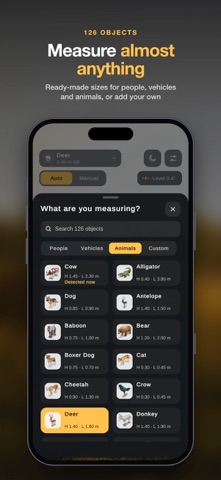
Point your camera at a person, a car or an animal. RangeFinder finds it, frames it and tells you how far away it is, with an honest ± range so you know how much to trust the reading. RangeFinder 4.0 is rebuilt from the ground up. No more lining up marks by hand: on-device AI detects the target for you, and a new measuring engine checks every reading three ways. HOW IT MEASURES • Height first: RangeFinder knows how tall a standing adult, a car or a horse typically is, and measures the angle from its top to its bottom. The tilt sensor corrects for pointing up or down. • Width confirms: the width it sees has to fit the object too. If it doesn't, you're told why, for example part of it is hidden or the object type is wrong. • Ground check: up close, the angle down to where the object stands gives a third, independent reading. Every reading shows a 95% range and a High, Medium or Low confidence, so you always know how good it is. MEASURE WHAT YOU SEE • 124 ready-made objects: people (adult, man, woman, teenager, children, sitting, kneeling), 71 vehicles from bicycles to trains, ships and aircraft, and 45 animals from deer and horses to bears and birds • Add your own: enter the exact height of someone or something you know for the most accurate readings • Tap any detected object to lock on, and it stays locked as it moves • Manual mode: drag a frame around anything the AI doesn't recognise BUILT FOR THE FIELD • Zoom up to 8× with buttons or a pinch • Level indicator and automatic tilt correction • Red night mode that keeps your eyes adjusted to the dark • Torch for low light • Metres, feet or yards everywhere • Portrait and landscape MORE ACCURATE OVER TIME • One-minute calibration: measure someone of known height at a known distance once, and RangeFinder corrects for your iPhone's camera. SAVE YOUR READINGS • Save any reading with a photo, the object, the confidence and the zoom used • Browse your history and export it as a CSV file PRIVATE AND SIMPLE • No ads, no account, no sign-up • Works offline: detection runs entirely on your iPhone and the camera image never leaves it GOOD TO KNOW RangeFinder estimates distance from the camera image and the typical size of the object, so results depend on how close the real object is to that size, on light and on distance. It's made for hunting and wildlife scouting, golf, hiking, sailing, photography and everyday curiosity, not for situations where safety depends on an exact distance. For the best results, calibrate once and keep the whole object in view.