PC 용 Sous Chef - Cook Tools & Timer
- 카테고리: Food & Drink
- 최근 업데이트: 2026-11-19
- 현재 버전: 5.0.0
- 파일 크기: 16.04 MB
- 개발자: ChuChu Train Productions
- 호환성: 필요 Windows XP, Windows Vista, Windows 7, Windows 8, Windows 8.1 and Windows 10, Windows 11



PC에서 Sous Chef - Cook Tools & Timer 용 호환 APK 다운로드
| 다운로드 | 개발자 | 평점 | 점수 | 현재 버전 | 성인 랭킹 |
|---|---|---|---|---|---|
| ↓ PC용 APK 다운로드 | ChuChu Train Productions | 0 | 0 | 5.0.0 | 4+ |
에뮬레이터의 중요성은 컴퓨터에서 안드로이드 환경을 흉내 내고 안드로이드 폰을 구입하지 않고도 안드로이드 앱을 설치하고 실행하는 것을 매우 쉽게 만들어주는 것입니다. 누가 당신이 두 세계를 즐길 수 없다고 말합니까? 우선 아래에있는 에뮬레이터 앱을 다운로드 할 수 있습니다.
A. Nox App . OR
B. Bluestacks App .
Bluestacks는 매우 대중적이므로 개인적으로 "B"옵션을 사용하는 것이 좋습니다. 문제가 발생하면 Google 또는 Naver.com에서 좋은 해결책을 찾을 수 있습니다.
Bluestacks.exe 또는 Nox.exe를 성공적으로 다운로드 한 경우 컴퓨터의 다운로드 폴더 또는 다운로드 한 파일을 일반적으로 저장하는 곳으로 이동하십시오.
찾으면 클릭하여 응용 프로그램을 설치하십시오. PC에서 설치 프로세스를 시작해야합니다.
다음을 클릭하여 EULA 라이센스 계약에 동의하십시오.
응용 프로그램을 설치하려면 화면 지시문을 따르십시오.
위 사항을 올바르게 수행하면 소프트웨어가 성공적으로 설치됩니다.
이제 설치 한 에뮬레이터 애플리케이션을 열고 검색 창을 찾으십시오. 지금 입력하십시오. - Sous Chef - Cook Tools & Timer 앱을 쉽게 볼 수 있습니다. 그것을 클릭하십시오. 응용 프로그램 창이 열리고 에뮬레이터 소프트웨어에 응용 프로그램이 표시됩니다. 설치 버튼을 누르면 응용 프로그램이 다운로드되기 시작합니다. 이제 우리는 모두 끝났습니다.
그런 다음 "모든 앱"아이콘이 표시됩니다.
클릭하면 설치된 모든 응용 프로그램이 포함 된 페이지로 이동합니다.
당신은 Sous Chef - Cook Tools & Timer 상. 그것을 클릭하고 응용 프로그램 사용을 시작하십시오.
Mac OS 에서 Sous Chef 다운로드
| 다운로드 | 개발자 | 점수 | 현재 버전 | 성인 랭킹 |
|---|---|---|---|---|
| 무료 - Mac 에서 다운로드 | ChuChu Train Productions | 0 |
5.0.0 | 4+ |
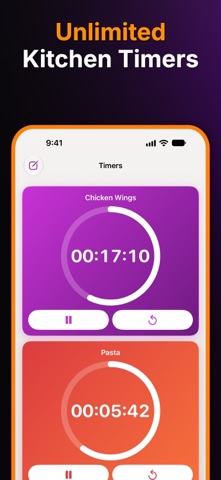
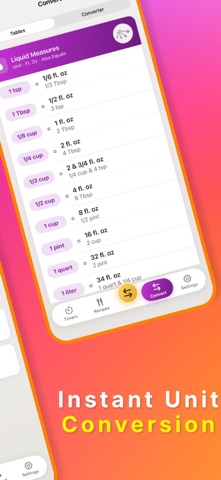
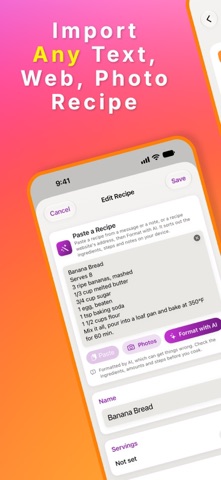
Kitchen Sous Chef keeps every part of a meal on time. Run as many kitchen timers as you need, keep your recipes in one place, scale them for any crowd and convert any measurement, all in one app made for cooking. KITCHEN TIMERS • Add as many timers as you need, each with its own name, color and alarm sound, and run them all at once. • Big, easy-to-read dials that fill the screen, on iPhone and iPad. • Pause, resume and reset with one tap. • Finish Together: pick the dishes and when you want to eat, and Sous Chef starts each timer at the right moment so everything is ready at once. • Timers on your Lock Screen and Home Screen with widgets and Live Activities, plus a Control Center button and Siri. • On iOS 26 and later, timers can ring as system alarms, even in Silent mode. • An Apple Watch app to start and reset timers from your wrist. RECIPES • Import recipes from a website, pasted text or photos of a cookbook page. • Format with AI sorts a pasted recipe into ingredients, steps and notes, using Apple Intelligence on supported devices. • Steps with their own timers: tap Start beside a step and its timer runs on the Timers tab. • Put each ingredient under the step that uses it, and add photos between steps. • Scale any recipe from 1/4x to 4x, with metric amounts at a tap. • Quick Scale: list a recipe's ingredients and scale them in seconds, then save it as a recipe. • Notes and websites live beside your recipes, organized into categories with food photos. • Random Recipe picks tonight's dinner for you. • Share a recipe as a clean, printable PDF or as text. CONVERTER • Convert cups, spoons, ounces, grams, milliliters and more, with weights worked out for common ingredients. • Kitchen conversion tables, and your recent conversions one tap away. MORE • Your timers, recipes and notes sync across your devices with iCloud. • Light and Dark appearance. • Made for iPhone and iPad, and runs on Mac. The free version includes 2 timers and 3 recipes, notes or websites, with ads. Full Access unlocks everything. AUTO-RENEWING SUBSCRIPTIONS Full Access is available as a weekly, monthly or yearly subscription, or as a one-time Lifetime Pass. Each one gives you unlimited timers, all running at once; unlimited recipes, notes and websites; every alarm sound and any timer color; all 291 food photos; recipe sharing as PDF or text; and removes ads. Payment is charged to your App Store account at confirmation of purchase. Subscriptions renew automatically unless cancelled at least 24 hours before the end of the current period, and your account is charged for the renewal within 24 hours of the end of the period. You can manage or cancel a subscription at any time from your Apple ID subscription settings, or from the Manage Subscriptions button on the app's In-App Purchases screen. Subscriptions support the app and pay for new features, updates and fixes. Terms of Use (EULA): https://www.apple.com/legal/internet-services/itunes/dev/stdeula/ Privacy Policy: https://www.chuchutrain.com/privacy-policy.html