PC 용 PDF Max - Edit, Sign PDFs
- 카테고리: Productivity
- 최근 업데이트: 2026-10-30
- 현재 버전: 27.6
- 파일 크기: 61.45 MB
- 개발자: Mobeera
- 호환성: 필요 Windows XP, Windows Vista, Windows 7, Windows 8, Windows 8.1 and Windows 10, Windows 11




PC에서 PDF Max - Edit, Sign PDFs 용 호환 APK 다운로드
| 다운로드 | 개발자 | 평점 | 점수 | 현재 버전 | 성인 랭킹 |
|---|---|---|---|---|---|
| ↓ PC용 APK 다운로드 | Mobeera | 23 | 4.6087 | 27.6 | 4+ |
에뮬레이터의 중요성은 컴퓨터에서 안드로이드 환경을 흉내 내고 안드로이드 폰을 구입하지 않고도 안드로이드 앱을 설치하고 실행하는 것을 매우 쉽게 만들어주는 것입니다. 누가 당신이 두 세계를 즐길 수 없다고 말합니까? 우선 아래에있는 에뮬레이터 앱을 다운로드 할 수 있습니다.
A. Nox App . OR
B. Bluestacks App .
Bluestacks는 매우 대중적이므로 개인적으로 "B"옵션을 사용하는 것이 좋습니다. 문제가 발생하면 Google 또는 Naver.com에서 좋은 해결책을 찾을 수 있습니다.
Bluestacks.exe 또는 Nox.exe를 성공적으로 다운로드 한 경우 컴퓨터의 다운로드 폴더 또는 다운로드 한 파일을 일반적으로 저장하는 곳으로 이동하십시오.
찾으면 클릭하여 응용 프로그램을 설치하십시오. PC에서 설치 프로세스를 시작해야합니다.
다음을 클릭하여 EULA 라이센스 계약에 동의하십시오.
응용 프로그램을 설치하려면 화면 지시문을 따르십시오.
위 사항을 올바르게 수행하면 소프트웨어가 성공적으로 설치됩니다.
이제 설치 한 에뮬레이터 애플리케이션을 열고 검색 창을 찾으십시오. 지금 입력하십시오. - PDF Max - Edit, Sign PDFs 앱을 쉽게 볼 수 있습니다. 그것을 클릭하십시오. 응용 프로그램 창이 열리고 에뮬레이터 소프트웨어에 응용 프로그램이 표시됩니다. 설치 버튼을 누르면 응용 프로그램이 다운로드되기 시작합니다. 이제 우리는 모두 끝났습니다.
그런 다음 "모든 앱"아이콘이 표시됩니다.
클릭하면 설치된 모든 응용 프로그램이 포함 된 페이지로 이동합니다.
당신은 PDF Max - Edit, Sign PDFs 상. 그것을 클릭하고 응용 프로그램 사용을 시작하십시오.
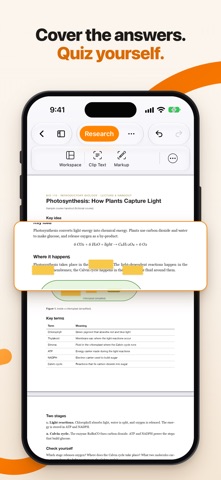
PDF Max is a complete PDF editor for iPhone, iPad, and Mac, trusted by millions of people since 2012. From signing a form to building research you can verify, PDF Max helps you edit, annotate, organize, understand, study, protect, and deliver PDFs—all in one app. YOUR PDF. NOW A WORKSPACE. Collect important passages, highlights, images, tables, formulas, and notes as Cards beside your PDFs. Every Card remembers where it came from, so you can return to the original page whenever you need the full context. • Search, tag, connect, and arrange your Cards • Gather related Cards into named groups called Frames • Organize evidence from several PDFs without merging them • Compare passages side by side or view your evidence as an Outline or table • Present Frames or export your work to Markdown, PDF, or Word STUDY WHAT MATTERS Turn trusted Cards into Questions, practice a focused topic, or use scheduled Study for long-term review. Track your Progress, study text and visual material, and return to the supporting PDF whenever an answer needs more context. On supported devices, Apple Intelligence can draft Questions for you to review before saving. EDIT, ANNOTATE, FILL, AND SIGN • Edit existing text, typography, images, links, shapes, and tables • Add, replace, crop, align, rotate, and arrange content • Remove image backgrounds and automatically crop subjects • Highlight, underline, strike through, draw, stamp, and comment • Add text boxes, callouts, notes, shapes, and threaded comments • Complete forms, find missing required fields, and add reusable signatures • Create and edit text, checkbox, radio, dropdown, signature, date, and image fields • Permanently redact text, areas, pages, or search results SCAN, READ, AND UNDERSTAND • Scan paper with automatic capture, edge detection, cleanup, crop, filters, and page reordering • Make scans searchable with optional OCR • Turn selected images into polished PDFs • Reflow fixed or scanned pages into a comfortable reading column • Keep figures beside the text they explain • Customize reading theme, typography, spacing, margins, and alignment • Translate supported languages and listen with on-device Read Aloud • Keep selected passages and useful context with Focus View VOICE NOTES THAT STAY ON THE PAGE • Place and play audio notes anywhere in a PDF • Create searchable on-device transcripts when the required speech model is available MAKE FLAT FORMS FILLABLE • Detect likely text, checkbox, and signature fields in flat or printed forms • Review every detected field before applying it • Use Form Assist to review suggested answers from your encrypted profile EVERY PDF TOOL IN ONE PLACE • Reorder, rotate, insert, duplicate, replace, extract, merge, split, or delete pages • Compress PDFs while preserving selectable text and vector graphics • Resize mixed pages to standard paper sizes • Add page numbers, N of M, Roman numerals, letters, or Bates numbering • Add or remove an open password • Create and edit PDF outlines and bookmarks • Recognize text with OCR and convert Word documents to PDF • Create PDFs from paper, journal, planner, graph, and project templates • Present PDF pages or Workspace Frames full screen • Save, print, flatten, share, or export the finished result Join more than 25 million downloads worldwide and move from document to outcome with PDF Max. Some advanced features require PDF Max PREMIUM. PDF MAX PREMIUM SUBSCRIPTION Payment will be charged to your Apple Account when the purchase is confirmed. Subscriptions renew automatically unless canceled at least 24 hours before the end of the current subscription period. You can manage or cancel your subscription in your Apple Account settings. Any unused portion of a free trial will be forfeited when a subscription is purchased, where applicable. Privacy Policy: https://mobeera.ai/privacy Terms: https://mobeera.ai/terms